
背景
保证数据安全是当今互联网时代的重要任务。为了应对日益复杂的网络攻击,行为验证码应运而生。行为验证码通过分析用户在网站上的行为模式,识别正常用户并阻止恶意活动。
它不仅提供了更强大的身份确认方式,还能有效减少伪造身份和破解账户的风险。从行为验证码开始,我们可以为数据安全建立起坚实的防线。
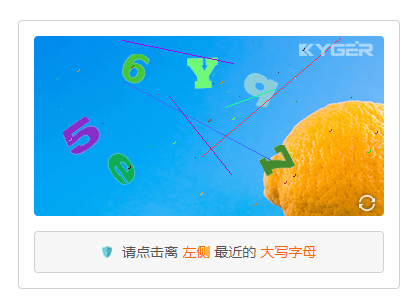
前端代码
1<script src="https://cdn6.kgcaptcha.com/captcha.js"></script>
2<script>
3kg.captcha({
4    // 绑定弹窗按钮
5    button: "#captchaButton",
6    // 验证成功事务处理
7    success: function (e) {
8        // 验证成功,直接提交表单
9        // form1.submit();
10        console.log(e);
11    },
12    // 验证失败事务处理
13    failure: function (e) {
14        console.log(e);
15    },
16    // 点击刷新按钮时触发
17    refresh: function (e) {
18        console.log(e);
19    }
20});
21</script>
22
23<a id="captchaButton">点击弹出验证窗口</a>
Python代码
1from wsgiref.simple_server import make_server
2from KgCaptchaSDK import KgCaptcha
3def start(environ, response):
4    # 填写你的 AppId,在应用管理中获取
5    AppID = "AppID"
6    # 填写你的 AppSecret,在应用管理中获取
7    AppSecret = "AppSecret"
8    request = KgCaptcha(AppID, AppSecret)
9    # 填写应用服务域名,在应用管理中获取
10    request.appCdn = "https://cdn6.kgcaptcha.com"
11    # 请求超时时间,秒
12    request.connectTimeout = 10
13    # 用户id/登录名/手机号等信息,当安全策略中的防控等级为3时必须填写
14    request.userId = "kgCaptchaDemo"
15    # 使用其它 WEB 框架时请删除 request.parse,使用框架提供的方法获取以下相关参数
16    parseEnviron = request.parse(environ)
17    # 前端验证成功后颁发的 token,有效期为两分钟
18    request.token = parseEnviron["post"].get("kgCaptchaToken", "")  # 前端 _POST["kgCaptchaToken"]
19    # 客户端IP地址
20    request.clientIp = parseEnviron["ip"]
21    # 客户端浏览器信息
22    request.clientBrowser = parseEnviron["browser"]
23    # 来路域名
24    request.domain = parseEnviron["domain"]
25    # 发送请求
26    requestResult = request.sendRequest()
27    if requestResult.code == 0:
28        # 验证通过逻辑处理
29        html = "验证通过"
30    else:
31        # 验证失败逻辑处理
32        html = f"{requestResult.msg} - {requestResult.code}"
33    response("200 OK", [("Content-type", "text/html; charset=utf-8")])
34    return [bytes(str(html), encoding="utf-8")]
35httpd = make_server("0.0.0.0", 8088, start)  # 设置调试端口  http://localhost:8088/
36httpd.serve_forever()
最后
SDK开源地址:https://github.com/KgCaptcha,顺便做了一个演示:https://www.kgcaptcha.com/demo/