
前言
在开局配置Nginx时有可能会配置错误,报各种错误代码。看不懂或者懒得去看这个报错时,其实最简单的方式是卸载并重装咯。今天就带大家一起学习下,如何彻底卸载nginx程序。
一、卸载NGINX 卸载nginx程序的详细步骤
1、停止Nginx软件
/usr/local/nginx/sbin/nginx -s stop 如果不知道nginx安装路径,可以通过执行ps命令找到nginx程序的PID,然后kill其PID
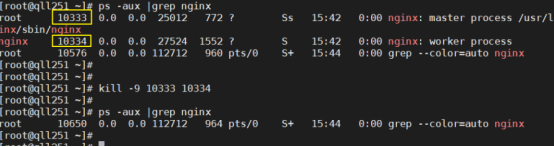
2、查找根下所有名字包含nginx的文件 find / -name nginx
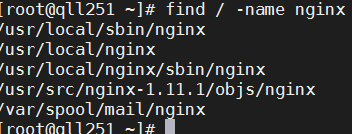
3、执行命令 rm -rf *删除nignx安装的相关文件
说明:全局查找往往会查出很多相关文件,但是前缀基本都是相同,后面不同的部分可以用*代替,以便快速删除~
[root@qll251 ~]# rm -rf /usr/local/sbin/nginx [root@qll251 ~]# rm -rf /usr/local/nginx [root@qll251 ~]# rm -rf /usr/src/nginx-1.11.1 [root@qll251 ~]# rm -rf /var/spool/mail/nginx 4、其他设置
如果设置了Nginx开机自启动的话,可能还需要下面两步
chkconfig nginx off
rm -rf /etc/init.d/nginx
删除之后,便可重新安装nginx了
二、开始安装NGINX a、安装所需插件 1、安装gcc gcc是linux下的编译器在此不多做解释,感兴趣的小伙伴可以去查一下相关资料,它可以编译 C,C++,Ada,Object C和Java等语言
命令:查看gcc版本
gcc -v
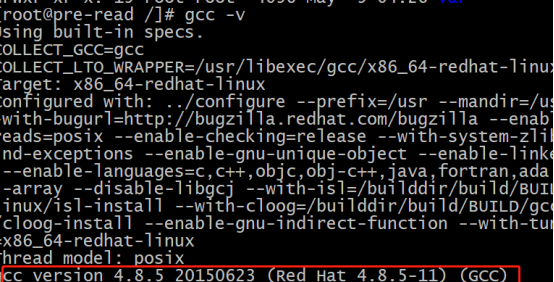
一般阿里云的centOS7里面是都有的,没有安装的话会提示命令找不到,
安装命令:
yum -y install gcc 2、pcre、pcre-devel安装 pcre是一个perl库,包括perl兼容的正则表达式库,nginx的http模块使用pcre来解析正则表达式,所以需要安装pcre库。
安装命令:
yum install -y pcre pcre-devel

3、zlib安装 zlib库提供了很多种压缩和解压缩方式nginx使用zlib对http包的内容进行gzip,所以需要安装
安装命令:
yum install -y zlib zlib-devel 4、安装openssl openssl是web安全通信的基石,没有openssl,可以说我们的信息都是在裸奔。。。。。。
安装命令:
yum install -y openssl openssl-devel b、安装nginx 我的环境是使用3A服务器安装的centos7 1、下载nginx安装包 wget http://nginx.org/download/nginx-1.9.9.tar.gz
2、把压缩包解压到usr/local/java tar -zxvf nginx-1.9.9.tar.gz 3、切换到cd /usr/local/java/nginx-1.9.9/下面 执行三个命令:
./configure --prefix=/usr/local/nginx --with-http_stub_status_module --with-http_ssl_module
make
make install 4、切换到/usr/local/nginx安装目录
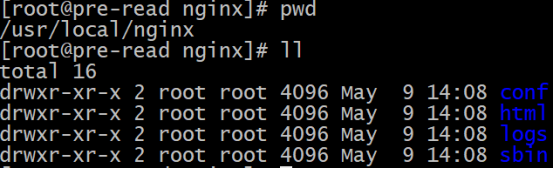
5、配置nginx的配置文件nginx.conf文件,主要也就是端口
1worker_processes  4;
2worker_rlimit_nofile 65535;
3
4#error_log  logs/error.log;
5#error_log  logs/error.log  notice;
6#error_log  logs/error.log  info;
7
8#pid        logs/nginx.pid;
9
10
11events {
12    worker_connections  65535;
13	#use epoll;
14	#accept_mutex off;
15	#multi_accept off;
16}
17
18
19http {
20    include       mime.types;
21    default_type  application/octet-stream;
22
23    #log_format  main  '$remote_addr - $remote_user [$time_local] "$request" '
24    #                  '$status $body_bytes_sent "$http_referer" '
25    #                  '"$http_user_agent" "$http_x_forwarded_for"';
26
27    #access_log  logs/access.log  main;
28
29    sendfile       on;
30    #tcp_nopush     on;
31	#tcp_nodelay    on;
32
33    #keepalive_timeout  0;
34    keepalive_timeout  65;
35	#send_timeout 10s;
36    #types_hash_max_size 2048;
37    #client_header_buffer_size 4k;
38    #client_max_body_size 8m;
39
40	proxy_connect_timeout 300;
41    proxy_send_timeout 300;
42    proxy_read_timeout 300;
43    proxy_buffer_size 64k;
44    proxy_buffers 4 64k;
45    proxy_busy_buffers_size 128k;
46    proxy_temp_file_write_size 128k;
47
48    #gzip  on;
49
50	upstream test123456 {
51		ip_hash;
52		server 192.168.0.192:8081;
53		server 192.168.0.144:8081;
54		server 192.168.0.203:8081;
55    }
56
57	upstream testjk123456 {
58		#ip_hash;
59		server 192.168.0.192:8081;
60		server 192.168.0.144:8081;
61		server 192.168.0.203:8081;
62    }
63
64
65
66
67    # another virtual host using mix of IP-, name-, and port-based configuration
68    #
69    #server {
70    #    listen       8000;
71    #    listen       somename:8080;
72    #    server_name  somename  alias  another.alias;
73
74    #    location / {
75    #        root   html;
76    #        index  index.html index.htm;
77    #    }
78    #}
79
80
81    # HTTPS server
82    #
83    #server {
84    #    listen       443 ssl;
85    #    server_name  localhost;
86
87    #    ssl_certificate      cert.pem;
88    #    ssl_certificate_key  cert.key;
89
90    #    ssl_session_cache    shared:SSL:1m;
91    #    ssl_session_timeout  5m;
92
93    #    ssl_ciphers  HIGH:!aNULL:!MD5;
94    #    ssl_prefer_server_ciphers  on;
95
96    #    location / {
97    #        root   html;
98    #        index  index.html index.htm;
99    #    }
100    #}
101
102	server {
103        listen       443 ssl;
104        server_name  test.jjtech.cn;
105		ssl_certificate      /usr/local/java/ng.crt;
106        ssl_certificate_key  /usr/local/java//ng.key;
107
108        ssl_session_cache    shared:SSL:1m;
109        ssl_session_timeout  5m;
110
111        #ssl_ciphers  HIGH:!aNULL:!MD5;
112        ssl_prefer_server_ciphers  on;
113
114		ssl_protocols TLSv1 TLSv1.1 TLSv1.2;
115        ssl_ciphers ECDH+AESGCM:ECDH+AES256:ECDH+AES128:ECDH+3DES:RSA+AESGCM:RSA+AES:RSA+3DES:!aNULL:!eNULL:!MD5:!DSS:!EXP:!ADH:!LOW:!MEDIUM;
116		proxy_ssl_server_name on;
117
118        #charset koi8-r;
119		charset utf-8;
120
121        #access_log  logs/host.access.log  main;
122		#rewrite ^(.*)$ https://${server_name}$1 permanent;
123
124		location /h5 {
125            root   /usr/local/java;
126            index  index.html index.htm;
127        }
128
129		location ~ ^/h5.*\.(css|jpeg|jpg|gif|js)$ {
130            root   /usr/local/java;
131        }
132
133
134		location /bz {
135            proxy_pass http://test123456/;
136			proxy_send_timeout 18000;
137			proxy_read_timeout 18000;
138			proxy_connect_timeout 18000;
139
140			proxy_set_header Upgrade $http_upgrade;
141			proxy_set_header Connection  "upgrade";
142
143        }
144
145		location /api {
146            proxy_pass http://testjk123456/;
147			proxy_send_timeout 18000;
148			proxy_read_timeout 18000;
149			proxy_connect_timeout 18000;
150			proxy_set_header Upgrade $http_upgrade;
151			proxy_set_header Connection  "upgrade";
152        }
153
154		location / {
155		   proxy_pass http://test123456/$request_uri;
156		   proxy_set_header Upgrade $http_upgrade;
157		   proxy_set_header Connection  "upgrade";
158		 }
159
160		 location /apilogin {
161		   proxy_pass http://test123456/$request_uri;
162		   proxy_set_header Upgrade $http_upgrade;
163		   proxy_set_header Connection  "upgrade";
164		 }
165
166
167
168
169        #error_page  404              /404.html;
170
171        # redirect server error pages to the static page /50x.html
172        #
173        error_page   500 502 503 504  /50x.html;
174        location = /50x.html {
175            root   html;
176        }
177
178        # proxy the PHP scripts to Apache listening on 127.0.0.1:80
179        #
180        #location ~ \.php$ {
181        #    proxy_pass   http://127.0.0.1;
182        #}
183
184        # pass the PHP scripts to FastCGI server listening on 127.0.0.1:9000
185        #
186        #location ~ \.php$ {
187        #    root           html;
188        #    fastcgi_pass   127.0.0.1:9000;
189        #    fastcgi_index  index.php;
190        #    fastcgi_param  SCRIPT_FILENAME  /scripts$fastcgi_script_name;
191        #    include        fastcgi_params;
192        #}
193
194        # deny access to .htaccess files, if Apache's document root
195        # concurs with nginx's one
196        #
197        #location ~ /\.ht {
198        #    deny  all;
199        #}
200    }
201
202}
可以按照自己服务器的端口使用情况来进行配置
ESC键,wq!强制保存并退出
6、启动nginx服务
切换目录到/usr/local/nginx/sbin下面

启动nginx命令: ./nginx 7、访问你的服务器IP 显示
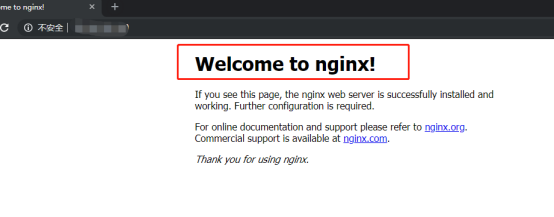
说明安装和配置都没问题OK了
8、nginx常用命令 1.启动nginx命点:./nginx 2.重启nginx命令:./nginx -s reload
- 停止 nginx 命令: ./nginx -s stop 或 ./nginx -s quit
- 关闭nginx进程:
ps -ef|grep nginx
命令 kill -9 8725 (进程号 上面的) 则关闭nginx