
- Android框架层
- Android输入系统
- Android框架层
本文首发于微信公众号「刘望舒」
基于Android 8.1
前言
在Android输入系统(三)InputReader的加工类型和InputDispatcher的分发过程这篇文章中,由于文章篇幅的原因,InputDispatcher的分发过程还有一部分没有讲解,这一部分就是事件分发到目标窗口的过程。
1. 为事件寻找合适的分发目标
我们先来回顾上一篇文章讲解的InputDispatcher的dispatchOnceInnerLocked函数: frameworks/native/services/inputflinger/InputDispatcher.cpp
1void InputDispatcher::dispatchOnceInnerLocked(nsecs_t* nextWakeupTime) {
2    ...
3    DropReason dropReason = DROP_REASON_NOT_DROPPED;//1
4   ...
5    switch (mPendingEvent->type) {//2
6    ...
7    case EventEntry::TYPE_MOTION: {
8        MotionEntry* typedEntry = static_cast<MotionEntry*>(mPendingEvent);
9        //如果没有及时响应窗口切换操作
10        if (dropReason == DROP_REASON_NOT_DROPPED && isAppSwitchDue) {
11            dropReason = DROP_REASON_APP_SWITCH;
12        }
13        //事件过期
14        if (dropReason == DROP_REASON_NOT_DROPPED
15                && isStaleEventLocked(currentTime, typedEntry)) {
16            dropReason = DROP_REASON_STALE;
17        }
18        //阻碍其他窗口获取事件
19        if (dropReason == DROP_REASON_NOT_DROPPED && mNextUnblockedEvent) {
20            dropReason = DROP_REASON_BLOCKED;
21        }
22        done = dispatchMotionLocked(currentTime, typedEntry,
23                &dropReason, nextWakeupTime);//3
24        break;
25    }
26    default:
27        ALOG_ASSERT(false);
28        break;
29    }
30    ...
31}
dispatchOnceInnerLocked函数中主要做了5件事,这里只截取了其中的一件事:事件的丢弃。 注释1处的dropReason代表了事件丢弃的原因,它的默认值为DROP_REASON_NOT_DROPPED,代表事件不被丢弃。 注释2处根据mPendingEvent的type做区分处理,这里主要截取了对Motion类型的处理。经过条件语句过滤,会调用注释3处的dispatchMotionLocked函数为Motion事件寻找合适的窗口。 frameworks/native/services/inputflinger/InputDispatcher.cpp
1bool InputDispatcher::dispatchMotionLocked(
2        nsecs_t currentTime, MotionEntry* entry, DropReason* dropReason, nsecs_t* nextWakeupTime) {
3    if (! entry->dispatchInProgress) {
4        //标记当前已经进入分发的过程
5        entry->dispatchInProgress = true;
6        logOutboundMotionDetailsLocked("dispatchMotion - ", entry);
7    }
8    // 如果事件是需要丢弃的,则返回true,不会去为该事件寻找合适的窗口
9    if (*dropReason != DROP_REASON_NOT_DROPPED) {//1
10        setInjectionResultLocked(entry, *dropReason == DROP_REASON_POLICY
11                ? INPUT_EVENT_INJECTION_SUCCEEDED : INPUT_EVENT_INJECTION_FAILED);
12        return true;
13    }
14    bool isPointerEvent = entry->source & AINPUT_SOURCE_CLASS_POINTER;
15    // 目标窗口信息列表会存储在inputTargets中
16    Vector<InputTarget> inputTargets;//2
17    bool conflictingPointerActions = false;
18    int32_t injectionResult;
19
20    if (isPointerEvent) {
21      //处理点击形式的事件,比如触摸屏幕
22        injectionResult = findTouchedWindowTargetsLocked(currentTime,
23                entry, inputTargets, nextWakeupTime, &conflictingPointerActions);//3
24    } else {
25        //处理非触摸形式的事件,比如轨迹球
26        injectionResult = findFocusedWindowTargetsLocked(currentTime,
27                entry, inputTargets, nextWakeupTime);//4
28    }
29    //输入事件被挂起,说明找到了窗口并且窗口无响应
30    if (injectionResult == INPUT_EVENT_INJECTION_PENDING) {
31        return false;
32    }
33    setInjectionResultLocked(entry, injectionResult);
34    //输入事件没有分发成功,说明没有找到合适的窗口
35    if (injectionResult != INPUT_EVENT_INJECTION_SUCCEEDED) {
36        if (injectionResult != INPUT_EVENT_INJECTION_PERMISSION_DENIED) {
37            CancelationOptions::Mode mode(isPointerEvent ?
38                    CancelationOptions::CANCEL_POINTER_EVENTS :
39                    CancelationOptions::CANCEL_NON_POINTER_EVENTS);
40            CancelationOptions options(mode, "input event injection failed");
41            synthesizeCancelationEventsForMonitorsLocked(options);
42        }
43        return true;
44    }
45   //分发目标添加到inputTargets列表中
46    addMonitoringTargetsLocked(inputTargets);//5
47    // Dispatch the motion.
48    if (conflictingPointerActions) {
49        CancelationOptions options(CancelationOptions::CANCEL_POINTER_EVENTS,
50                "conflicting pointer actions");
51        synthesizeCancelationEventsForAllConnectionsLocked(options);
52    }
53    //将事件分发给inputTargets列表中的目标
54    dispatchEventLocked(currentTime, entry, inputTargets);//6
55    return true;
56}
注释1处说明事件是需要丢弃的,这时就会直接返回true,不会为该事件寻找窗口,这次的分发任务就没有完成,会在下一次InputDispatcherThread的循环中再次尝试分发。注释3和注释4处会对点击形式和非触摸形式的事件进行处理,将事件处理的结果交由injectionResult。后面会判断injectionResult的值,如果injectionResult的值为INPUT_EVENT_INJECTION_PENDING,这说明找到了窗口并且窗口无响应输入事件被挂起,这时就会返回false;如果injectionResult的值不为INPUT_EVENT_INJECTION_SUCCEEDED,这说明没有找到合适的窗口,输入事件没有分发成功,这时就会返回true。 注释5处会将分发的目标添加到inputTargets列表中,最终在注释6处将事件分发给inputTargets列表中的目标。 从注释2处可以看出inputTargets列表中的存储的是InputTarget结构体: frameworks/native/services/inputflinger/InputDispatcher.h
1struct InputTarget {
2  enum {
3    //此标记表示事件正在交付给前台应用程序
4    FLAG_FOREGROUND = 1 << 0,
5    //此标记指示MotionEvent位于目标区域内
6    FLAG_WINDOW_IS_OBSCURED = 1 << 1,
7    ...
8};
9    //inputDispatcher与目标窗口的通信管道
10    sp<InputChannel> inputChannel;//1
11    //事件派发的标记
12    int32_t flags;
13    //屏幕坐标系相对于目标窗口坐标系的偏移量
14    float xOffset, yOffset;//2
15    //屏幕坐标系相对于目标窗口坐标系的缩放系数
16    float scaleFactor;//3
17    BitSet32 pointerIds;
18}
InputTarget结构体可以说是inputDispatcher与目标窗口的转换器,其分为两大部分,一个是枚举中存储的inputDispatcher与目标窗口交互的标记,另一部分是inputDispatcher与目标窗口交互参数,比如注释1处的inputChannel,它实际上是一个SocketPair,SocketPair用于进程间双向通信,这非常适合inputDispatcher与目标窗口之间的通信,因为inputDispatcher不仅要将事件分发到目标窗口,同时inputDispatcher也需要得到目标窗口对事件的响应。注释2处的xOffset和yOffset,屏幕坐标系相对于目标窗口坐标系的偏移量,MotionEntry(MotionEvent)中的存储的坐标是屏幕坐标系,因此就需要注释2和注释3处的参数,来将屏幕坐标系转换为目标窗口的坐标系。
2. 处理点击形式的事件
在InputDispatcher的dispatchMotionLocked函数的注释3和注释4处,分别对Motion事件中的点击形式事件和非触摸形式事件做了处理,由于非触摸形式事件不是很常见,这里对点击形式事件进行解析。InputDispatcher的findTouchedWindowTargetsLocked函数如有400多行,这里截取了需要了解的部分,并且分两个部分来讲解。 frameworks/native/services/inputflinger/InputDispatcher.cpp
1.findTouchedWindowTargetsLocked函数part1:
1int32_t InputDispatcher::findTouchedWindowTargetsLocked(nsecs_t currentTime,
2        const MotionEntry* entry, Vector<InputTarget>& inputTargets, nsecs_t* nextWakeupTime,
3        bool* outConflictingPointerActions) {
4    ...
5    if (newGesture || (isSplit && maskedAction == AMOTION_EVENT_ACTION_POINTER_DOWN)) {
6       //从MotionEntry中获取坐标点
7        int32_t pointerIndex = getMotionEventActionPointerIndex(action);
8        int32_t x = int32_t(entry->pointerCoords[pointerIndex].
9                getAxisValue(AMOTION_EVENT_AXIS_X));
10        int32_t y = int32_t(entry->pointerCoords[pointerIndex].
11                getAxisValue(AMOTION_EVENT_AXIS_Y));
12        sp<InputWindowHandle> newTouchedWindowHandle;
13        bool isTouchModal = false;
14        size_t numWindows = mWindowHandles.size();//1
15        // 遍历窗口,找到触摸过的窗口和窗口之外的外部目标
16        for (size_t i = 0; i < numWindows; i++) {//2
17            //获取InputDispatcher中代表窗口的windowHandle
18            sp<InputWindowHandle> windowHandle = mWindowHandles.itemAt(i);
19            //得到窗口信息windowInfo
20            const InputWindowInfo* windowInfo = windowHandle->getInfo();
21            if (windowInfo->displayId != displayId) {
22            //如果displayId不匹配,开始下一次循环
23                continue;
24            }
25            //获取窗口的flag
26            int32_t flags = windowInfo->layoutParamsFlags;
27            //如果窗口时可见的
28            if (windowInfo->visible) {
29               //如果窗口的flag不为FLAG_NOT_TOUCHABLE(窗口是touchable)
30                if (! (flags & InputWindowInfo::FLAG_NOT_TOUCHABLE)) {
31                   // 如果窗口是focusable或者flag不为FLAG_NOT_FOCUSABLE,则说明该窗口是”可触摸模式“
32                    isTouchModal = (flags & (InputWindowInfo::FLAG_NOT_FOCUSABLE
33                            | InputWindowInfo::FLAG_NOT_TOUCH_MODAL)) == 0;//3
34                   //如果窗口是”可触摸模式或者坐标点落在窗口之上
35                    if (isTouchModal || windowInfo->touchableRegionContainsPoint(x, y)) {
36                        newTouchedWindowHandle = windowHandle;//4
37                        break; // found touched window, exit window loop
38                    }
39                }
40                if (maskedAction == AMOTION_EVENT_ACTION_DOWN
41                        && (flags & InputWindowInfo::FLAG_WATCH_OUTSIDE_TOUCH)) {
42                    //将符合条件的窗口放入TempTouchState中,以便后续处理。
43                    mTempTouchState.addOrUpdateWindow(
44                            windowHandle, InputTarget::FLAG_DISPATCH_AS_OUTSIDE, BitSet32(0));//5
45                }
46            }
47        }
开头先从MotionEntry中获取坐标,为了后面筛选窗口用。注释1处获取列表mWindowHandles的InputWindowHandle数量,InputWindowHandle中存储保存了InputWindowInfo,InputWindowInfo中又包含了WindowManager.LayoutParams定义的窗口标志,关于窗口标志见Android解析WindowManager(二)Window的属性这篇文章。除了窗口标志,InputWindowInfo中还包含了InputChannel和窗口各种属性,InputWindowInfo描述了可以接收输入事件的窗口的属性。这么看来,InputWindowHandle和WMS中的WindowState很相似。通俗来讲,WindowState用来代表WMS中的窗口,而InputWindowHandle用来代表输入系统中的窗口。 那么输入系统是如何得到窗口信息的呢?这是因为mWindowHandles列表就是WMS更新到InputDispatcher中的。 注释2处开始遍历mWindowHandles列表中的窗口,找到触摸过的窗口和窗口之外的外部目标。注释3处,如果窗口是focusable或者flag不为FLAG_NOT_FOCUSABLE,则说明该窗口是”可触摸模式“。经过层层的筛选,如果窗口是”可触摸模式“或者坐标点落在窗口之上,会在注释4处,将windowHandle赋值给newTouchedWindowHandle。最后在注释5处,将newTouchedWindowHandle添加到TempTouchState中,以便后续处理。
2.findTouchedWindowTargetsLocked函数part2:
1...
2    // 确保所有触摸过的前台窗口都为新的输入做好了准备
3    for (size_t i = 0; i < mTempTouchState.windows.size(); i++) {
4        const TouchedWindow& touchedWindow = mTempTouchState.windows[i];
5        if (touchedWindow.targetFlags & InputTarget::FLAG_FOREGROUND) {
6            // 检查窗口是否准备好接收更多的输入
7            String8 reason = checkWindowReadyForMoreInputLocked(currentTime,
8                    touchedWindow.windowHandle, entry, "touched");//1
9            if (!reason.isEmpty()) {//2
10            //如果窗口没有准备好,则将原因赋值给injectionResult
11                injectionResult = handleTargetsNotReadyLocked(currentTime, entry,
12                        NULL, touchedWindow.windowHandle, nextWakeupTime, reason.string());//3
13             //不做后续的处理,直接跳到Unresponsive标签
14                goto Unresponsive;//3
15            }
16        }
17    }
18    ...
19    //代码走到这里,说明窗口已经查找成功
20    injectionResult = INPUT_EVENT_INJECTION_SUCCEEDED;//5
21    //遍历TempTouchState中的窗口
22    for (size_t i = 0; i < mTempTouchState.windows.size(); i++) {
23        const TouchedWindow& touchedWindow = mTempTouchState.windows.itemAt(i);
24        //为每个mTempTouchState中的窗口生成InputTargets
25        addWindowTargetLocked(touchedWindow.windowHandle, touchedWindow.targetFlags,
26                touchedWindow.pointerIds, inputTargets);//6
27    }
28   //在下一次迭代中,删除外部窗口或悬停触摸窗口
29    mTempTouchState.filterNonAsIsTouchWindows();
30...
31Unresponsive:
32    //重置TempTouchState
33    mTempTouchState.reset();
34    nsecs_t timeSpentWaitingForApplication = getTimeSpentWaitingForApplicationLocked(currentTime);
35    updateDispatchStatisticsLocked(currentTime, entry,
36            injectionResult, timeSpentWaitingForApplication);
37#if DEBUG_FOCUS
38    ALOGD("findTouchedWindow finished: injectionResult=%d, injectionPermission=%d, "
39            "timeSpentWaitingForApplication=%0.1fms",
40            injectionResult, injectionPermission, timeSpentWaitingForApplication / 1000000.0);
41#endif
42    return injectionResult;
43}
注释1处用于检查窗口是否准备好接收更多的输入,并将结果赋值给reason。注释2处,如果reason的值不为空,说明该窗口无法接收更多的输入,注释3处的handleTargetsNotReadyLocked函数会得到无法接收更多输入的原因,赋值给injectionResult,其函数内部会计算窗口处理的时间,如果超时(默认为5秒),就会报ANR,并设置nextWakeupTime的值为LONG_LONG_MIN,强制InputDispatcherThread在下一次循环中立即被唤醒,InputDispatcher会重新开始分发输入事件。这个时候,injectionResult的值为INPUT_EVENT_INJECTION_PENDING。因为窗口无法接收更多的输入,因此会在注释4处,调用goto语句跳到Unresponsive标签,Unresponsive标签中会调用TempTouchState的reset函数来重置TempTouchState。 如果代码已经走到了注释5处,说明窗口已经查找成功,会遍历TempTouchState中的窗口,在注释6处为每个TempTouchState中 的窗口生成inputTargets。 在第一小节,InputDispatcher的dispatchMotionLocked函数的注释6处,会调用InputDispatcher的dispatchEventLocked函数 将事件分发给inputTargets列表中的分发目标,接下来我们来查看下是如何实现的。
3. 向目标窗口发送事件
InputDispatcher的dispatchEventLocked函数如下所示。 frameworks/native/services/inputflinger/InputDispatcher.cpp
1void InputDispatcher::dispatchEventLocked(nsecs_t currentTime,
2        EventEntry* eventEntry, const Vector<InputTarget>& inputTargets) {
3#if DEBUG_DISPATCH_CYCLE
4    ALOGD("dispatchEventToCurrentInputTargets");
5#endif
6    ALOG_ASSERT(eventEntry->dispatchInProgress); // should already have been set to true
7    pokeUserActivityLocked(eventEntry);
8    //遍历inputTargets列表
9    for (size_t i = 0; i < inputTargets.size(); i++) {
10        const InputTarget& inputTarget = inputTargets.itemAt(i);
11        //根据inputTarget内部的inputChannel来获取Connection的索引
12        ssize_t connectionIndex = getConnectionIndexLocked(inputTarget.inputChannel);//1
13        if (connectionIndex >= 0) {
14              //获取保存在mConnectionsByFd容器中的Connection
15            sp<Connection> connection = mConnectionsByFd.valueAt(connectionIndex);
16            //根据inputTarget,开始事件发送循环
17            prepareDispatchCycleLocked(currentTime, connection, eventEntry, &inputTarget);//2
18        } else {
19#if DEBUG_FOCUS
20            ALOGD("Dropping event delivery to target with channel '%s' because it "
21                    "is no longer registered with the input dispatcher.",
22                    inputTarget.inputChannel->getName().string());
23#endif
24        }
25    }
26}
遍历inputTargets列表,获取每一个inputTarget,注释1处,根据inputTarget内部的inputChannel来获取Connection的索引,再根据这个索引作为Key值来获取mConnectionsByFd容器中的Connection。Connection可以理解为InputDispatcher和目标窗口的连接,其内部包含了连接的状态、InputChannel、InputWindowHandle和事件队列等等。注释2处调用prepareDispatchCycleLocked函数根据当前的inputTarget,开始事件发送循环。最终会通过inputTarget中的inputChannel来和窗口进行进程间通信,最终将Motion事件发送给目标窗口。
4. Motion事件分发过程总结
结合Android输入系统(二)IMS的启动过程和输入事件的处理和Android输入系统(三)InputReader的加工类型和InputDispatcher的分发过程这两篇文章,可以总结一下Motion事件分发过程,简化为下图。
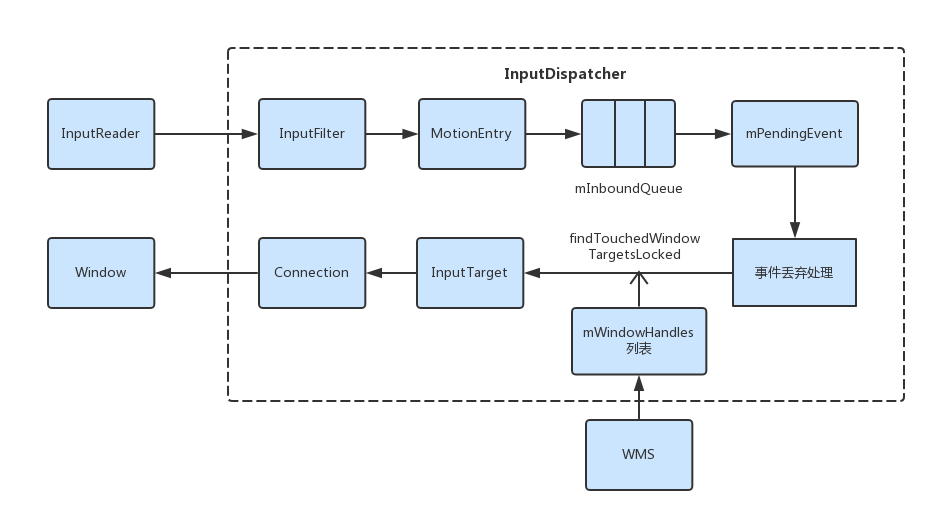
- Motion事件在InputReaderThread线程中的InputReader进行加工,加工完毕后会判断是否要唤醒InputDispatcherThread,如果需要唤醒,会在InputDispatcherThread的线程循环中不断的用InputDispatcher来分发 Motion事件。
- 将Motion事件交由InputFilter过滤,如果返回值为false,这次Motion事件就会被忽略掉。
- InputReader对Motion事件加工后的数据结构为NotifyMotionArgs,在InputDispatcher的notifyMotion函数中,用NotifyMotionArgs中的事件参数信息构造一个MotionEntry对象。这个MotionEntry对象会被添加到InputDispatcher的mInboundQueue队列的末尾。
- 如果mInboundQueue不为空,取出mInboundQueue队列头部的EventEntry赋值给mPendingEvent。
- 根据mPendingEvent的值,进行事件丢弃处理。
- 调用InputDispatcher的findTouchedWindowTargetsLocked函数,在mWindowHandles窗口列表中为Motion事件找到目标窗口,并为该窗口生成inputTarget。
- 根据inputTarget获取一个Connection,依赖Connection将输入事件发送给目标窗口。
这里只是简单的总结了Motion事件分发过程,和Motion事件类似的还有key事件,就需要读者自行去阅读源码了。
后记
实际上输入系统还有很多内容需要去讲解,比如inputChannel如何和窗口进行进程间通信,InputDispatcher如何得到窗口的反馈,这些内容会在本系列的后续文章中进行讲解。
感谢 《深入理解Android》卷三