
首先回顾一下 java 的几种 reference:
从jdk 1.2 开始,引用分为 强引用,软引用、弱引用 和虚引用, 其中 软引用、弱引用 和虚引用 和 ReferenceQueue 关联。
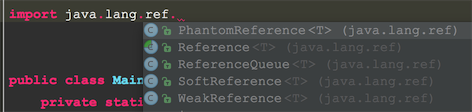
在JDK 1.2以前的版本中,若一个对象不被任何变量引用,那么程序就无法再使用这个对象。也就是说,只有对象处于可触及(reachable)状态,程序才能使用它。从JDK 1.2版本开始,把对象的引用分为4种级别,从而使程序能更加灵活地控制对象的生命周期。这4种级别由高到低依次为:强引用、软引用、弱引用和虚引用。
1,强引用(Strong Reference, 没有具体的类来标识强引用,正常的使用的对象引用都是强引用,由vm实现)
强引用是使用最普遍的引用。如果一个对象具有强引用,那垃圾回收器绝不会回收它。
当内存空间不足,Java虚拟机宁愿抛出OutOfMemoryError错误,使程序异常终止,也不会靠随意回收具有强引用的对象来解决内存不足的问题。
2,软引用(SoftReference)
如果一个对象只具有软引用,则内存空间足够,垃圾回收器就不会回收它;如果内存空间不足了,就会回收这些对象的内存。
只要垃圾回收器没有回收它,该对象就可以被程序使用。软引用可用来实现内存敏感的高速缓存。
**软引用可以和一个引用队列(ReferenceQueue)联合使用,如果软引用所引用的对象被垃圾回收器回收,**Java虚拟机就会把这个软引用加入到与之关联的引用队列中。
**3,**弱引用(WeakReference)
弱引用与软引用的区别在于:只具有弱引用的对象拥有更短暂的生命周期。
在垃圾回收器线程扫描它所管辖的内存区域的过程中,一旦发现了只具有弱引用的对象,不管当前内存空间足够与否,都会回收它的内存。
不过,由于垃圾回收器是一个优先级很低的线程,因此不一定会很快发现那些只具有弱引用的对象。
弱引用可以和一个引用队列(ReferenceQueue)联合使用,如果弱引用所引用的对象被垃圾回收,Java虚拟机就会把这个弱引用加入到与之关联的引用队列中。
4,虚引用(PhantomReference)
“虚引用”顾名思义,就是形同虚设,与其他几种引用都不同,虚引用并不会决定对象的生命周期。如果一个对象仅持有虚引用,那么它就和没有任何引用一样,在任何时候都可能被垃圾回收器回收。
虚引用主要用来跟踪对象被垃圾回收器回收的活动。虚引用与软引用和弱引用的一个区别在于:虚引用必须和引用队列 (ReferenceQueue)联合使用。
当垃圾回收器准备回收一个对象时,如果发现它还有虚引用,就会在回收对象的内存之前,把这个虚引用加入到与之 关联的引用队列中。
1ReferenceQueue queue = new ReferenceQueue ();
2PhantomReference pr = new PhantomReference (object, queue);
程序可以通过判断引用队列中是否已经加入了虚引用,来了解被引用的对象是否将要被垃圾回收。如果程序发现某个虚引用已经被加入到引用队列,那么就可以在所引用的对象的内存被回收之前采取必要的行动。
5,ReferenceQueue是作为 JVM GC与上层Reference对象管理之间的一个消息传递方式, 软引用、弱引用等的入队操作有vm的gc直接操作
LeakCanary 中的 RefWatcher 就是通过弱引用及其队列来实现监控的:
有两个很重要的结构: retainedKeys 和 queue ,
retainedKeys 代表没被gc 回收的对象,
而queue中的弱引用代表的是被gc了的对象,通过这两个结构就可以监控对象是不是被回收了;
retainedKeys存放了RefWatcher为每个被监控的对象生成的唯一key;
同时每个被监控对象的弱引用(KeyedWeakReference)关联了 其对应的key 和 queue,这样对象若被回收,则其对应的弱引用会被入队到queue中;
removeWeaklyReachableReferences(..)所做的就是把存在与queue中的弱引用的key 从 retainedKeys 中删除。
1  private final Set<String> retainedKeys;
2  private final ReferenceQueue<Object> queue;
3
4
5/**
6   * Watches the provided references and checks if it can be GCed. This method is non blocking,
7   * the check is done on the {@link Executor} this {@link RefWatcher} has been constructed with.
8   *
9   * @param referenceName An logical identifier for the watched object.
10   */
11  public void watch(Object watchedReference, String referenceName) {
12    checkNotNull(watchedReference, "watchedReference");
13    checkNotNull(referenceName, "referenceName");
14    if (debuggerControl.isDebuggerAttached()) {
15      return;
16    }
17    final long watchStartNanoTime = System.nanoTime();
18    String key = UUID.randomUUID().toString();
19    retainedKeys.add(key);
20    final KeyedWeakReference reference =
21        new KeyedWeakReference(watchedReference, key, referenceName, queue);
22
23    watchExecutor.execute(new Runnable() {
24      @Override public void run() {
25        ensureGone(reference, watchStartNanoTime);
26      }
27    });
28  }
29
30void ensureGone(KeyedWeakReference reference, long watchStartNanoTime) {
31    long gcStartNanoTime = System.nanoTime();
32
33    long watchDurationMs = NANOSECONDS.toMillis(gcStartNanoTime - watchStartNanoTime);
34    removeWeaklyReachableReferences();
35    if (gone(reference) || debuggerControl.isDebuggerAttached()) {
36      return;
37    }
38    gcTrigger.runGc();
39    removeWeaklyReachableReferences();
40    if (!gone(reference)) {
41      long startDumpHeap = System.nanoTime();
42      long gcDurationMs = NANOSECONDS.toMillis(startDumpHeap - gcStartNanoTime);
43
44      File heapDumpFile = heapDumper.dumpHeap();
45
46      if (heapDumpFile == HeapDumper.NO_DUMP) {
47        // Could not dump the heap, abort.
48        return;
49      }
50      long heapDumpDurationMs = NANOSECONDS.toMillis(System.nanoTime() - startDumpHeap);
51      heapdumpListener.analyze(
52          new HeapDump(heapDumpFile, reference.key, reference.name, excludedRefs, watchDurationMs,
53              gcDurationMs, heapDumpDurationMs));
54    }
55  }
56
57private boolean gone(KeyedWeakReference reference) {
58    return !retainedKeys.contains(reference.key);
59  }
60
61private void removeWeaklyReachableReferences() {
62    // WeakReferences are enqueued as soon as the object to which they point to becomes weakly
63    // reachable. This is before finalization or garbage collection has actually happened.
64    KeyedWeakReference ref;
65    while ((ref = (KeyedWeakReference) queue.poll()) != null) {
66      retainedKeys.remove(ref.key);
67    }
68  }
什么时候使用RefWatcher进行监控 ?
对于android, 若要监控Activity, 需要在其执行destroy的 时候进行监控:
通过向Application 注册 ActivityLifecycleCallback, 在onActivityDestroyed(Activity activity) 中 开始监听 activity对象, 因为这时activity应该被回收了,若发生内存泄露,则可以没发现;
RefWatcher 检查对象是否被回收是在一个 Executor 中执行的, Android 的监控 提供了 AndroidWatchExecutor , 它在主线程执行, 但是有一个delay 时间(默认5000 milisecs), 因为对于application 来说,执行destroy activity只是把必要资源回收,activity 对象不一定会马上被 gc回收。
AndroidWatchExecutor:
1private void executeDelayedAfterIdleUnsafe(final Runnable runnable) {
2    // This needs to be called from the main thread.
3    Looper.myQueue().addIdleHandler(new MessageQueue.IdleHandler() {
4      @Override public boolean queueIdle() {
5        backgroundHandler.postDelayed(runnable, DELAY_MILLIS);
6        return false;
7      }
8    });
9  }
ActivityRefWatcher:
1package com.squareup.leakcanary;
2
3import android.annotation.TargetApi;
4import android.app.Activity;
5import android.app.Application;
6import android.os.Bundle;
7
8import static android.os.Build.VERSION.SDK_INT;
9import static android.os.Build.VERSION_CODES.ICE_CREAM_SANDWICH;
10import static com.squareup.leakcanary.Preconditions.checkNotNull;
11
12@TargetApi(ICE_CREAM_SANDWICH) public final class ActivityRefWatcher {
13
14  public static void installOnIcsPlus(Application application, RefWatcher refWatcher) {
15    if (SDK_INT < ICE_CREAM_SANDWICH) {
16      // If you need to support Android < ICS, override onDestroy() in your base activity.
17      return;
18    }
19    ActivityRefWatcher activityRefWatcher = new ActivityRefWatcher(application, refWatcher);
20    activityRefWatcher.watchActivities();
21  }
22
23  private final Application.ActivityLifecycleCallbacks lifecycleCallbacks =
24      new Application.ActivityLifecycleCallbacks() {
25        @Override public void onActivityCreated(Activity activity, Bundle savedInstanceState) {
26        }
27
28        @Override public void onActivityStarted(Activity activity) {
29        }
30
31        @Override public void onActivityResumed(Activity activity) {
32        }
33
34        @Override public void onActivityPaused(Activity activity) {
35        }
36
37        @Override public void onActivityStopped(Activity activity) {
38        }
39
40        @Override public void onActivitySaveInstanceState(Activity activity, Bundle outState) {
41        }
42
43        @Override public void onActivityDestroyed(Activity activity) {
44          ActivityRefWatcher.this.onActivityDestroyed(activity);
45        }
46      };
47
48  private final Application application;
49  private final RefWatcher refWatcher;
50
51  /**
52   * Constructs an {@link ActivityRefWatcher} that will make sure the activities are not leaking
53   * after they have been destroyed.
54   */
55  public ActivityRefWatcher(Application application, final RefWatcher refWatcher) {
56    this.application = checkNotNull(application, "application");
57    this.refWatcher = checkNotNull(refWatcher, "refWatcher");
58  }
59
60  void onActivityDestroyed(Activity activity) {
61    refWatcher.watch(activity);
62  }
63
64  public void watchActivities() {
65    // Make sure you don't get installed twice.
66    stopWatchingActivities();
67    application.registerActivityLifecycleCallbacks(lifecycleCallbacks);
68  }
69
70  public void stopWatchingActivities() {
71    application.unregisterActivityLifecycleCallbacks(lifecycleCallbacks);
72  }
73}
若发生了泄露, refWatcher 会执行dump ,生成dump 文件,然后由mat 或haha 等分析工具找到泄露对象的引用路径。
参考 :http://blog.csdn.net/lyfi01/article/details/6415726, http://hongjiang.info/java-referencequeue/