
一、Mybatis框架
1、mybatis简介
MyBatis 是一款优秀的持久层框架,它支持定制化 SQL、存储过程以及高级映射。MyBatis 避免了几乎所有的 JDBC 代码和手动设置参数以及获取结果集。MyBatis 可以使用简单的 XML 或注解来配置和映射原生类型、接口和 Java 的 POJO(Plain Old Java Objects,普通老式 Java 对象)为数据库中的记录。
2、mybatis特点
11)sql语句与代码分离,存放于xml配置文件中,方便管理
22)用逻辑标签控制动态SQL的拼接,灵活方便
33)查询的结果集与java对象自动映射
44)编写原生态SQL,接近JDBC
55)简单的持久化框架,框架不臃肿简单易学
3、适用场景
MyBatis专注于SQL本身,是一个足够灵活的DAO层解决方案。 对性能的要求很高,或者需求变化较多的项目,MyBatis将是不错的选择。
二、与SpringBoot2.0整合
1、项目结构图
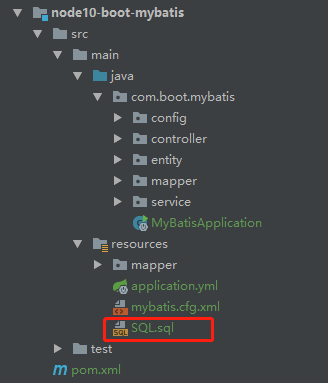
采用druid连接池,该连接池。
2、核心依赖
1<!-- mybatis依赖 -->
2<dependency>
3    <groupid>org.mybatis.spring.boot</groupid>
4    <artifactid>mybatis-spring-boot-starter</artifactid>
5    <version>1.3.2</version>
6</dependency>
7<!-- mybatis的分页插件 -->
8<dependency>
9    <groupid>com.github.pagehelper</groupid>
10    <artifactid>pagehelper</artifactid>
11    <version>4.1.6</version>
12</dependency>
3、核心配置
1mybatis:
2  # mybatis配置文件所在路径
3  config-location: classpath:mybatis.cfg.xml
4  type-aliases-package: com.boot.mybatis.entity
5  # mapper映射文件
6  mapper-locations: classpath:mapper/*.xml
4、逆向工程生成的文件
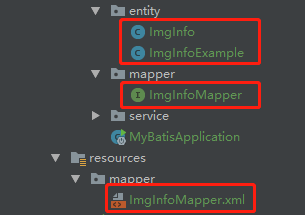
这里就不贴代码了。
5、编写基础测试接口
1// 增加
2int insert(ImgInfo record);
3// 组合查询
4List<imginfo> selectByExample(ImgInfoExample example);
5// 修改
6int updateByPrimaryKeySelective(ImgInfo record);
7// 删除
8int deleteByPrimaryKey(Integer imgId);
6、编写接口实现
1@Service
2public class ImgInfoServiceImpl implements ImgInfoService {
3    @Resource
4    private ImgInfoMapper imgInfoMapper ;
5    @Override
6    public int insert(ImgInfo record) {
7        return imgInfoMapper.insert(record);
8    }
9    @Override
10    public List<imginfo> selectByExample(ImgInfoExample example) {
11        return imgInfoMapper.selectByExample(example);
12    }
13    @Override
14    public int updateByPrimaryKeySelective(ImgInfo record) {
15        return imgInfoMapper.updateByPrimaryKeySelective(record);
16    }
17    @Override
18    public int deleteByPrimaryKey(Integer imgId) {
19        return imgInfoMapper.deleteByPrimaryKey(imgId);
20    }
21}
7、控制层测试类
1@RestController
2public class ImgInfoController {
3    @Resource
4    private ImgInfoService imgInfoService ;
5    // 增加
6    @RequestMapping("/insert")
7    public int insert(){
8        ImgInfo record = new ImgInfo() ;
9        record.setUploadUserId("A123");
10        record.setImgTitle("博文图片");
11        record.setSystemType(1) ;
12        record.setImgType(2);
13        record.setImgUrl("https://avatars0.githubusercontent.com/u/50793885?s=460&v=4");
14        record.setLinkUrl("https://avatars0.githubusercontent.com/u/50793885?s=460&v=4");
15        record.setShowState(1);
16        record.setCreateDate(new Date());
17        record.setUpdateDate(record.getCreateDate());
18        record.setRemark("知了");
19        record.setbEnable("1");
20        return imgInfoService.insert(record) ;
21    }
22    // 组合查询
23    @RequestMapping("/selectByExample")
24    public List<imginfo> selectByExample(){
25        ImgInfoExample example = new ImgInfoExample() ;
26        example.createCriteria().andRemarkEqualTo("知了") ;
27        return imgInfoService.selectByExample(example);
28    }
29    // 修改
30    @RequestMapping("/updateByPrimaryKeySelective")
31    public int updateByPrimaryKeySelective(){
32        ImgInfo record = new ImgInfo() ;
33        record.setImgId(11);
34        record.setRemark("知了一笑");
35        return imgInfoService.updateByPrimaryKeySelective(record);
36    }
37    // 删除
38    @RequestMapping("/deleteByPrimaryKey")
39    public int deleteByPrimaryKey() {
40        Integer imgId = 11 ;
41        return imgInfoService.deleteByPrimaryKey(imgId);
42    }
43}
8、测试顺序
1http://localhost:8010/insert
2http://localhost:8010/selectByExample
3http://localhost:8010/updateByPrimaryKeySelective
4http://localhost:8010/deleteByPrimaryKey
三、集成分页插件
1、mybatis配置文件
1<!--?xml version="1.0" encoding="UTF-8" ?-->
2
3<configuration>
4    <plugins>
5        <!--mybatis分页插件-->
6        <plugin interceptor="com.github.pagehelper.PageHelper">
7            <property name="dialect" value="mysql" />
8        </plugin>
9    </plugins>
10</configuration>
2、分页实现代码
1@Override 2public PageInfo<imginfo> queryPage(int page,int pageSize) { 3 PageHelper.startPage(page,pageSize) ; 4 ImgInfoExample example = new ImgInfoExample() ; 5 // 查询条件 6 example.createCriteria().andBEnableEqualTo("1").andShowStateEqualTo(1); 7 // 排序条件 8 example.setOrderByClause("create_date DESC,img_id ASC"); 9 List<imginfo> imgInfoList = imgInfoMapper.selectByExample(example) ; 10 PageInfo<imginfo> pageInfo = new PageInfo<>(imgInfoList) ; 11 return pageInfo ; 12}
3、测试接口
http://localhost:8010/queryPage
四、源代码地址
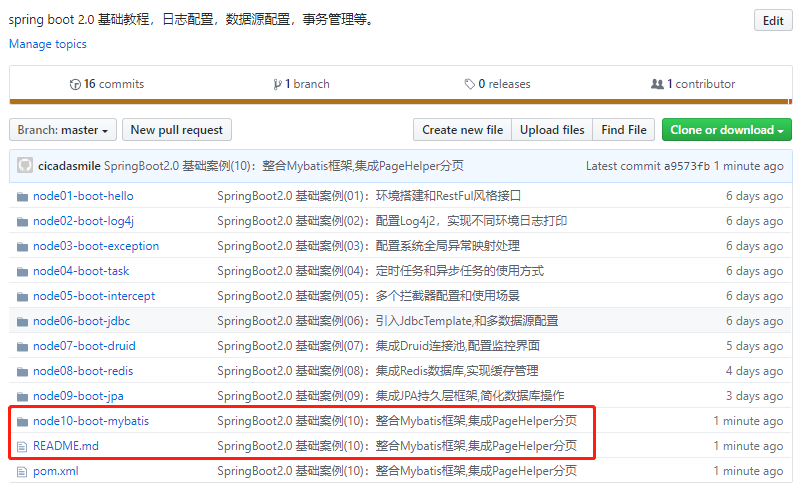
1GitHub地址:知了一笑
2https://github.com/cicadasmile/spring-boot-base
3码云地址:知了一笑
4https://gitee.com/cicadasmile/spring-boot-base
 </imginfo></imginfo></imginfo></imginfo></imginfo></imginfo>