2019-08-23 11:07:09
1. 项目创建
1.1 安装
下载.NETCORE SDK 进行安装
下载NETCORE RUNTIME进行安装.
下载Runtime & Hosting Bundle进行安装
下载地址:https://dotnet.microsoft.com/download/dotnet-core
微软的安装在windows方面很简单,基本就是一键安装.
1.2 开发工具
VisualStudio 2019
1.3建立项目工程
点击文件创建项目,出现如下图示
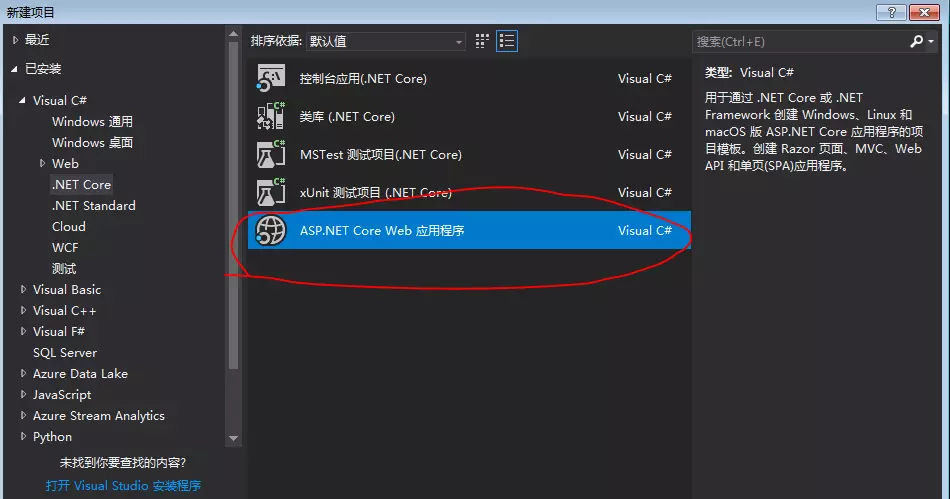
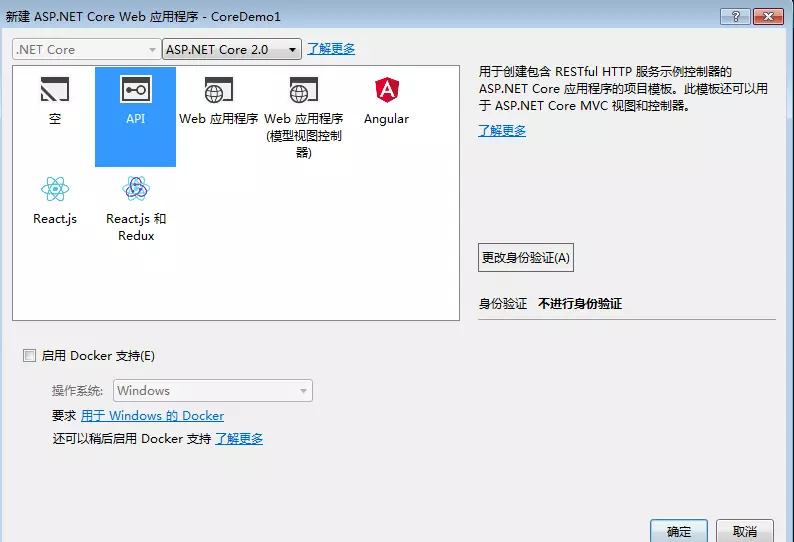
选择画红圈部分,接着出现如下图示
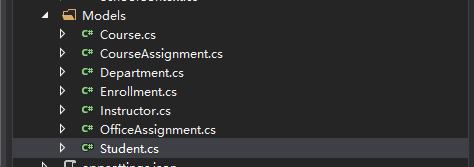
1.4 新建Models文件夹,创建数据库实体类
1.5 创建数据库上下文类
创建继承DbContext的上下文类,将数据库实体添加到DbSet中,重写OnModelCreating方
1 1 public class SchoolContext : DbContext
2 2     {
3 3         public SchoolContext(DbContextOptions<SchoolContext> options) : base(options)
4 4         {
5 5         }
6 6
7 7         public DbSet<Course> Courses { get; set; }
8 8         public DbSet<Enrollment> Enrollments { get; set; }
9 9         public DbSet<Student> Students { get; set; }
1010         public DbSet<Department> Departments { get; set; }
1111         public DbSet<Instructor> Instructors { get; set; }
1212         public DbSet<OfficeAssignment> OfficeAssignments { get; set; }
1313         public DbSet<CourseAssignment> CourseAssignments { get; set; }
1414
1515         protected override void OnModelCreating(ModelBuilder modelBuilder)
1616         {
1717             modelBuilder.Entity<Course>().ToTable("Course");
1818             modelBuilder.Entity<Enrollment>().ToTable("Enrollment");
1919             modelBuilder.Entity<Student>().ToTable("Student");
2020             modelBuilder.Entity<Department>().ToTable("Department");
2121             modelBuilder.Entity<Instructor>().ToTable("Instructor");
2222             modelBuilder.Entity<OfficeAssignment>().ToTable("OfficeAssignment");
2323             modelBuilder.Entity<CourseAssignment>().ToTable("CourseAssignment");
2424
2525             modelBuilder.Entity<CourseAssignment>()
2626                 .HasKey(c => new { c.CourseID, c.InstructorID });
2727         }
2828     }
1.6使用测试数据设定数据库种子
1  1 using System;
2  2 using System.Linq;
3  3 using Microsoft.EntityFrameworkCore;
4  4 using Microsoft.Extensions.DependencyInjection;
5  5 using ContosoUniversity.Models;
6  6
7  7 namespace ContosoUniversity.Data
8  8 {
9  9     public static class DbInitializer
10 10     {
11 11         public static void Initialize(SchoolContext context)
12 12         {
13 13             //context.Database.EnsureCreated();
14 14
15 15             // Look for any students.
16 16             if (context.Students.Any())
17 17             {
18 18                 return;   // DB has been seeded
19 19             }
20 20
21 21             var students = new Student[]
22 22             {
23 23                 new Student { FirstMidName = "Carson",   LastName = "Alexander",
24 24                     EnrollmentDate = DateTime.Parse("2010-09-01") },
25 25                 new Student { FirstMidName = "Meredith", LastName = "Alonso",
26 26                     EnrollmentDate = DateTime.Parse("2012-09-01") },
27 27                 new Student { FirstMidName = "Arturo",   LastName = "Anand",
28 28                     EnrollmentDate = DateTime.Parse("2013-09-01") },
29 29                 new Student { FirstMidName = "Gytis",    LastName = "Barzdukas",
30 30                     EnrollmentDate = DateTime.Parse("2012-09-01") },
31 31                 new Student { FirstMidName = "Yan",      LastName = "Li",
32 32                     EnrollmentDate = DateTime.Parse("2012-09-01") },
33 33                 new Student { FirstMidName = "Peggy",    LastName = "Justice",
34 34                     EnrollmentDate = DateTime.Parse("2011-09-01") },
35 35                 new Student { FirstMidName = "Laura",    LastName = "Norman",
36 36                     EnrollmentDate = DateTime.Parse("2013-09-01") },
37 37                 new Student { FirstMidName = "Nino",     LastName = "Olivetto",
38 38                     EnrollmentDate = DateTime.Parse("2005-09-01") }
39 39             };
40 40
41 41             foreach (Student s in students)
42 42             {
43 43                 context.Students.Add(s);
44 44             }
45 45             context.SaveChanges();
46 46
47 47             var instructors = new Instructor[]
48 48             {
49 49                 new Instructor { FirstMidName = "Kim",     LastName = "Abercrombie",
50 50                     HireDate = DateTime.Parse("1995-03-11") },
51 51                 new Instructor { FirstMidName = "Fadi",    LastName = "Fakhouri",
52 52                     HireDate = DateTime.Parse("2002-07-06") },
53 53                 new Instructor { FirstMidName = "Roger",   LastName = "Harui",
54 54                     HireDate = DateTime.Parse("1998-07-01") },
55 55                 new Instructor { FirstMidName = "Candace", LastName = "Kapoor",
56 56                     HireDate = DateTime.Parse("2001-01-15") },
57 57                 new Instructor { FirstMidName = "Roger",   LastName = "Zheng",
58 58                     HireDate = DateTime.Parse("2004-02-12") }
59 59             };
60 60
61 61             foreach (Instructor i in instructors)
62 62             {
63 63                 context.Instructors.Add(i);
64 64             }
65 65             context.SaveChanges();
66 66
67 67             var departments = new Department[]
68 68             {
69 69                 new Department { Name = "English",     Budget = 350000,
70 70                     StartDate = DateTime.Parse("2007-09-01"),
71 71                     InstructorID  = instructors.Single( i => i.LastName == "Abercrombie").ID },
72 72                 new Department { Name = "Mathematics", Budget = 100000,
73 73                     StartDate = DateTime.Parse("2007-09-01"),
74 74                     InstructorID  = instructors.Single( i => i.LastName == "Fakhouri").ID },
75 75                 new Department { Name = "Engineering", Budget = 350000,
76 76                     StartDate = DateTime.Parse("2007-09-01"),
77 77                     InstructorID  = instructors.Single( i => i.LastName == "Harui").ID },
78 78                 new Department { Name = "Economics",   Budget = 100000,
79 79                     StartDate = DateTime.Parse("2007-09-01"),
80 80                     InstructorID  = instructors.Single( i => i.LastName == "Kapoor").ID }
81 81             };
82 82
83 83             foreach (Department d in departments)
84 84             {
85 85                 context.Departments.Add(d);
86 86             }
87 87             context.SaveChanges();
88 88
89 89             var courses = new Course[]
90 90             {
91 91                 new Course {CourseID = 1050, Title = "Chemistry",      Credits = 3,
92 92                     DepartmentID = departments.Single( s => s.Name == "Engineering").DepartmentID
93 93                 },
94 94                 new Course {CourseID = 4022, Title = "Microeconomics", Credits = 3,
95 95                     DepartmentID = departments.Single( s => s.Name == "Economics").DepartmentID
96 96                 },
97 97                 new Course {CourseID = 4041, Title = "Macroeconomics", Credits = 3,
98 98                     DepartmentID = departments.Single( s => s.Name == "Economics").DepartmentID
99 99                 },
100100                 new Course {CourseID = 1045, Title = "Calculus",       Credits = 4,
101101                     DepartmentID = departments.Single( s => s.Name == "Mathematics").DepartmentID
102102                 },
103103                 new Course {CourseID = 3141, Title = "Trigonometry",   Credits = 4,
104104                     DepartmentID = departments.Single( s => s.Name == "Mathematics").DepartmentID
105105                 },
106106                 new Course {CourseID = 2021, Title = "Composition",    Credits = 3,
107107                     DepartmentID = departments.Single( s => s.Name == "English").DepartmentID
108108                 },
109109                 new Course {CourseID = 2042, Title = "Literature",     Credits = 4,
110110                     DepartmentID = departments.Single( s => s.Name == "English").DepartmentID
111111                 },
112112             };
113113
114114             foreach (Course c in courses)
115115             {
116116                 context.Courses.Add(c);
117117             }
118118             context.SaveChanges();
119119
120120             var officeAssignments = new OfficeAssignment[]
121121             {
122122                 new OfficeAssignment {
123123                     InstructorID = instructors.Single( i => i.LastName == "Fakhouri").ID,
124124                     Location = "Smith 17" },
125125                 new OfficeAssignment {
126126                     InstructorID = instructors.Single( i => i.LastName == "Harui").ID,
127127                     Location = "Gowan 27" },
128128                 new OfficeAssignment {
129129                     InstructorID = instructors.Single( i => i.LastName == "Kapoor").ID,
130130                     Location = "Thompson 304" },
131131             };
132132
133133             foreach (OfficeAssignment o in officeAssignments)
134134             {
135135                 context.OfficeAssignments.Add(o);
136136             }
137137             context.SaveChanges();
138138
139139             var courseInstructors = new CourseAssignment[]
140140             {
141141                 new CourseAssignment {
142142                     CourseID = courses.Single(c => c.Title == "Chemistry" ).CourseID,
143143                     InstructorID = instructors.Single(i => i.LastName == "Kapoor").ID
144144                     },
145145                 new CourseAssignment {
146146                     CourseID = courses.Single(c => c.Title == "Chemistry" ).CourseID,
147147                     InstructorID = instructors.Single(i => i.LastName == "Harui").ID
148148                     },
149149                 new CourseAssignment {
150150                     CourseID = courses.Single(c => c.Title == "Microeconomics" ).CourseID,
151151                     InstructorID = instructors.Single(i => i.LastName == "Zheng").ID
152152                     },
153153                 new CourseAssignment {
154154                     CourseID = courses.Single(c => c.Title == "Macroeconomics" ).CourseID,
155155                     InstructorID = instructors.Single(i => i.LastName == "Zheng").ID
156156                     },
157157                 new CourseAssignment {
158158                     CourseID = courses.Single(c => c.Title == "Calculus" ).CourseID,
159159                     InstructorID = instructors.Single(i => i.LastName == "Fakhouri").ID
160160                     },
161161                 new CourseAssignment {
162162                     CourseID = courses.Single(c => c.Title == "Trigonometry" ).CourseID,
163163                     InstructorID = instructors.Single(i => i.LastName == "Harui").ID
164164                     },
165165                 new CourseAssignment {
166166                     CourseID = courses.Single(c => c.Title == "Composition" ).CourseID,
167167                     InstructorID = instructors.Single(i => i.LastName == "Abercrombie").ID
168168                     },
169169                 new CourseAssignment {
170170                     CourseID = courses.Single(c => c.Title == "Literature" ).CourseID,
171171                     InstructorID = instructors.Single(i => i.LastName == "Abercrombie").ID
172172                     },
173173             };
174174
175175             foreach (CourseAssignment ci in courseInstructors)
176176             {
177177                 context.CourseAssignments.Add(ci);
178178             }
179179             context.SaveChanges();
180180
181181             var enrollments = new Enrollment[]
182182             {
183183                 new Enrollment {
184184                     StudentID = students.Single(s => s.LastName == "Alexander").ID,
185185                     CourseID = courses.Single(c => c.Title == "Chemistry" ).CourseID,
186186                     Grade = Grade.A
187187                 },
188188                     new Enrollment {
189189                     StudentID = students.Single(s => s.LastName == "Alexander").ID,
190190                     CourseID = courses.Single(c => c.Title == "Microeconomics" ).CourseID,
191191                     Grade = Grade.C
192192                     },
193193                     new Enrollment {
194194                     StudentID = students.Single(s => s.LastName == "Alexander").ID,
195195                     CourseID = courses.Single(c => c.Title == "Macroeconomics" ).CourseID,
196196                     Grade = Grade.B
197197                     },
198198                     new Enrollment {
199199                         StudentID = students.Single(s => s.LastName == "Alonso").ID,
200200                     CourseID = courses.Single(c => c.Title == "Calculus" ).CourseID,
201201                     Grade = Grade.B
202202                     },
203203                     new Enrollment {
204204                         StudentID = students.Single(s => s.LastName == "Alonso").ID,
205205                     CourseID = courses.Single(c => c.Title == "Trigonometry" ).CourseID,
206206                     Grade = Grade.B
207207                     },
208208                     new Enrollment {
209209                     StudentID = students.Single(s => s.LastName == "Alonso").ID,
210210                     CourseID = courses.Single(c => c.Title == "Composition" ).CourseID,
211211                     Grade = Grade.B
212212                     },
213213                     new Enrollment {
214214                     StudentID = students.Single(s => s.LastName == "Anand").ID,
215215                     CourseID = courses.Single(c => c.Title == "Chemistry" ).CourseID
216216                     },
217217                     new Enrollment {
218218                     StudentID = students.Single(s => s.LastName == "Anand").ID,
219219                     CourseID = courses.Single(c => c.Title == "Microeconomics").CourseID,
220220                     Grade = Grade.B
221221                     },
222222                 new Enrollment {
223223                     StudentID = students.Single(s => s.LastName == "Barzdukas").ID,
224224                     CourseID = courses.Single(c => c.Title == "Chemistry").CourseID,
225225                     Grade = Grade.B
226226                     },
227227                     new Enrollment {
228228                     StudentID = students.Single(s => s.LastName == "Li").ID,
229229                     CourseID = courses.Single(c => c.Title == "Composition").CourseID,
230230                     Grade = Grade.B
231231                     },
232232                     new Enrollment {
233233                     StudentID = students.Single(s => s.LastName == "Justice").ID,
234234                     CourseID = courses.Single(c => c.Title == "Literature").CourseID,
235235                     Grade = Grade.B
236236                     }
237237             };
238238
239239             foreach (Enrollment e in enrollments)
240240             {
241241                 var enrollmentInDataBase = context.Enrollments.Where(
242242                     s =>
243243                             s.Student.ID == e.StudentID &&
244244                             s.Course.CourseID == e.CourseID).SingleOrDefault();
245245                 if (enrollmentInDataBase == null)
246246                 {
247247                     context.Enrollments.Add(e);
248248                 }
249249             }
250250             context.SaveChanges();
251251         }
252252     }
253253 }
1.7在appsetting.json文件中配置本地数据库连接
11 "ConnectionStrings": {
22     "SchoolContext": "Server=.;Database=ApiDb;user id=sa;password=123456;"
33   }
1.8在Startup.cs文件中配置使用sql server
1 1 public void ConfigureServices(IServiceCollection services)
2 2 {
3 3       services.AddDbContext<SchoolContext>(opt =>
4 4         opt.UseSqlServer(Configuration.GetConnectionString("SchoolContext")));
5 5       services.AddMvc().SetCompatibilityVersion(CompatibilityVersion.Version_2_2);
6 6       services.AddSwaggerGen(c =>
7 7       {
8 8         c.SwaggerDoc("v1", new OpenApiInfo { Title = "My API", Version = "v1" });
9 9       });
1010 }
1.9在Program.cs文件中调用测试数据
1 1 public class Program
2 2 {
3 3     public static void Main(string[] args)
4 4     {
5 5         var host = CreateWebHostBuilder(args).Build();
6 6
7 7         using (var scope = host.Services.CreateScope())
8 8         {
9 9             var services = scope.ServiceProvider;
1010             try
1111             {
1212                 var context = services.GetRequiredService<SchoolContext>();
1313                 DbInitializer.Initialize(context);
1414             }
1515             catch (Exception ex)
1616             {
1717                 var logger = services.GetRequiredService<ILogger<Program>>();
1818                 logger.LogError(ex, "An error occurred while seeding the database.");
1919             }
2020         }
2121
2222         host.Run();
2323 }
2. EF数据库迁移
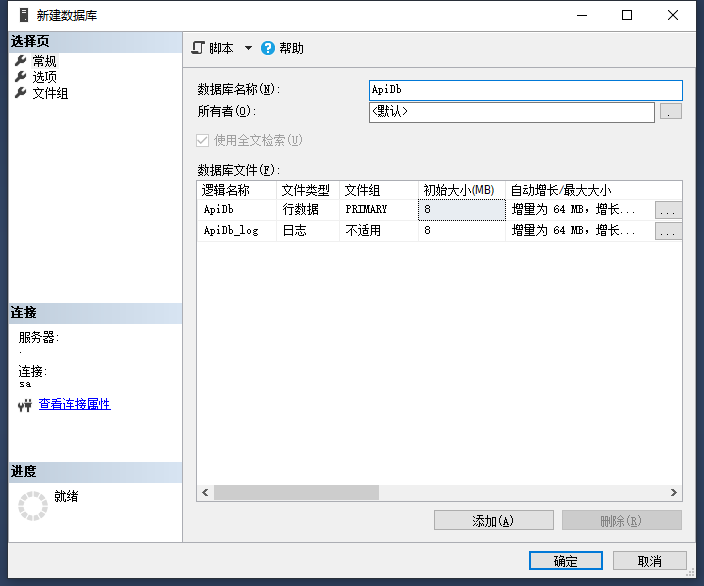
2.1首先在本地数据库,创建一个空的数据库
2.2执行数据库迁移
保存项目更改,生成项目。然后打开CMD命令窗口,切换到工程目录下,执行以下命令
dotnet ef migrations add ComplexDataModel
2.3更新数据库
更改数据库后或删除数据库后,在命令窗口运行以下命令
dotnet ef database update
2.4查看数据库
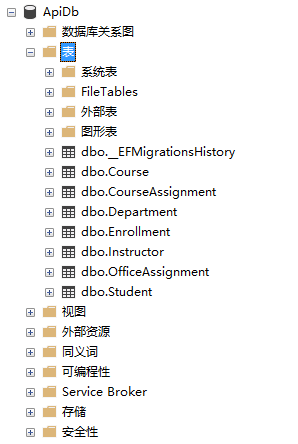
打开SQL Server Management,查看数据库表生成情况
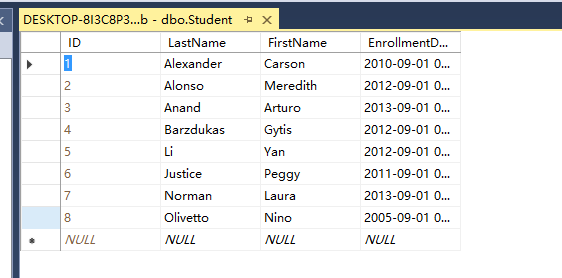
2.5运行项目,生成测试数据
测试数据已自动生成