
1.通过MediaQuery.removePadding可以移除元素的pandding,需要注意要指定移除哪个方向的padding,例如移除上面的padding
1MediaQuery.removePadding(
2            removeTop: true,
3            context: context,
4            child: ,
5)
2.获取状态栏高度
1import 'dart:ui';
2MediaQueryData.fromWindow(window).padding.top
同时我们也可以在flutter/src/material/constants.dart中查看flutter自带的AppBar的默认参数
1/// The height of the toolbar component of the [AppBar].
2const double kToolbarHeight = 56.0;
3
4/// The height of the bottom navigation bar.
5const double kBottomNavigationBarHeight = 56.0;
3.引入官方webview_flutter: ^0.3.7+1 ,提示错误需要使用AndroidX
1'         *********************************************************'
2'         WARNING: This version of ' + PLUGIN + ' will break your Android build if it or its dependencies aren\'t compatible with AndroidX.'
3'         See https://goo.gl/CP92wY for more information on the problem and how to fix it.'
4'         This warning prints for all Android build failures. The real root cause of the error may be unrelated.'
5'         *********************************************************'
解决方法:
打开flutter的android宿主项目点击Refactor-Migrate to AndroidX
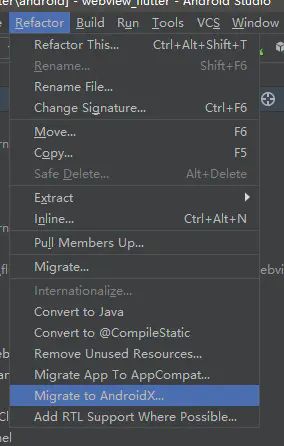
image.png
接下来再弹出的窗口点击Do Refactor 让Android Studio自动将项目转化为AndroidX依赖
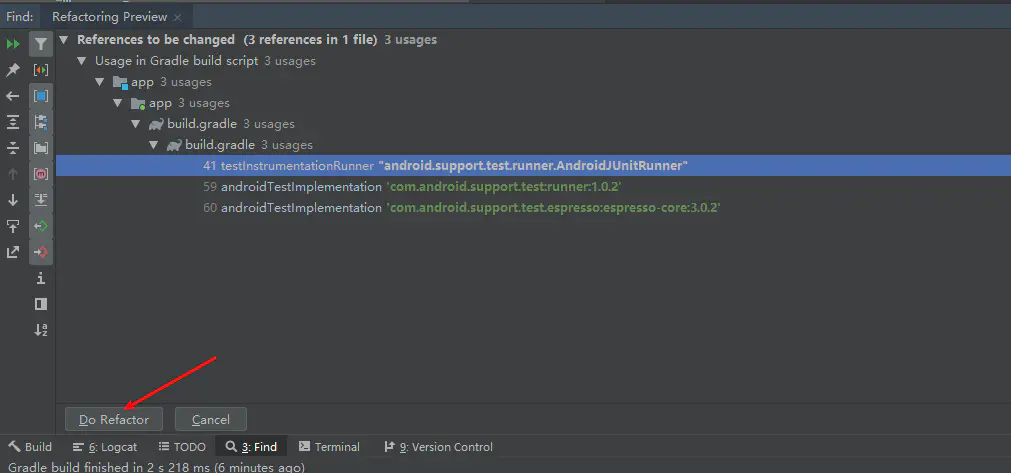
转化完毕后可以clean Project看看还有其他错误没,没有错误后回到Flutter项目运行即可