本文同步发表于我的微信公众号,在微信搜索
OpenCV or Android即可关注。
前言
第三周挑战赛是速度比拼,按照官方发出的设计图最快完成且符合所有设计规范者胜出。不仅要做得快,还要做得好,奖品自然不会少。这一期的奖品是:Google Pixel 5。深知干不过业界大佬们,花个半天纯当练手完成题目。
设计图
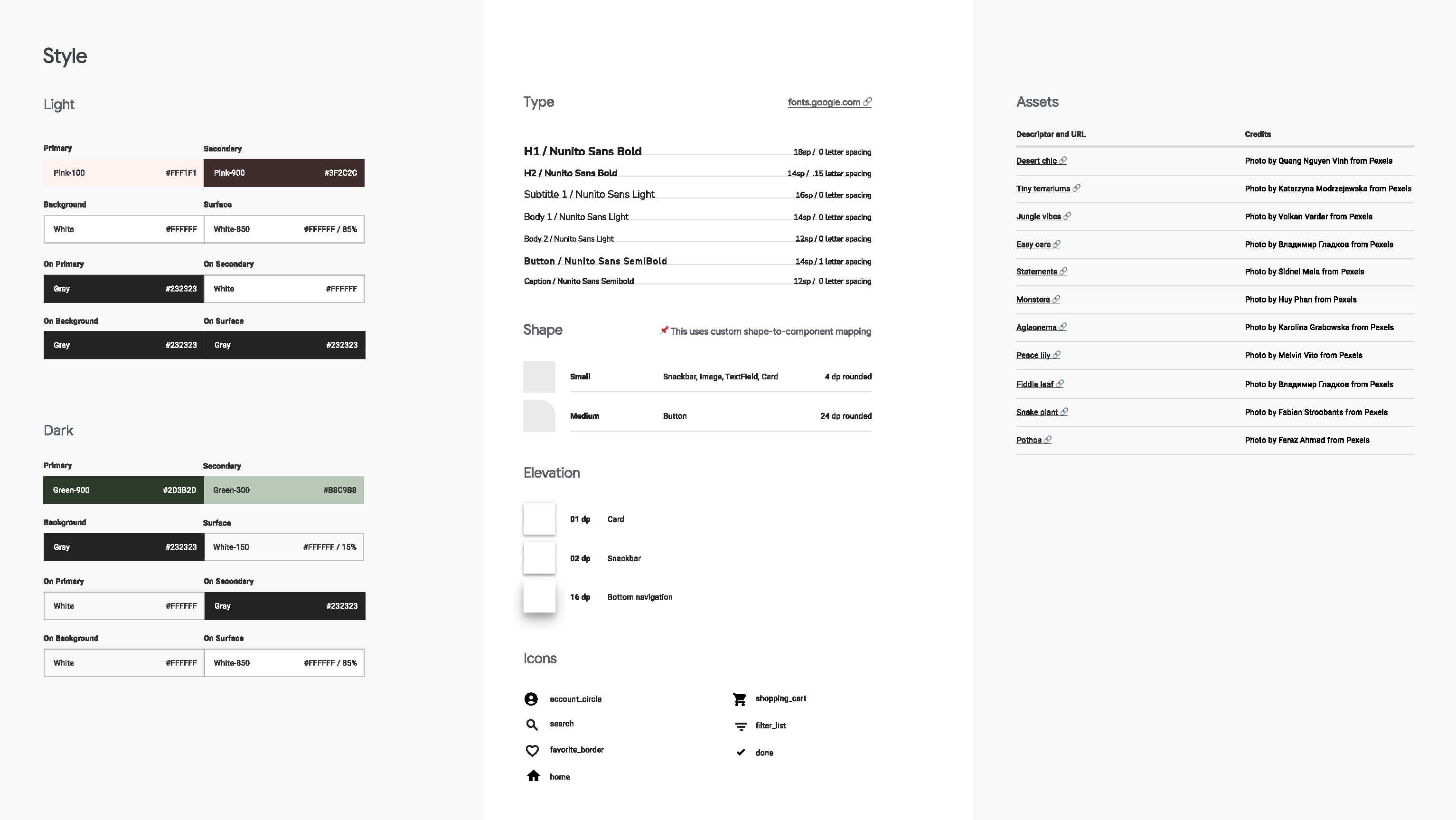
设计风格
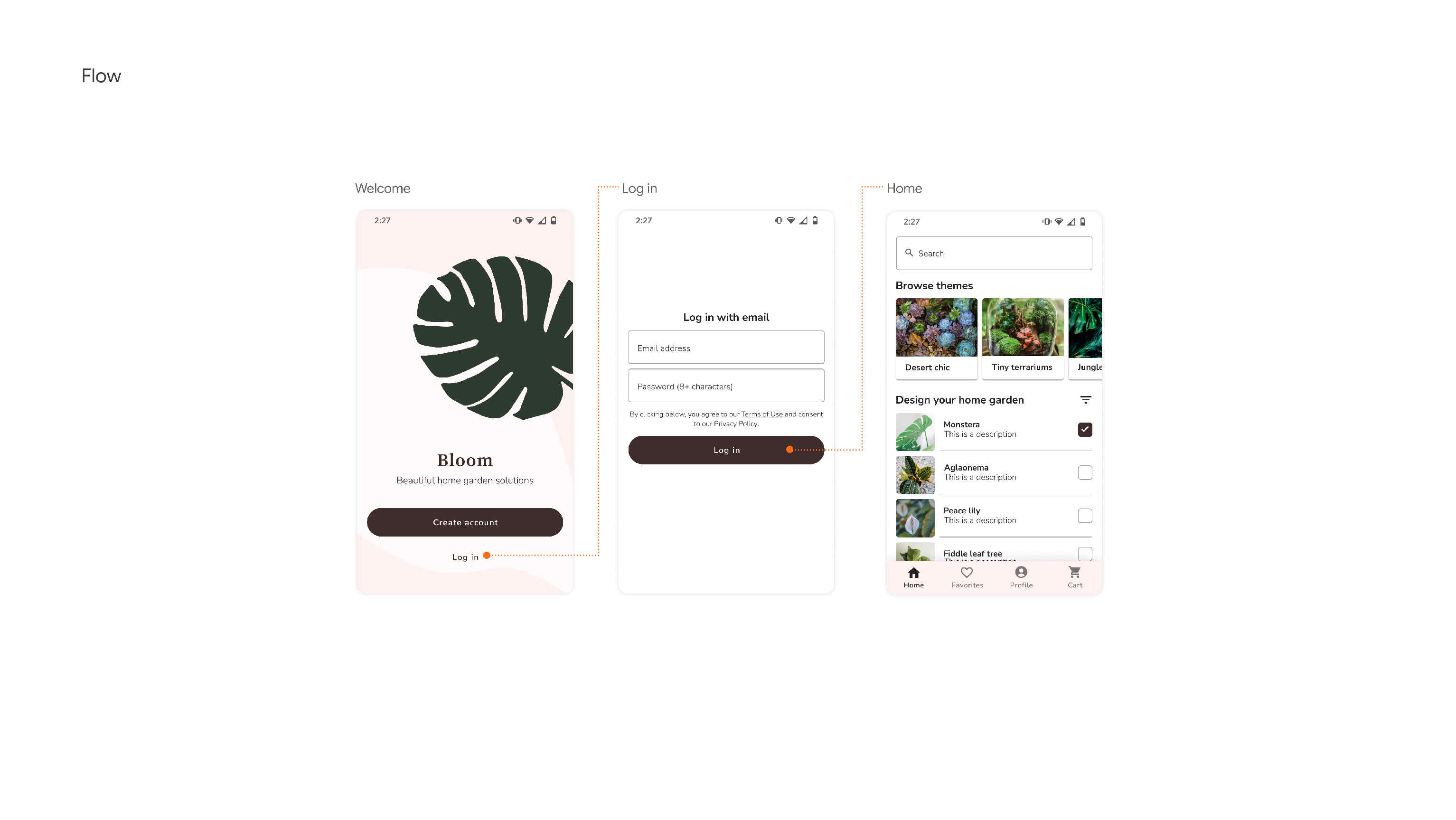
界面导航
界面标注
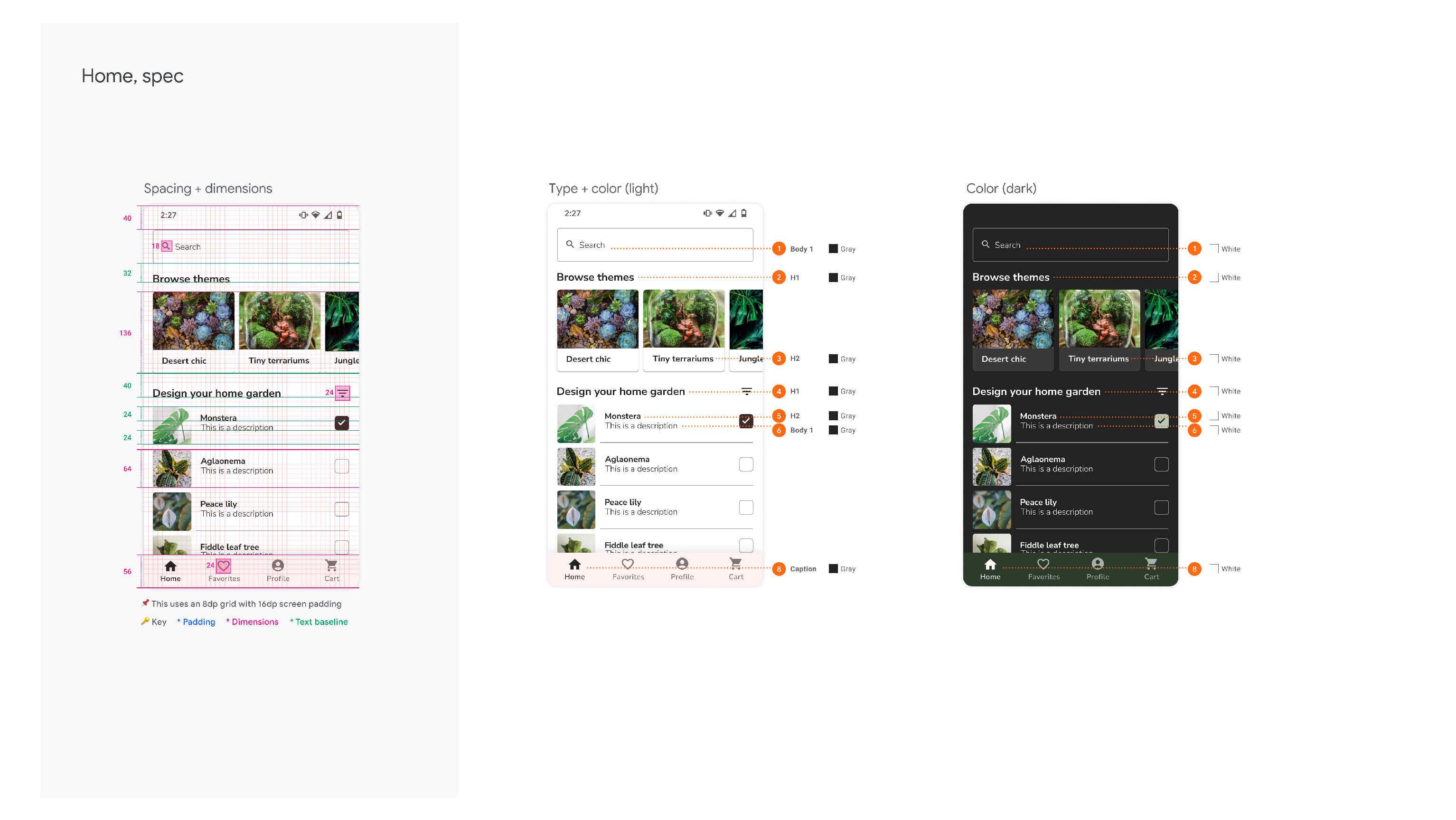
完整设计图:https://github.com/android/android-dev-challenge-compose/blob/assets/Bloom.zip
知识点
- 主题:自定义主题
- 列表:LazyColumn、LazyRow
- 文字:文本输入框、风格化文本、自定义字体
- 导航:基础使用、底部导航栏集成
关键实现
定义主题
界面布局中使用主题元素配置color、shape、typography等内容。localImages、localElevations为自定义内容。
1@Composable
2fun BloomTheme(darkTheme: Boolean = isSystemInDarkTheme(), content: @Composable() () -> Unit) {
3    val colors = if (darkTheme) {
4        DarkColorPalette
5    } else {
6        LightColorPalette
7    }
8    val images = if (darkTheme) DarkImages else LightImages
9    val elevations = AllElevations
10
11    CompositionLocalProvider(
12        localImages provides images,
13        localElevations provides elevations
14    ) {
15        MaterialTheme(
16            colors = colors,
17            typography = typography,
18            shapes = shapes,
19            content = content
20        )
21    }
22}
23
24object BloomTheme {
25    val colors: Colors
26        @Composable
27        get() = MaterialTheme.colors
28
29    val typography: Typography
30        @Composable
31        get() = MaterialTheme.typography
32
33    val shapes: Shapes
34        @Composable
35        get() = MaterialTheme.shapes
36
37    val images: Images
38        @Composable
39        get() = localImages.current
40
41    val elevations: Elevations
42        @Composable
43        get() = localElevations.current
44}
1@Immutable
2data class Images(
3    @DrawableRes val welcomeBackground: Int,
4    @DrawableRes val welcomeIllos: Int,
5    @DrawableRes val welcomeLogo: Int
6)
7
8internal val localImages = staticCompositionLocalOf<Images> {
9    error("No LocalImages specified")
10}
风格化文本
1val termsString = buildTermsString(
2    stringResource(R.string.login_terms),
3    listOf(
4        stringResource(R.string.terms),
5        stringResource(R.string.privancy)
6    )
7)
8Text(
9    text = termsString,
10    textAlign = TextAlign.Center,
11    modifier = Modifier.paddingFromBaseline(
12        top = 24.dp,
13        bottom = 16.dp
14    )
15)
1fun buildTermsString(source: String, segments: List<String>) = buildAnnotatedString {
2    append(source)
3    for (segment in segments) {
4        val startIndex = source.indexOf(segment)
5        val endIndex = startIndex + segment.length
6        addStyle(
7            style = SpanStyle(textDecoration = TextDecoration.Underline),
8            start = startIndex,
9            end = endIndex
10        )
11    }
12}
带边框密码文本输入
1TextField(
2    modifier = Modifier
3        .height(56.dp)
4        .fillMaxWidth()
5        .border(  // 设置边框
6            width = 1.dp,
7            color = Color(0xFF9E9E9E),
8            shape = BloomTheme.shapes.small
9        ),
10    value = password,
11    onValueChange = { password = it },
12    singleLine = true,
13    placeholder = {
14        Text(
15            text = stringResource(R.string.password_hint),
16            style = BloomTheme.typography.body1,
17        )
18    },
19    textStyle = BloomTheme.typography.body1,
20    colors = TextFieldDefaults.textFieldColors(
21        backgroundColor = Color.Transparent,
22        textColor = BloomTheme.colors.onPrimary
23    ),
24    visualTransformation = PasswordVisualTransformation(), // 密码形式
25    keyboardOptions = KeyboardOptions(keyboardType = KeyboardType.Password) // 密码安全键盘
26)
底部导航栏
1sealed class Screen(
2    val route: String,
3    @StringRes val resourceId: Int,
4    val icon: ImageVector
5) {
6    object Home : Screen("home", R.string.home, Icons.Filled.Home)
7    object Favorites : Screen("favorite", R.string.favorites, Icons.Filled.FavoriteBorder)
8    object Profile : Screen("profile", R.string.profile, Icons.Filled.AccountCircle)
9    object Cart : Screen("cart", R.string.cart, Icons.Filled.ShoppingCart)
10}
11
12val items = listOf(
13    Screen.Home,
14    Screen.Favorites,
15    Screen.Profile,
16    Screen.Cart
17)
18
19@Composable
20fun Main() {
21    val navController = rememberNavController()
22
23    Scaffold(
24        bottomBar = {
25            BottomNavigation(
26                modifier = Modifier
27                    .navigationBarsPadding()
28                    .height(56.dp),
29                backgroundColor = MaterialTheme.colors.primary,
30                contentColor = MaterialTheme.colors.onPrimary,
31                elevation = BloomTheme.elevations.bottomNavigation
32            ) {
33                val navBackStackEntry by navController.currentBackStackEntryAsState()
34                val currentRoute = navBackStackEntry?.arguments?.getString(KEY_ROUTE)
35                items.forEach { screen ->
36                    BottomNavigationItem(
37                        selected = currentRoute == screen.route,
38                        onClick = {
39                            navController.navigate(screen.route) {
40                                popUpTo = navController.graph.startDestination
41                                launchSingleTop = true
42                            }
43                        },
44                        icon = {
45                            Icon(
46                                imageVector = screen.icon,
47                                contentDescription = stringResource(id = screen.resourceId),
48                                modifier = Modifier.size(24.dp, 24.dp),
49                                tint = MaterialTheme.colors.onPrimary
50                            )
51                        },
52                        label = {
53                            Text(
54                                stringResource(id = screen.resourceId),
55                                style = MaterialTheme.typography.caption
56                            )
57                        }
58                    )
59                }
60            }
61        }
62    ) {
63        NavHost(navController, startDestination = Screen.Home.route) {
64            composable(Screen.Home.route) { Home() }
65            composable(Screen.Favorites.route) { Favorites() }
66            composable(Screen.Profile.route) { Profile() }
67            composable(Screen.Cart.route) { Cart() }
68        }
69    }
70}
效果
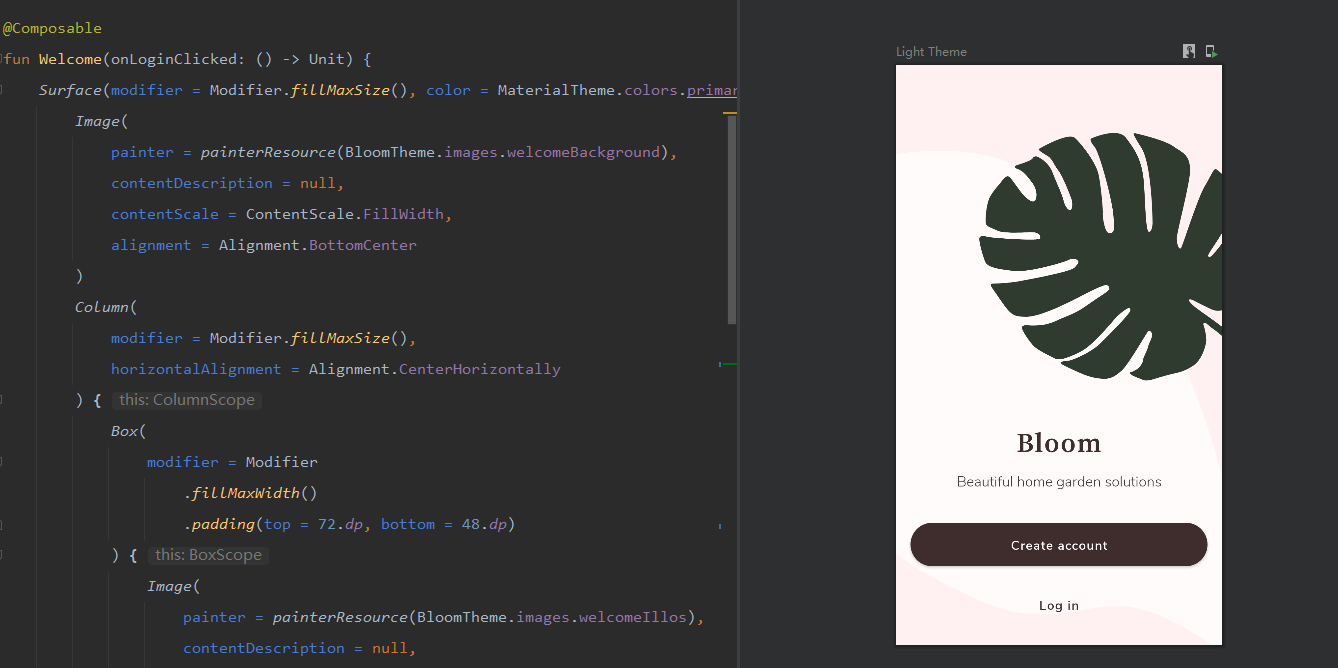
Welcome
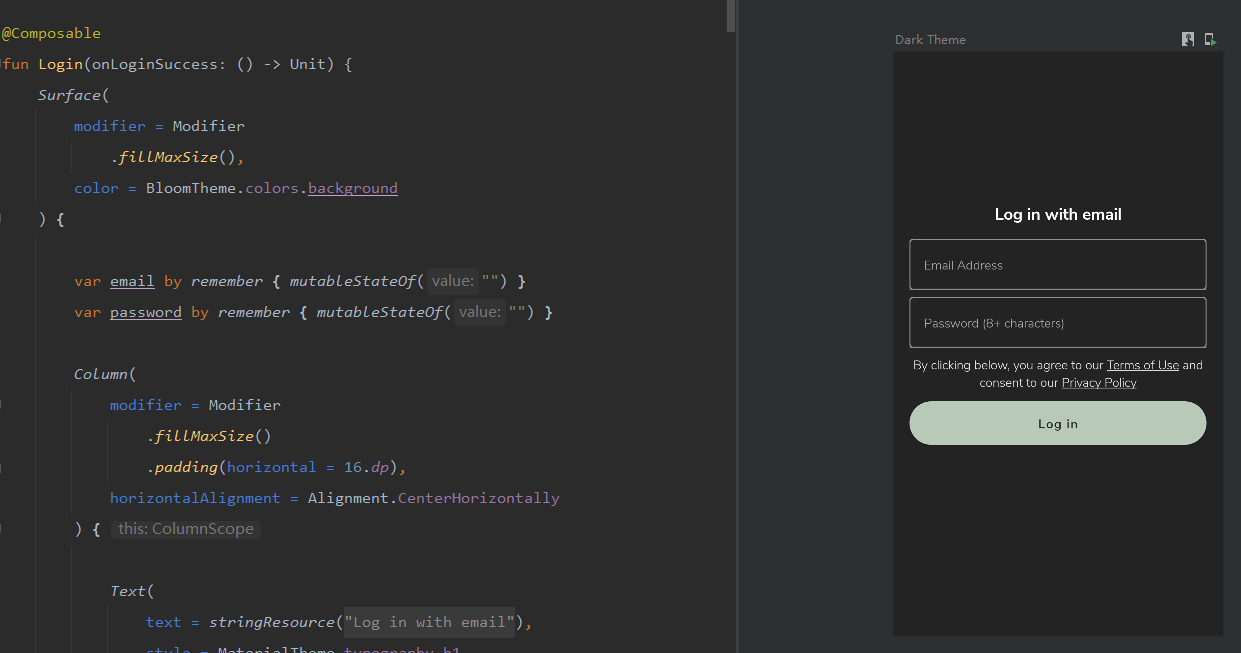
Login
Home