
解析钻Gerber274X格式前首先得了解此格式,这样才能更好的解析呀。
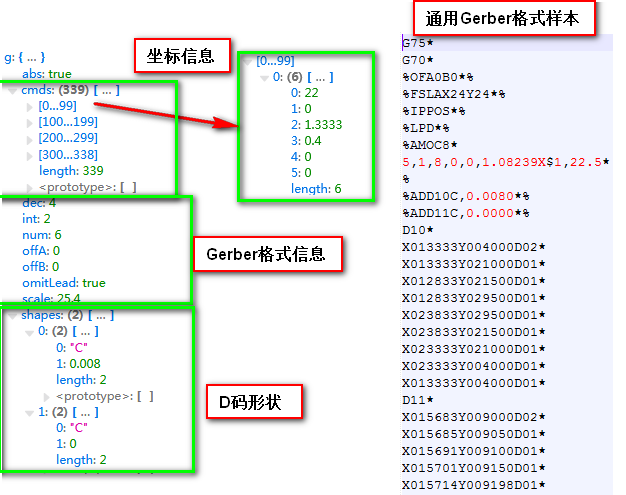
一个Gerber274X里面包含的基本信息如下:
1.单位:公式mm,英制inch
2.省零方式:前省零,后省零
3.坐标方式:绝对坐标,相对坐标
4.坐标位数:3:5,2:6
5.Gerber D码形状
6.Gerber坐标信息
更多Gerber 274X格式详见(1M带宽,需等20秒)
http://pcbren.cn/ShareFiles/Gerber274x.pdf
一.数据结构信息
1、数据块(Data Blocks)
RS-274X 文件是由数据块组成的,每个数据块都是以(*) 结尾,每个数据块都包括了一个或多个参数,如示例
X0Y0D02*
X10000Y0DO1*为了增强可读性,建议相关的数据块在一行(因为一个数据块可以在多行),
2、数据类型
数据类型主要包括以下几种类型,坐标数据(Coordinate Data),功能指令(Function Codes) ,参数(Parameters)
3、坐标数据
坐标数据主要是定义在平面的中点数据,在RS274D的术语中称为地址。
坐标数据可能是:
1)X和Y坐标定义的点,
2)相对于X,Y方向的便移量数据,称为I,J数据
FS(Format Specification) 格式定义指示了数字如何被解释的。
坐标系采用右手坐标系。
坐标是模态(modal) 的,如果一个X被忽略,则X将保留上一次的X坐标值,如果在当前层的第一个X被忽略,因为没有上一次的X的坐标值,那么X坐标将被视为零。类似地,Y坐标也是这样处理的。
偏移量不是模态上的,如果I或J被忽略,则缺省值为零。
注意:
GERBER的读者有时候会错误地处理缺省值零。为了清晰和鲁棒性,推荐总是显式地指定第一个坐标(即便就是零,也显式指定),这样就不用考虑缺省的零。
示例:
1: X100Y200* 点 (+100, +200)
2: Y-300* 点 (+100, -300)
3: I200J100* 平移 (+200, +100)
4: X300Y200I150J50* 点(+300, +200) 且 平移(+150, +50)
5: X+100I-50* 点 (+100, +200) 且 平移 (-50, 0)
4、功能指令(Function Codes):
功能指令描述的是如何解析相关联的坐标数据。如,画一条线或画一个圆。(通常,但不是所有,这些代码是延续已经过时的RS-274D的格式,它们被称为字(words)或代码(codes))。
如
G74*
每个指令都会影响到其后的数据块,直到遇到另外一个相同类型的代码或生成新层时结束。我们称这种持续性的活动为模态(modal)。例如G02指示的是顺时针圆弧插补(CCI, clockwise circular interpolation)。在遇到另外一个插补指令或生成新层之前,该指令后的所有坐标数据都被解释为顺时针圆弧插补。指令的细节描述后序再讨论。
5、参数 (Parameters)
参数定义了整个图像或单层的各种特征。它们被用于解释其他的数据类型,(通常,这些参数被称为Mass 参数)。控制整个图像的参数通常会放在文件的开始处。产生新层的参数被放置在文件恰当的位置。参数由两个字符加一个或多个紧随其后的可选修改符组成。参数的限定符号为“%”.每个包含在数据块内的参数必须以“*”结束。并且参数限定符必须立即跟在块结束符后面,不允许插入空格。
例如:
%FSLAX23Y23*%
参数必须是在成对的参数限定符内,限定符内可以放一个或多个参数,两个限定符之间最大的字符数为4096个。
例如:
%SFA1.0B1.0*ASAXBY*%
为了提高可读性,两个参数间允许换行,如:
%SFA1.0B1.0*
ASAXBY*%
当然,为了简化和可读性,推荐每行是只设置一个参数。与参数联合的所有数值都使用显式的小数点,如果不使用小数点,数值应当认为是整数。
参数的语法为:
%参数指令<必选修饰符>[可选修饰符]%
语法
说明
参数指令 (parameter code)
两个字符的指令,如AD,AM,FS等
必选修饰符(required modifiers)
必须是完整的定义
可选修饰符(optional modifiers)
依赖必选修饰符的定义
此数据结构仅用于测试用JS解析Gerber格式绘出图形, 数据结构构建与解析方式不是很完美.后续需改进。
二.JS代码实现:
1function loadGerber274X(text) {
2    text = text.replace(/\s+/g, '');
3    var sections = text.split('%');
4    var g = {offA: 0, offB: 0, shapes: [], cmds: [], scale: 1}, shape = 0, macros = {}, mode = 1, inverted = false, prevX = 0, prevY = 0;
5    function numVal(x) {
6        if(x[0] == '+')
7            return numVal(x.slice(1));
8        if(x[0] == '-')
9            return -numVal(x.slice(1));
10        if(x == '0')
11            return 0;
12        if(g.omitLead)
13            while(x.length < g.num)
14                x = '0'+x;
15        else
16            while(x.length < g.num)
17                x += '0';
18        return parseFloat(x.slice(0, g.int)+'.'+x.slice(g.int), 10);
19    }
20
21    for(var i = 0; i < sections.length; i++) {
22        if(!sections[i].length)
23            continue;
24        sections[i][sections[i].length-1] == '*' && (sections[i] = sections[i].slice(0, -1));
25        sections[i] = sections[i].split('*');
26        for(var j = 0; j < sections[i].length; j++) {
27            var d = sections[i][j];
28            if(i%2) { // Parameters.
29                if(d[0] == 'F' && d[1] == 'S') {// Format Specification.
30                    var r = /^([LT]?)([AI])X(\d)(\d)Y(\d)(\d)$/.exec(d.slice(2)); // assert(r);
31                    g.omitLead = !r[1] || r[1] == 'L';
32                    g.abs = r[2] == 'A';
33                    if(!g.abs) throw new Error('Need absolute values');
34                    g.int = +r[3], g.dec = +r[4], g.num = g.int+g.dec;
35                } else if(d[0] == 'O' && d[1] == 'F') {// Offset.
36                    var r = /^(?:A([-+\d.]+)|)(?:B([-+\d.]+)|)$/.exec(d.slice(2)); // assert(r);
37                    g.offA = parseInt(r[1], 10), g.offB = parseInt(r[2], 10);
38                } else if(d == 'IPNEG') // Image Polarity.
39                    throw new Error('Negative image polarity');
40                else if(d[0] == 'L' && d[1] == 'P') { // Layer Polarity.
41                    if(inverted && d[2] == 'D') // Switch to dark.
42                        g.cmds.push([16<<2, inverted = false]);
43                    else if(!inverted && d[2] == 'C') // Switch to clear.
44                        g.cmds.push([16<<2, inverted = true]);
45                } else if(d[0] == 'A' && d[1] == 'M') { // Aperture Macro.
46                    var macro = [];
47                    for(j++; j < sections[i].length; j++)
48                        macro.push(sections[i][j]/*.split(',')*/);
49                    macros[d.slice(2)] = macro;
50                } else if(d[0] == 'A' && d[1] == 'D' && d[2] == 'D') { // Aperture Definition.
51                    var r = /^(\d+)([^,]+)(?:,(.+)|)$/.exec(d.slice(3)); // assert(r);
52                    var j = r[1]-10, args = [];
53                    if(r[3])
54                        args = r[3].split('X');
55                    if(macros[r[2]]) {
56                        function applyArgs(m) {
57                            m = m.replace(/\$(\d+)/g, function(s, n) {
58                                return +args[n-1] || 0;
59                            }).toLowerCase(), repl = true;
60                            while(repl == true)
61                                repl = false, m = m.replace(/([\d.]+)x([\d.]+)/g, function(s, a, b) {return repl = true, a*b});
62                            repl = true;
63                            while(repl == true)
64                                repl = false, m = m.replace(/([\d.]+)\/([\d.]+)/g, function(s, a, b) {return repl = true, a/b});
65                            repl = true;
66                            while(repl == true)
67                                repl = false, m = m.replace(/([\d.]+)\+([\d.]+)/g, function(s, a, b) {return repl = true, a+b});
68                            repl = true;
69                            while(repl == true)
70                                repl = false, m = m.replace(/([\d.]+)-([\d.]+)/g, function(s, a, b) {return repl = true, a-b});
71                            return m;
72                        }
73                        var m1 = macros[r[2]], m2 = [];
74                        for(var k = 0; k < m1.length; k++) {
75                            var eq = /^\$(\d+)=(.+)$/.exec(m1[k]);
76                            if(eq)
77                                args[eq[1]-1] = +applyArgs(eq[2]);
78                            else
79                                m2.push(applyArgs(m1[k]).split(',').map(function(x) {return +x}));
80                        }
81                        g.shapes[j] = ['M', m2];
82
83                    } else
84                        g.shapes[j] = [r[2]].concat(args.map(function(x) {return +x}));
85                    if(j < shape)
86                        shape = j;
87                } else if(d == 'MOIN') // Specify Inches.
88                    g.scale = 25.4;
89                else if(d == 'MOMM') // Specify MMs.
90                    g.scale = 1;
91                else
92                    console.log(d);
93            } else { // Function codes.
94                if(d[0] == 'G' && d[1] == '0' && d[2] == '4' || d[0] == 'M')
95                    continue;
96                if(d[0] == 'G' && d[1] == '5' && d[2] == '4')
97                    d = d.slice(3);
98                if(d == 'G70') { // Specify Inches.
99                    g.scale = 25.4;
100                    continue;
101                }
102                if(d == 'G74') { // Set Single quadrant mode.
103                    mode &= ~4;
104                    continue;
105                }
106                if(d == 'G75') { // Set Multi quadrant mode.
107                    mode |= 4;
108                    continue;
109                }
110                if(d == 'G36') { // Start Outline fill.
111                    if(!(mode & 8))
112                        g.cmds.push([8<<2, true]);
113                    mode |= 8;
114                    continue;
115                }
116                if(d == 'G37') { // End Outline fill.
117                    if(mode & 8)
118                        g.cmds.push([8<<2, false]);
119                    mode &= ~8;
120                    continue;
121                }
122                var cmode = 0;
123                if(d[0] == 'G' && d.length > 4) {
124                    var r = /^\d*/.exec(d = d.slice(1)); // assert(r);
125                    mode = (mode & 12) | (cmode = parseInt(r[0], 10));
126                    d = d.slice(r[0].length);
127                }
128                function getNum(offset) {
129                    var r = /^[-+\d]*/.exec(d = d.slice(offset)); // assert(r);
130                    d = d.slice(r[0].length);
131                    return numVal(r[0]);
132                }
133                var x = prevX, y = prevY, oi = 0, oj = 0, hasX = false, hasY = false;
134                if(d[0] == 'X')
135                    x = getNum(1), hasX = true;
136                if(d[0] == 'Y')
137                    y = getNum(1), hasY = true;
138                if(d[0] == 'I')
139                    oi = getNum(1), (!(mode&2) && (x += oi, hasX = true));
140                if(d[0] == 'J')
141                    oj = getNum(1), (!(mode&2) && (y += oj, hasY = true));
142                if(d[0] == 'D')  {// Draw.
143                    if(d[1] == '0')
144                        g.cmds.push([(mode<<2) | d[2], shape, x, y, oi, oj]);
145                    else
146                        shape = d.slice(1)-10;
147                } else if(hasX && (x != prevX) || hasY && (y != prevY))
148                    g.cmds.push([(mode<<2) | 1, shape, x, y, oi, oj]);
149                else
150                    console.log(d);
151                prevX = x, prevY = y;
152            }
153        }
154    }
155    return g;
156};
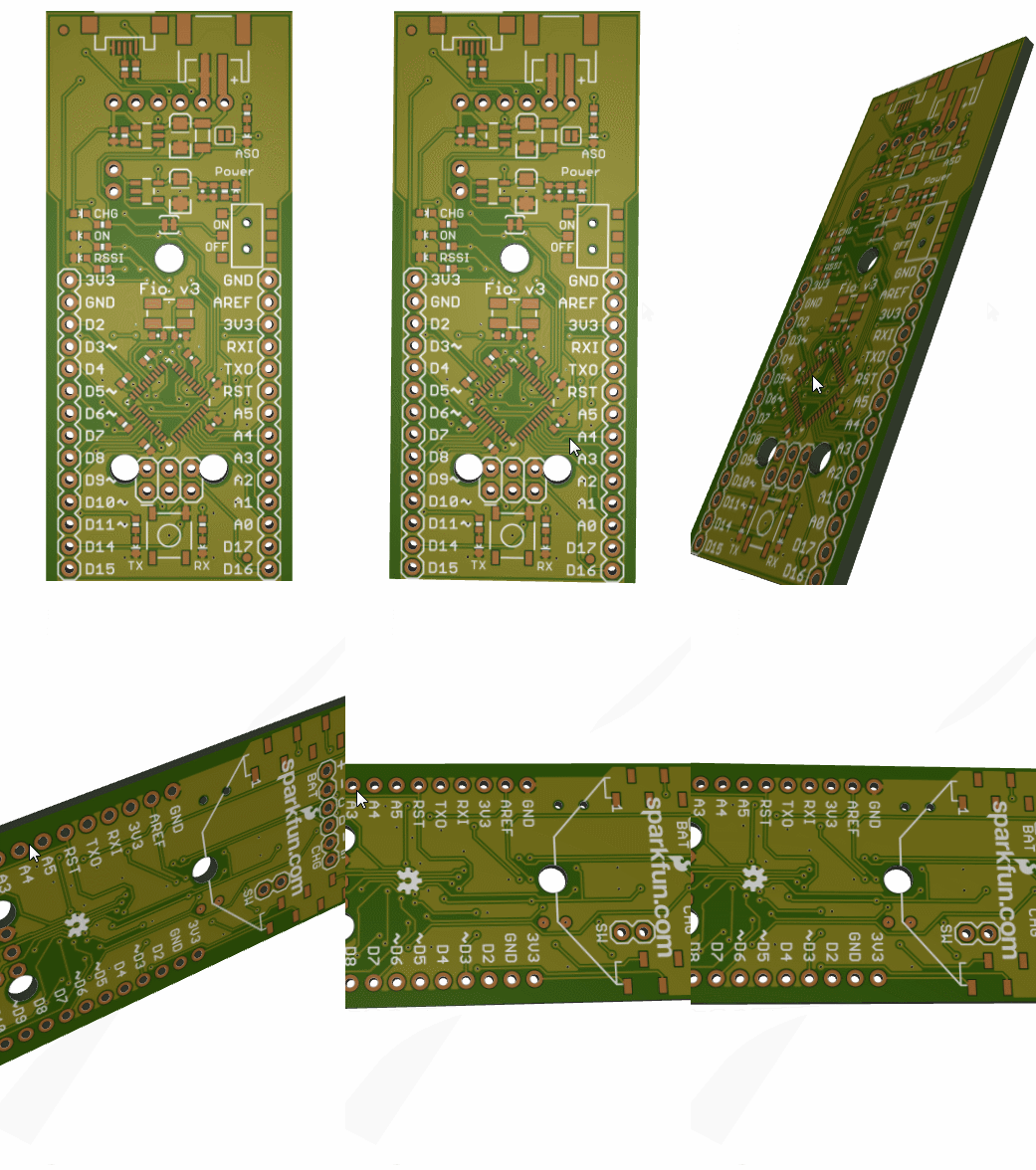
三.Gerber274X解析绘图Web效果图
JS解析展示,无交互功能,虽然是在前端,但最佳作法解析动作放在后端,后端解析后的数据或图像传送到前端
部份Gerber274X解析说明引用了:
https://www.cnblogs.com/begincsdn/archive/2012/07/07/2580279.html