
点击上方“AI算法与图像处理”,选择加"星标"或“置顶”
重磅干货,第一时间送达
来源:OpenCV学堂
==========================================================================================================
前一阵子YOLOv4发布了,后面就是YOLOv5,估计再过几天就要YOLOv10086了,这个时代技术进步太魔幻,改几个参数就可以继续升级版本。2020.718 OpenCV4.4发布了,支持YOLOv4推理,于是我立刻测试了一波。
模型下载
YOLOv4的相关模型合集在这里
https://github.com/AlexeyAB/darknet/wiki/YOLOv4-model-zoo
我使用的是基于COCO预训练模型:
YOLOv4-Leaky
OpenCV4.4 DNN
OpenCV4.4 支持YOLOv4,这个是它的官方release里面说的,其实我早就发现了YOLOv4可以通过OpenCV4.2直接跑,怎么OpenCV4.4才官宣。也许不发布新版本不好官宣,只有发布了新版本才可以顺便说一下。此外OpenCV4.4 DNN还有很多新添加的演示程序,支持了深度学习的光流、支持tensorflow object detection API的EfficientDet对象检测模型,但是前提是tensorflow2.x才可以。多了一个tf_text_graph_efficientdet.py文件,用来生成对应的pbtxt文件。
OpenCV4.4 DNN + YOLOv4对象检测演示
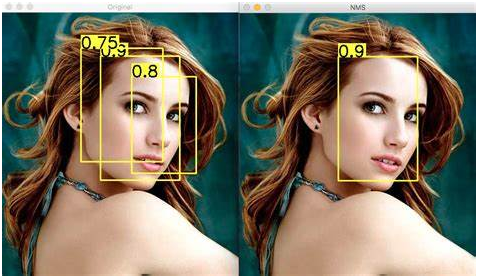
跟YOLOv3一样,YOLOv4也有三个输出层,完成推理之后,需要在进一步通过NMS实现对重叠框的去除,什么是NMS(非最大抑制),看下图就懂啦:
然后说一下模型输入格式与输出格式
输入:NCHW=1x3x416x416
输出:NXC 其中N表示多少个对象,C的前四个数矩形框的[center_x, center_y, width, height],从第五个数值开始分别是每个类别的得分,求的最大得分,如果高于阈值0.5,则认为检测到了对象,每个score对应的index即是COCO类别文本。
根据上面的描述,对一个视频文件实现YOLOv4的对象检测代码如下:
1Net net = readNetFromDarknet(yolov4_config, yolov4_model); 2net.setPreferableBackend(DNN_BACKEND_INFERENCE_ENGINE); 3net.setPreferableTarget(DNN_TARGET_CPU); 4std::vector<String> outNames = net.getUnconnectedOutLayersNames(); 5for (int i = 0; i < outNames.size(); i++) { 6 printf("output layer name : %s\n", outNames[i].c_str()); 7} 8 9vector<string> classNamesVec;10ifstream classNamesFile("D:/projects/opencv_tutorial/data/models/object_detection_classes_yolov3.txt");11if (classNamesFile.is_open())12{13 string className = "";14 while (std::getline(classNamesFile, className))15 classNamesVec.push_back(className);16}1718VideoCapture capture;19capture.open("D:/images/video/f35_02.mp4");20Mat frame;21// 加载图像 22while (true) {23 int64 start = getTickCount();24 capture.read(frame);25 Mat inputBlob = blobFromImage(frame, 1 / 255.F, Size(416, 416), Scalar(), true, false);26 net.setInput(inputBlob);2728 // 检测29 std::vector<Mat> outs;30 net.forward(outs, outNames);3132 vector<Rect> boxes;33 vector<int> classIds;34 vector<float> confidences;35 for (size_t i = 0; i<outs.size(); ++i)36 {37 // detected objects and C is a number of classes + 4 where the first 438 float* data = (float*)outs[i].data;39 for (int j = 0; j < outs[i].rows; ++j, data += outs[i].cols)40 {41 Mat scores = outs[i].row(j).colRange(5, outs[i].cols);42 Point classIdPoint;43 double confidence;44 minMaxLoc(scores, 0, &confidence, 0, &classIdPoint);45 if (confidence > 0.5)46 {47 int centerX = (int)(data[0] * frame.cols);48 int centerY = (int)(data[1] * frame.rows);49 int width = (int)(data[2] * frame.cols);50 int height = (int)(data[3] * frame.rows);51 int left = centerX - width / 2;52 int top = centerY - height / 2;5354 classIds.push_back(classIdPoint.x);55 confidences.push_back((float)confidence);56 boxes.push_back(Rect(left, top, width, height));57 }58 }59 }6061 vector<int> indices;62 NMSBoxes(boxes, confidences, 0.5, 0.2, indices);63 for (size_t i = 0; i < indices.size(); ++i)64 {65 int idx = indices[i];66 Rect box = boxes[idx];67 String className = classNamesVec[classIds[idx]];68 putText(frame, className.c_str(), box.tl(), FONT_HERSHEY_SIMPLEX, 1.0, Scalar(255, 0, 0), 2, 8);69 rectangle(frame, box, Scalar(0, 0, 255), 2, 8, 0);70 }71 float fps = getTickFrequency() / (getTickCount() - start);72 float time = (getTickCount() - start) / getTickFrequency();73 ostringstream ss;74 ss << "FPS : "<< fps <<" detection time: " << time*1000 << " ms";75 putText(frame, ss.str(), Point(20, 20), 0, 0.5, Scalar(0, 0, 255));76 imshow("YOLOv4-Detections", frame);77 char c = waitKey(1);78 if (c == 27) {79 break;80 }81}82waitKey(0);83return;
代码运行结果如下:
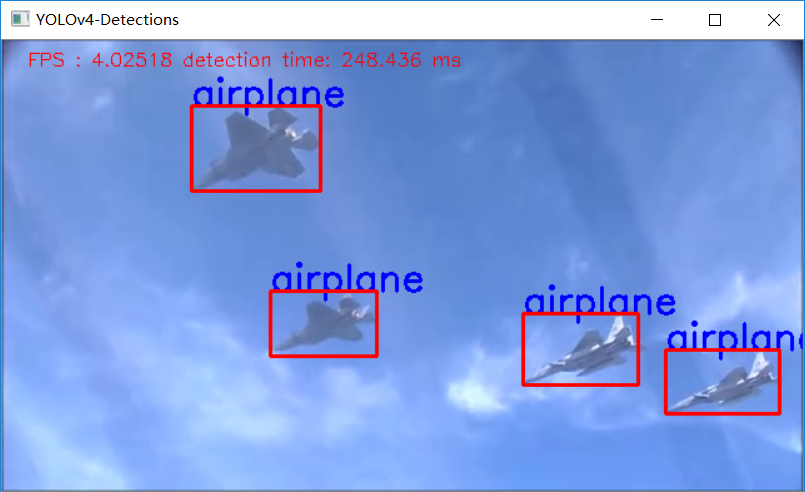
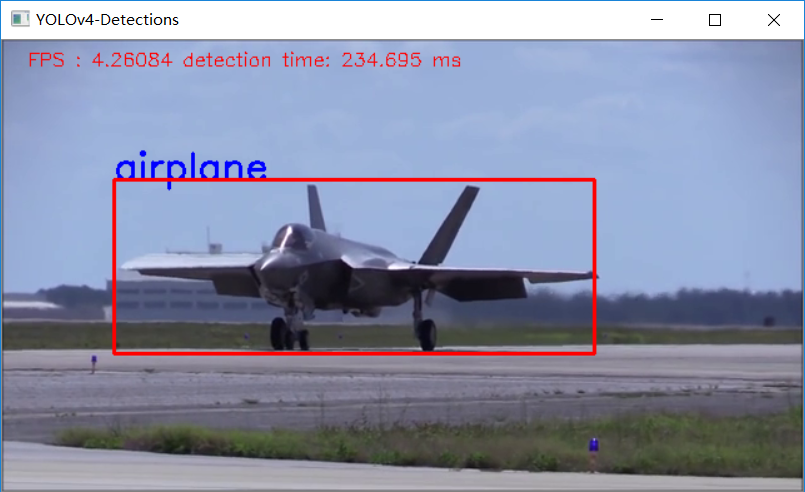
我只能说速度有点感人,我有点怕啦,当然我是在i7CPU上运行的。
1最后的最后求一波分享!YOLOv4 trick相关论文已经下载并放在公众号后台关注“AI算法与图像处理”,回复 “200714”获取
2
3
4
5
6
7
8
9
10
11
12
13
14
15
16
17
18
19
20
21
22
23
24
25
26
27
28
29
30
31
32
33
34
35
36
37
38
39
40
41
42
43
44
45
46
47
48
49
50
51
52
53
54
55
56
57
58
59
60
61
62
63
64
65
66
67
68
69
70
71
72
73
74
75
76
77
78
79
80
81
82
83
84
85
86
87
88
89
90
91
92
93
94
95
96        个人微信
97
98
99
100
101
102
103
104
105
106
107
108
109
110
111
112
113
114        请注明:
115
116
117
118
119
120        地区+学校/企业+研究方向+昵称
121
122
123
124
125
126
127
128
129
130
131
132
133
134
135
136
137
138        如果没有备注不拉群!
139
140
141
142
143
144
145
146
147
148
149
150
151
152
153
154
155
156
157
158
159
160
161
162
163
164
165
166
167
168
169
170
171
172
173
174
175
176
177
178
179
180
181
182
183
184
185
186
本文分享自微信公众号 - AI算法与图像处理(AI_study)。
如有侵权,请联系 support@oschina.cn 删除。
本文参与“OSC源创计划”,欢迎正在阅读的你也加入,一起分享。