
序言:
写这个文章的目的,就是把平时学习的一些东西做个笔记,以防以后忘记和查找方便使用。感兴趣的同学可以通过本文对tomcat中的session机制进行了解。写的不好之处请见谅。
1、session和cookie的基础
由于http协议是无状态的协议,为了能够记住请求的状态,于是引入了Session和Cookie的机制。我们应该有一个很明确的概念,那就是Session是存在于服务器端的,在单体式应用中,他是由tomcat管理的,存在于tomcat的内存中,而Cookie则是存在于客户端,更方便理解的说法,可以说存在于浏览器。Cookie并不常用,至少在企业或者互联网开发中,并没有什么场景需要我们过多的关注Cookie。http协议允许从服务器返回Response时携带一些Cookie,并且同一个域下对Cookie的数量有所限制,之前说过Session的持久化依赖于服务端的策略,而Cookie的持久化则是依赖于本地文件。虽然说Cookie并不常用,但是有一类特殊的Cookie却是我们需要额外关注的,那便是与Session相关的sessionId,他是真正维系客户端和服务端的桥梁。
2、环境搭建
为了研究出tomcat中的JSESSIONID是如何生成的,我们需要搭建一个web测试环境,然后追踪tomcat的源码,一窥究竟。
这里为了方便,我使用SpringBoot来快速搭建一个web环境,开发工具采用的是IDEA,构建工具为Maven。相关配置如下:
父pom配置:
1<groupId>com.my.learn</groupId>
2<artifactId>spring-root</artifactId>
3<version>1.0-SNAPSHOT</version>
4<packaging>pom</packaging>
5
6<name>spring-root</name>
7
8<parent>
9    <groupId>org.springframework.boot</groupId>
10    <artifactId>spring-boot-starter-parent</artifactId>
11    <version>1.5.10.RELEASE</version>
12</parent>
13
14<properties>
15    <project.build.sourceEncoding>UTF-8</project.build.sourceEncoding>
16    <project.reporting.outputEncoding>UTF-8</project.reporting.outputEncoding>
17    <java.version>1.8</java.version>
18</properties>
19<dependencies>
20    <dependency>
21        <groupId>org.projectlombok</groupId>
22        <artifactId>lombok</artifactId>
23        <version>1.16.6</version>
24    </dependency>
25</dependencies>
26<build>
27    <plugins>
28        <plugin>
29            <groupId>org.springframework.boot</groupId>
30            <artifactId>spring-boot-maven-plugin</artifactId>
31        </plugin>
32    </plugins>
33</build>
工程pom配置:
1<artifactId>session-tomcat</artifactId>
2<version>0.0.1-SNAPSHOT</version>
3<packaging>jar</packaging>
4<name>session-tomcat</name>
5  <parent>
6      <groupId>com.my.learn</groupId>
7      <artifactId>spring-root</artifactId>
8      <version>1.0-SNAPSHOT</version>
9  </parent>
10<dependencies>
11	<dependency>
12		<groupId>org.springframework.boot</groupId>
13		<artifactId>spring-boot-starter-web</artifactId>
14	</dependency>
15</dependencies>
添加一个controller负责接受浏览器请求:
1@RestController
2@CommonsLog
3public class CookieController {
4
5    @RequestMapping("/test/cookie")
6    public String cookie(HttpServletRequest request,
7                         HttpServletResponse response,
8                         HttpSession session) {
9
10        Cookie[] cookies = request.getCookies();
11        if(cookies !=null) {
12            Arrays.stream(cookies).forEach((cookie) ->
13                    log.info(cookie.getName() + " : " + cookie.getValue())
14            );
15        }
16
17        return "index";
18    }
19
20    @RequestMapping("/test/cookie1")
21    public String cookie1( HttpServletRequest request) {
22        HttpSession session = request.getSession(false);
23
24        return "index";
25    }
26
27}
3、分析问题追踪源码
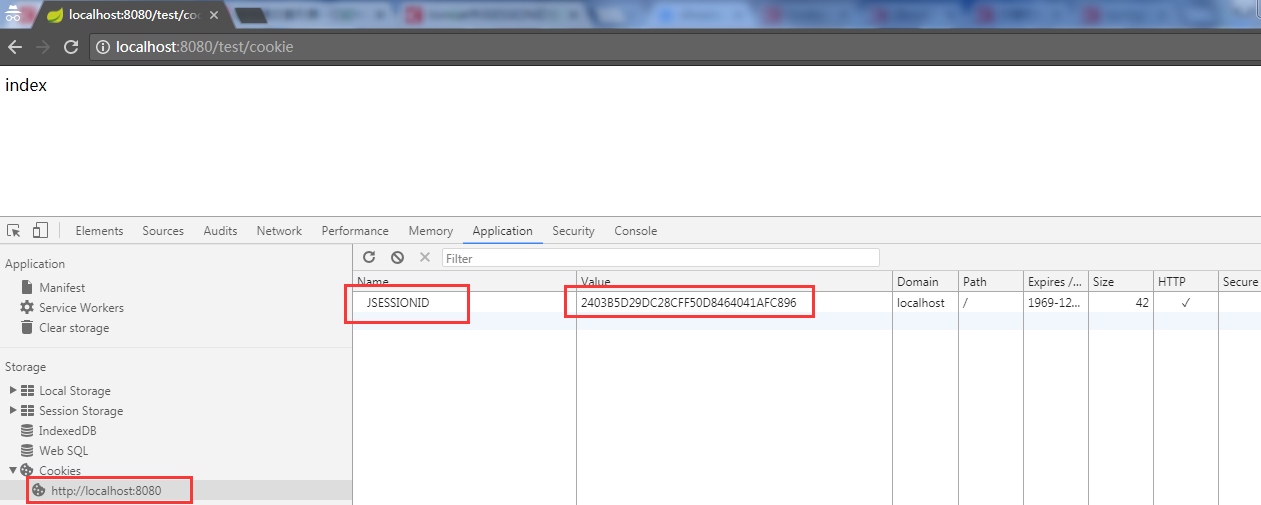
第一步、在chorm浏览器输入地址http://localhost:8080/test/cookie,可以看到如下结果:
第二步:删除第一步中产生的cookie[JESSIONID],访问连接http://localhost:8080/test/cookie1,产生如下结果:
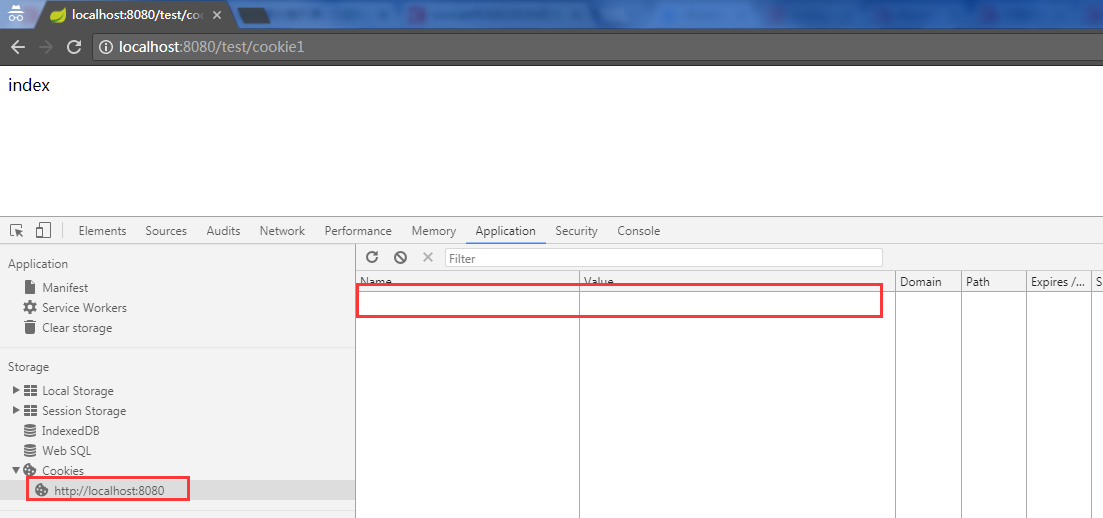
这时候没有产生绑定session的cookie。
是什么原因导致JESSIONID没有生成。
通过结果我们分析,服务器往浏览器中返回cookie信息,一般都是通过HttpServletResponse的addCookie去完成。
我们在/test/cookie请求中添加一段代码,
response.addCookie(new Cookie("key","value"));
在上面打断点跟踪源代码发现,最终添加cookie的代码是在ResponseFacade.addCookie 方法中,类 ResponseFacade 含有org.apache.catalina.connector.Response的实例对象,addCookie方法通过对象response完成调用。
1@Override
2    public void addCookie(Cookie cookie) {
3
4        if (isCommitted()) {
5            return;
6        }
7
8        response.addCookie(cookie);
9
10    }
在response对象又含有org.apache.coyote.Response对象,最终的添加通过 org.apache.coyote.Response对象来完成的。
1 private void addHeader(String name, String value, Charset charset) {
2
3        if (name == null || name.length() == 0 || value == null) {
4            return;
5        }
6
7        if (isCommitted()) {
8            return;
9        }
10
11        // Ignore any call from an included servlet
12        if (included) {
13            return;
14        }
15
16        char cc=name.charAt(0);
17        if (cc=='C' || cc=='c') {
18            if (checkSpecialHeader(name, value))
19            return;
20        }
21
22        getCoyoteResponse().addHeader(name, value, charset);
23    }
我们通过对上面的底层代码大断点,最后发现session中 JESSIONID实在下面的调用过程中创建的。
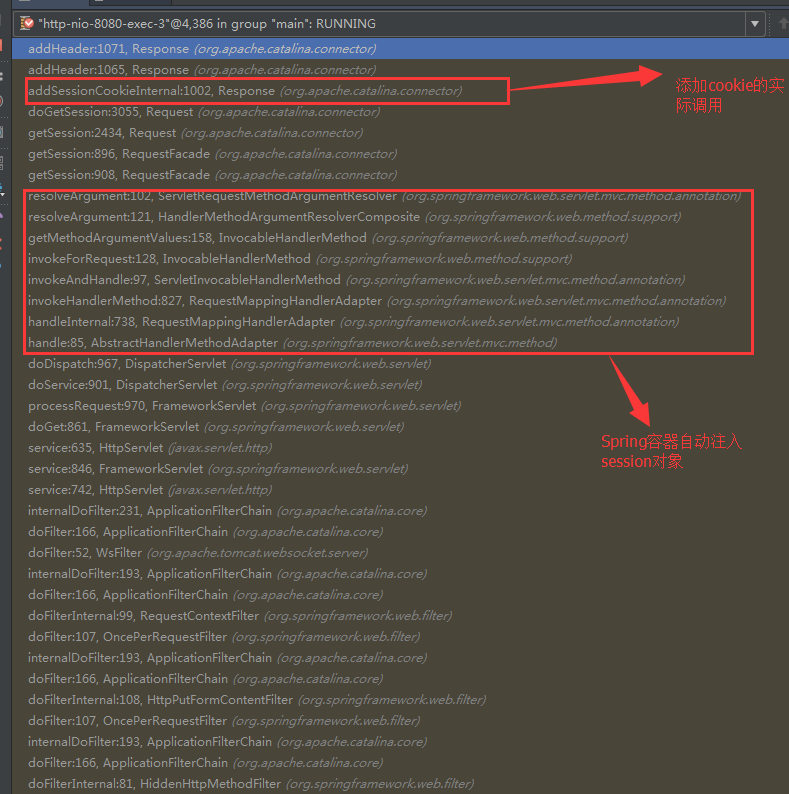
在 org.apache.catalina.connector.Request对象的doGetSession方法中调用的。
1// Create a new session if requested and the response is not committed
2        if (!create) {
3            return (null);
4        }
5        if (response != null
6                && context.getServletContext()
7                        .getEffectiveSessionTrackingModes()
8                        .contains(SessionTrackingMode.COOKIE)
9                && response.getResponse().isCommitted()) {
10            throw new IllegalStateException(
11                    sm.getString("coyoteRequest.sessionCreateCommitted"));
12        }
13
14        // Re-use session IDs provided by the client in very limited
15        // circumstances.
16        String sessionId = getRequestedSessionId();
17        if (requestedSessionSSL) {
18            // If the session ID has been obtained from the SSL handshake then
19            // use it.
20        } else if (("/".equals(context.getSessionCookiePath())
21                && isRequestedSessionIdFromCookie())) {
22            /* This is the common(ish) use case: using the same session ID with
23             * multiple web applications on the same host. Typically this is
24             * used by Portlet implementations. It only works if sessions are
25             * tracked via cookies. The cookie must have a path of "/" else it
26             * won't be provided for requests to all web applications.
27             *
28             * Any session ID provided by the client should be for a session
29             * that already exists somewhere on the host. Check if the context
30             * is configured for this to be confirmed.
31             */
32            if (context.getValidateClientProvidedNewSessionId()) {
33                boolean found = false;
34                for (Container container : getHost().findChildren()) {
35                    Manager m = ((Context) container).getManager();
36                    if (m != null) {
37                        try {
38                            if (m.findSession(sessionId) != null) {
39                                found = true;
40                                break;
41                            }
42                        } catch (IOException e) {
43                            // Ignore. Problems with this manager will be
44                            // handled elsewhere.
45                        }
46                    }
47                }
48                if (!found) {
49                    sessionId = null;
50                }
51            }
52        } else {
53            sessionId = null;
54        }
55        session = manager.createSession(sessionId);
56
57        // Creating a new session cookie based on that session
58        if (session != null
59                && context.getServletContext()
60                        .getEffectiveSessionTrackingModes()
61                        .contains(SessionTrackingMode.COOKIE)) {
62            Cookie cookie =
63                ApplicationSessionCookieConfig.createSessionCookie(
64                        context, session.getIdInternal(), isSecure());
65
66            response.addSessionCookieInternal(cookie);
67        }
通过代码我发现是由,Request中getSession(boolean create)发起的。当我们的create设置为true的时候,当session被new出来之后,会在当前的Resposne中自动添加 JESSIONID的这个cookie。假如获取session这是为false,或者不从容器中获取session,就不添加JESSIONID这个cookie。
我们在controller的方法上添加断点,可以看到response对象的实际封装结构。如下
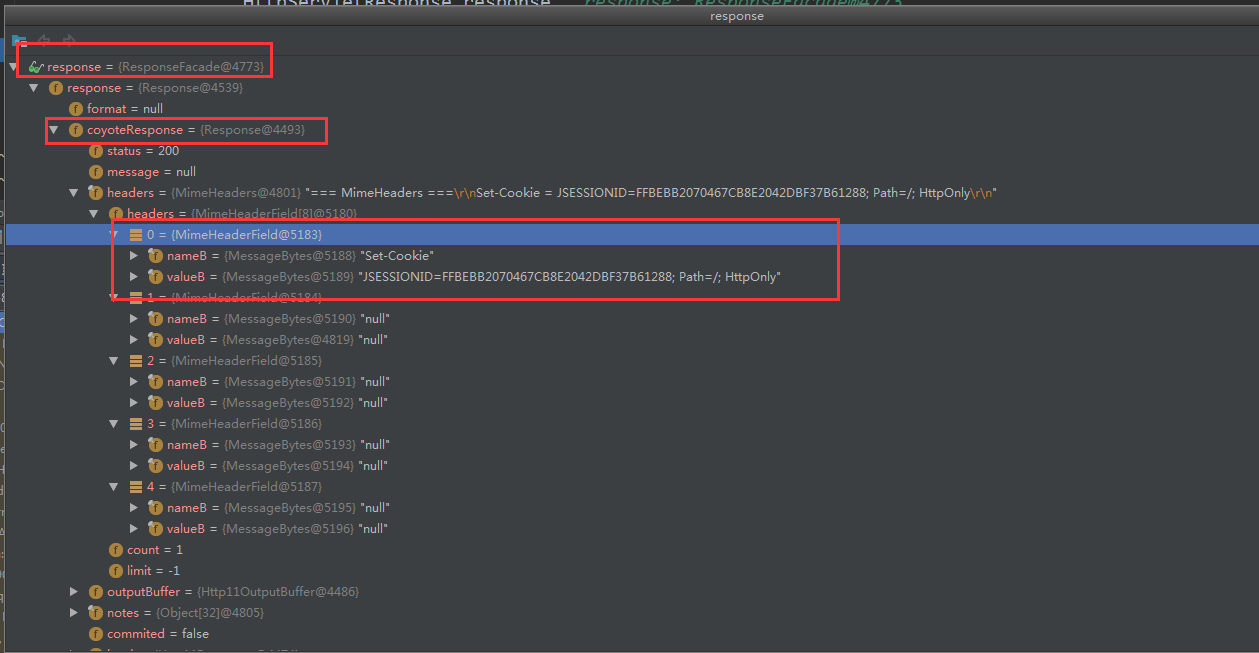
这时候传递给我们的response对象里面已经包含了JESSIONID的cookie信息了。
4、结论
对于tomcat容器来说,当服务端的session被创建时,Response中自动添加了一个Cookie:JSESSIONID:xxxx,再后续的请求中,浏览器也是自动的带上了这个Cookie,服务端根据Cookie中的JSESSIONID取到了对应的session。这验证了一开始的说法,客户端服务端是通过JSESSIONID进行交互的,并且,添加和携带key为JSESSIONID的Cookie都是tomcat和浏览器自动帮助我们完成的,这很关键。
本文转自 https://blog.csdn.net/zlbook/article/details/79409784,如有侵权,请联系删除。