
大家好,我是皮皮。
扫雷大家都玩过,今天我们就是用JavaScript来打造扫雷游戏。废话不多说,直接看下效果;
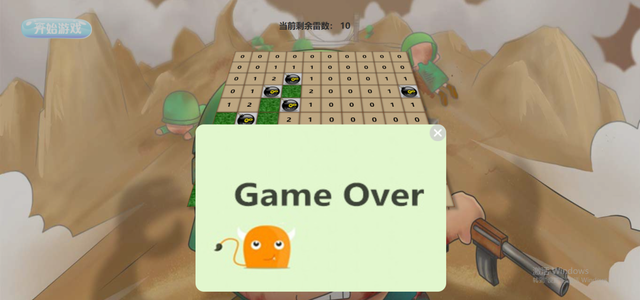
上图是失败后的结果。
一、思路分析
我们新建一个首页,在首页放置一个点击开始游戏的按钮,动态生成100个小格,即100div;然后通过点击div进行扫雷操作,然后扫雷成功或者失败显示对应的结果;
二、静态页面搭建
2.1 结构层
1<body>
2    <div class="wrapper">
3        <div class="btn" id="btn"></div>  <!-- 开始游戏按钮-->
4        <div class="box" id="box"></div>  <!-- 存放小雷的div-->
5        <div class="flagBox" id="flagBox"> <!-- 游戏结束才显示的当前雷数的div-->
6            当前剩余雷数:
7            <span id="score">10</span>
8        </div>
9        <div class="alertBox" id="alertBox">  <!-- Game over弹出的框(窗口)-->
10            <div class="alertImg" id="alertImg">
11                <div class="close" id="close"></div>
12            </div>
13        </div>
14    </div>
15</body>
16
2.2 样式层
清楚默认边距
1*{
2    margin:0;
3    padding:0;
4}
5
页面最大div
1.wrapper {
2    width:100%;
3    height:1000px;
4    position: fixed;
5    top:0;
6    left:0;
7    background-image: url('img/bg.jpg');
8    background-size: 100% 100%;
9}
10
效果如下:
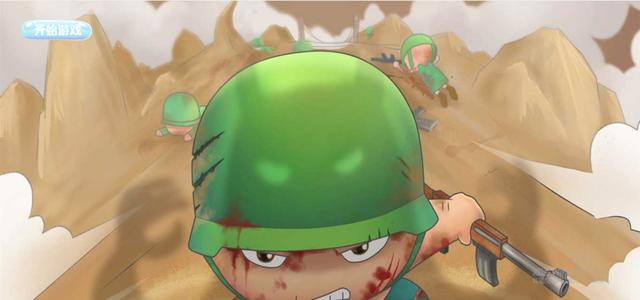
开始游戏按钮
1.btn{
2    height:140px;
3    width:170px;
4    position:absolute;
5    left:50px;
6    background-image: url('img/startGame.png');
7    background-size: 100% 100%;
8    cursor: pointer;
9}
10
储存雷的大div
1.box{
2    height:500px;
3    width:500px;
4    transform: perspective(800px) rotateX(45deg);
5    margin:20px auto;
6    border-top:1px solid #B25F27;
7    border-left:1px solid #B25F27;
8    box-shadow:  5px 5px 5px rgba(0,0,0,0.3);
9    display:none; /* 先设置为none,开始游戏后显示block */
10}
11
每一个方块的小div(一共100个)
1.block{
2    width:49px;
3    height:49px;
4    border-right:1px solid #B25F27;
5    border-bottom:1px solid #B25F27;
6    box-shadow: 0 0 4px #333 inset;
7    background-image: url('img/cao.jpg');
8    float: left;
9}
10
当前所剩雷数
1.flagBox{
2    position:absolute;
3    top:50px;
4    left:50%;
5    width:200px;
6    height:50px;
7    margin-left:-100px;
8    color:#333;
9    font-size:20px;
10    font-weight: bolder;
11    display:none; /* 先设置为none,开始游戏后显示block */
12}
13
Game Over
1.alertBox{
2    display:none; /* 先设置为none,开始结束显示block */
3    position:absolute;
4    width:100%;
5    height:100%;
6    left:0;
7    top:0;
8    background-color: rgba(0,0,0,0.2);
9}
10
游戏结束弹出窗口右上角的X
1.close{
2    position:absolute;
3    right:0;
4    top:0;
5    height:40px;
6    width:40px;
7    background-image: url('img/closeBtn.png');
8    background-size: 100% 100%;
9    cursor: pointer;
10
11}
12
三、js页面交互
3.1 获取元素及变量初始化
1var startBtn = document.getElementById('btn');
2var box = document.getElementById('box');
3var flagBox = document.getElementById('flagBox');
4var alertBox = document.getElementById('alertBox');
5var alertImg = document.getElementById('alertImg');
6var closeBtn = document.getElementById('close');
7var score = document.getElementById('score');
8// 先声明变量,但是不初始化
9var minesNum;
10var mineOver;
11var block;
12var mineMap = [];
13var startGameBool = true;
14
3.2 10个雷的初始化设置
1function init() {
2    minesNum = 10;
3    mineOver = 10;
4    score.innerHTML = mineOver;
5
6    for (var i = 0; i < 10; i++) { // 双层循环 10 * 10 个div
7        for (var j = 0; j < 10; j++) {
8            var con = document.createElement('div');
9            con.classList.add('block'); // 给创建出来的div添加类名 block
10            con.setAttribute('id', i + '-' + j);
11            box.appendChild(con);
12            mineMap.push({ mine: 0 });
13        }
14    }
15    block = document.getElementsByClassName('block');
16    while (minesNum) { // 创建一个10次的循环,即设置10个雷
17        var mineIndex = Math.floor(Math.random() * 100);
18        if (mineMap[mineIndex].mine === 0) {
19            mineMap[mineIndex].mine = 1;
20            block[mineIndex].classList.add('isLei'); // 10个雷有小div的block类属性,还有自己的属性,isLei
21            minesNum--;
22        }
23    }
24}
25
3.3 游戏开始事件封装
1function bindEvent() {
2    startBtn.onclick = function () { // 开始按钮点击事件
3        if(startGameBool){
4            box.style.display = 'block';
5            flagBox.style.display = 'block';
6            init();
7            startGameBool = false;
8        }
9    }
10    box.oncontextmenu = function () {
11        return false;
12    }
13    box.onmousedown = function (e) { // 小div鼠标按下事件封装
14        var event = e.target;
15        if (e.which == 1) { //Netscape/Firefox/Opera中不支持 window.event.keyCode,需要用event.which代替
16            leftClick(event);
17        } else if (e.which == 3) {
18            rightClick(event);
19        }
20    }
21    closeBtn.onclick = function () { // 游戏结束,弹出game over窗口的关闭按钮事件封装
22        alertBox.style.display = 'none';
23        flagBox.style.display = 'none';
24        box.style.display = 'none';
25        box.innerHTML = '';
26        startGameBool = true;
27    }
28}
29
3.4 核心事件函数封装
leftClick 没有雷 --> 显示数字(代表以当前小格为中心周围8个格的雷数)扩散(当前周围八个格没有雷) 有雷 --> game Over
1function leftClick(dom) {
2    if(dom.classList.contains('flag')){
3        return;
4    }
5    var isLei = document.getElementsByClassName('isLei'); // 获得前面的10个雷的div
6    if (dom && dom.classList.contains('isLei')) { // 判断是不是雷块
7        for (var i = 0; i < isLei.length; i++) {
8            isLei[i].classList.add('show'); // 显示地雷背景图
9        }
10        setTimeout(function () {
11            alertBox.style.display = 'block';
12            alertImg.style.backgroundImage = 'url("img/over.jpg")';  // 上面显示雷,标志游戏结束
13        }, 800)
14    } else { // 否则继续扫雷
15        var n = 0;
16        var posArr = dom && dom.getAttribute('id').split('-');
17        var posX = posArr && +posArr[0];
18        var posY = posArr && +posArr[1];
19        dom && dom.classList.add('num');
20        for (var i = posX - 1; i <= posX + 1; i++) {
21            for (var j = posY - 1; j <= posY + 1; j++) {
22                var aroundBox = document.getElementById(i + '-' + j);
23                if (aroundBox && aroundBox.classList.contains('isLei')) {
24                    n++;
25                }
26            }
27        }
28        dom && (dom.innerHTML = n);
29        if (n == 0) {
30            for (var i = posX - 1; i <= posX + 1; i++) {
31                for (var j = posY - 1; j <= posY + 1; j++) {
32                    var nearBox = document.getElementById(i + '-' + j);
33                    if (nearBox && nearBox.length != 0) {
34                        if (!nearBox.classList.contains('check')) {
35                            nearBox.classList.add('check');
36                            leftClick(nearBox);
37                        }
38                    }
39                }
40            }
41        }
42    }
43}
44
rightClick 没有标记并且没有数字 --> 进行标记;
有标记 --> 取消标记 --> 标记是否正确,10个都正确标记,提示成功;
如果已经出现,则点击无效果;
1function rightClick(dom){
2    if(dom.classList.contains('num')){ // 如果已经出现,则点击无效果
3        return;
4    }
5    dom.classList.toggle('flag'); // 在元素中切换类名,切换为flag类名,显示红旗背景图;此处的雷被扫除了
6    if(dom.classList.contains('isLei') && dom.classList.contains('flag')){
7        mineOver --; // 雷数减一
8    }
9    if(dom.classList.contains('isLei') && !dom.classList.contains('flag')){
10        mineOver ++;
11    }
12
13    score.innerHTML = mineOver;
14    if(mineOver == 0){ // 扫完雷,标志雷数量为0
15        alertBox.style.display = 'block';
16        alertImg.style.backgroundImage = 'url("img/success.png")'; // 游戏胜利
17    }
18}
19
3.5 游戏开始
1bindEvent()
2
四、总结
本文我们通过JavaScript打造了简单的扫雷游戏,首先是设计下简单的界面样式,然后通过扫雷的逻辑动态构建雷块的位置,通过点击小方块进行扫雷,感兴趣的小伙伴可以去试一下。
小伙伴们,快快用实践一下吧!如果在学习过程中,有遇到任何问题,欢迎加我好友,我拉你进Python学习交流群共同探讨学习。