
一、序言
在Office Word中,支持在Word文档中插入类型非常丰富的形状,包括线条、矩形、基本形状(诸如圆形、多边形、星形、括号、笑脸等等图形)、箭头形状、公式形状、流程图、旗帜图形、标注图形等等,我们在编程过程中,想要在Word中绘制不同类型的图形,可以通过类库来操作。控件Spire.Doc for .NET 6.0及以上版本开始支持Office Word中的所有图形,可以通过代码操作某个单一的形状,也可以通过将单一形状进行组合来获得想要的图形或形状效果,当然,也支持自己自定义图形,通过编程绘制也是可以的。下面将介绍向Word绘制形状和组合形状的方法,方法中的代码供参考。
PS:
- Spire.Doc for .NET获取地址
- 安装后,dll文件可在安装路径下的Bin文件夹中获取
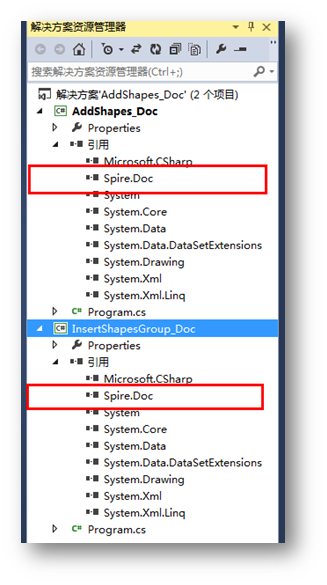
Dll引用
二、代码示例
(一)绘制单一形状
步骤1:添加如下using指定
1using Spire.Doc;
2using Spire.Doc.Documents;
3using Spire.Doc.Fields;
4using System.Drawing;
步骤2:创建示例,添加section、paragraph
1//创建一个Document实例
2Document doc = new Document();
3//添加一个section paragraph
4 Section sec = doc.AddSection();
5 Paragraph para1 = sec.AddParagraph();
步骤3:在文档指定位置插入形状,并设置形状类型、大小、填充颜色、线条样式等
(这里简单列举几个形状的添加方法,方法比较简单,不做赘述,效果图中列举了部分形状样式,需要其他样式的形状可自行设置添加)
1//插入一个矩形
2            ShapeObject shape1 = para1.AppendShape(50, 50, ShapeType.Rectangle);
3            shape1.FillColor = Color.Blue;
4            shape1.StrokeColor = Color.LightSkyBlue;
5            shape1.HorizontalPosition = 20;
6            shape1.VerticalPosition = 20;
7
8            //插入一个圆形
9            ShapeObject shape2 = para1.AppendShape(50, 50, ShapeType.Ellipse);
10            shape2.FillColor = Color.Purple;
11            shape2.StrokeColor = Color.LightPink;
12            shape2.LineStyle = ShapeLineStyle.Single;
13            shape2.StrokeWeight = 1;
14            shape2.HorizontalPosition = 80;
15            shape2.VerticalPosition = 20;
16
17            //插入一个公式符号 +
18            ShapeObject shape3 = para1.AppendShape(50, 50, ShapeType.Plus);
19            shape3.FillColor = Color.DarkCyan;
20            shape3.StrokeColor = Color.LightGreen;
21            shape3.LineStyle = ShapeLineStyle.Single;
22            shape3.StrokeWeight = 1;
23            shape3.HorizontalPosition = 140;
24            shape3.VerticalPosition = 20;
25
26            //插入一颗星形
27            ShapeObject shape4 = para1.AppendShape(50, 50, ShapeType.Star);
28            shape4.FillColor = Color.Red;
29            shape4.StrokeColor = Color.Gold;
30            shape4.LineStyle = ShapeLineStyle.Single;
31            shape4.HorizontalPosition = 200;
32            shape4.VerticalPosition = 20;
步骤4:保存文档
1//保存并打开文档
2doc.SaveToFile("InsertShapes.docx", FileFormat.Docx2010);
3System.Diagnostics.Process.Start("InsertShapes.docx");
形状添加效果:

全部代码:


1  1 using Spire.Doc;
2  2 using Spire.Doc.Documents;
3  3 using Spire.Doc.Fields;
4  4 using System.Drawing;
5  5
6  6 namespace AddShapes_Doc
7  7 {
8  8     class Program
9  9     {
10 10         static void Main(string[] args)
11 11         {
12 12             //创建一个Document实例
13 13             Document doc = new Document();
14 14
15 15             //添加一个section paragraph
16 16             Section sec = doc.AddSection();
17 17             Paragraph para1 = sec.AddParagraph();
18 18
19 19             //插入一个矩形
20 20             ShapeObject shape1 = para1.AppendShape(50, 50, ShapeType.Rectangle);
21 21             shape1.FillColor = Color.Blue;
22 22             shape1.StrokeColor = Color.LightSkyBlue;
23 23             shape1.HorizontalPosition = 20;
24 24             shape1.VerticalPosition = 20;
25 25
26 26             //插入一个圆形
27 27             ShapeObject shape2 = para1.AppendShape(50, 50, ShapeType.Ellipse);
28 28             shape2.FillColor = Color.Purple;
29 29             shape2.StrokeColor = Color.LightPink;
30 30             shape2.LineStyle = ShapeLineStyle.Single;
31 31             shape2.StrokeWeight = 1;
32 32             shape2.HorizontalPosition = 80;
33 33             shape2.VerticalPosition = 20;
34 34
35 35             //插入一个公式符号 +
36 36             ShapeObject shape3 = para1.AppendShape(50, 50, ShapeType.Plus);
37 37             shape3.FillColor = Color.DarkCyan;
38 38             shape3.StrokeColor = Color.LightGreen;
39 39             shape3.LineStyle = ShapeLineStyle.Single;
40 40             shape3.StrokeWeight = 1;
41 41             shape3.HorizontalPosition = 140;
42 42             shape3.VerticalPosition = 20;
43 43
44 44             //插入一颗星形
45 45             ShapeObject shape4 = para1.AppendShape(50, 50, ShapeType.Star);
46 46             shape4.FillColor = Color.Red;
47 47             shape4.StrokeColor = Color.Gold;
48 48             shape4.LineStyle = ShapeLineStyle.Single;
49 49             shape4.HorizontalPosition = 200;
50 50             shape4.VerticalPosition = 20;
51 51
52 52             //插入一个立方体
53 53             ShapeObject shape5 = para1.AppendShape(50, 50, ShapeType.Cube);
54 54             shape5.FillColor = Color.OrangeRed;
55 55             shape5.StrokeColor = Color.Orange;
56 56             shape5.LineStyle = ShapeLineStyle.Single;
57 57             shape5.HorizontalPosition = 260;
58 58             shape5.VerticalPosition = 20;
59 59
60 60             //插入一个圆柱体
61 61             ShapeObject shape6 = para1.AppendShape(50, 50, ShapeType.Can);
62 62             shape6.FillColor = Color.Goldenrod;
63 63             shape6.StrokeColor = Color.Gold;
64 64             shape6.LineStyle = ShapeLineStyle.Single;
65 65             shape6.HorizontalPosition = 320;
66 66             shape6.VerticalPosition = 20;
67 67
68 68             //插入一个箭头
69 69             ShapeObject shape7 = para1.AppendShape(50, 50, ShapeType.Arrow);
70 70             shape7.FillColor = Color.Yellow;
71 71             shape7.StrokeColor = Color.Yellow;
72 72             shape7.LineStyle = ShapeLineStyle.Single;
73 73             shape7.HorizontalPosition = 20;
74 74             shape7.VerticalPosition = 80;
75 75
76 76             //插入一个v形臂章图形
77 77             ShapeObject shape8 = para1.AppendShape(50, 50, ShapeType.Chevron);
78 78             shape8.FillColor = Color.YellowGreen;
79 79             shape8.StrokeColor = Color.Yellow;
80 80             shape8.LineStyle = ShapeLineStyle.Single;
81 81             shape8.HorizontalPosition = 80;
82 82             shape8.VerticalPosition = 80;
83 83
84 84             //插入一个循环箭头图形
85 85             ShapeObject shape9 = para1.AppendShape(50, 50, ShapeType.CircularArrow);
86 86             shape9.FillColor = Color.Green;
87 87             shape9.StrokeColor = Color.Yellow;
88 88             shape9.LineStyle = ShapeLineStyle.Single;
89 89             shape9.HorizontalPosition = 140;
90 90             shape9.VerticalPosition = 80;
91 91
92 92             //插入一个云图形
93 93             ShapeObject shape10 = para1.AppendShape(50, 50, ShapeType.CloudCallout);
94 94             shape10.FillColor = Color.LightSkyBlue;
95 95             shape10.StrokeColor = Color.White;
96 96             shape10.LineStyle = ShapeLineStyle.Single;
97 97             shape10.HorizontalPosition = 200;
98 98             shape10.VerticalPosition = 80;
99 99
100100             //插入一个环形图
101101             ShapeObject shape11 = para1.AppendShape(50, 50, ShapeType.Donut);
102102             shape11.FillColor = Color.Pink;
103103             shape11.StrokeColor = Color.White;
104104             shape11.LineStyle = ShapeLineStyle.Single;
105105             shape11.HorizontalPosition = 260;
106106             shape11.VerticalPosition = 80;
107107
108108             //插入一个波浪形状图
109109             ShapeObject shape12 = para1.AppendShape(50, 50, ShapeType.DoubleWave);
110110             shape12.FillColor = Color.Plum;
111111             shape12.StrokeColor = Color.White;
112112             shape12.LineStyle = ShapeLineStyle.Single;
113113             shape12.HorizontalPosition = 320;
114114             shape12.VerticalPosition = 80;
115115
116116             //插入一个礼结状图形
117117             ShapeObject shape13 = para1.AppendShape(50, 50, ShapeType.EllipseRibbon);
118118             shape13.FillColor = Color.RosyBrown;
119119             shape13.StrokeColor = Color.White;
120120             shape13.LineStyle = ShapeLineStyle.Single;
121121             shape13.HorizontalPosition = 20;
122122             shape13.VerticalPosition = 140;
123123
124124             //插入一个心形图
125125             ShapeObject shape14 = para1.AppendShape(50, 50, ShapeType.Heart);
126126             shape14.FillColor = Color.Red;
127127             shape14.StrokeColor = Color.White;
128128             shape14.LineStyle = ShapeLineStyle.Single;
129129             shape14.HorizontalPosition = 80;
130130             shape14.VerticalPosition = 140;
131131
132132             //插入一个六边形图形
133133             ShapeObject shape15 = para1.AppendShape(50, 50, ShapeType.Hexagon);
134134             shape15.FillColor = Color.DarkCyan;
135135             shape15.StrokeColor = Color.White;
136136             shape15.LineStyle = ShapeLineStyle.Single;
137137             shape15.HorizontalPosition = 140;
138138             shape15.VerticalPosition = 140;
139139
140140             //插入一个不规则图形
141141             ShapeObject shape16 = para1.AppendShape(50, 50, ShapeType.IrregularSeal1);
142142             shape16.FillColor = Color.DeepPink;
143143             shape16.StrokeColor = Color.White;
144144             shape16.LineStyle = ShapeLineStyle.Single;
145145             shape16.HorizontalPosition = 200;
146146             shape16.VerticalPosition = 140;
147147
148148             //插入一个月亮形状
149149             ShapeObject shape17 = para1.AppendShape(50, 50, ShapeType.Moon);
150150             shape17.FillColor = Color.Violet;
151151             shape17.StrokeColor = Color.White;
152152             shape17.LineStyle = ShapeLineStyle.Single;
153153             shape17.HorizontalPosition = 260;
154154             shape17.VerticalPosition = 140;
155155
156156             //插入一个"禁止"形状
157157             ShapeObject shape18 = para1.AppendShape(50, 50, ShapeType.NoSmoking);
158158             shape18.FillColor = Color.Yellow;
159159             shape18.StrokeColor = Color.Goldenrod;
160160             shape18.LineStyle = ShapeLineStyle.Single;
161161             shape18.HorizontalPosition = 320;
162162             shape18.VerticalPosition = 140;
163163
164164             //保存并打开文档
165165             doc.SaveToFile("InsertShapes.docx", FileFormat.Docx2010);
166166             System.Diagnostics.Process.Start("InsertShapes.docx");
167167         }
168168     }
169169 }
View Code
(二)添加组合形状
步骤1:添加如下using指令
1using Spire.Doc;
2using Spire.Doc.Documents;
3using Spire.Doc.Fields;
4using System.Drawing;
步骤2:创建文档,添加section、paragraph
1Document doc = new Document();
2Section sec = doc.AddSection();
3Paragraph para1 = sec.AddParagraph();
步骤3:添加文字,并应用格式到文字
1para1.AppendText("中日文化交流");
2ParagraphStyle style1 = new ParagraphStyle(doc);
3style1.Name = "titleStyle";
4style1.CharacterFormat.Bold = true;
5style1.CharacterFormat.FontName = "隶书";
6style1.CharacterFormat.FontSize = 30f;
7doc.Styles.Add(style1);
8para1.ApplyStyle("titleStyle");
9para1.Format.HorizontalAlignment = HorizontalAlignment.Center;
步骤4:实例化段落2,并创建一个形状组合,并设置大小
1//实例化段落2
2Paragraph para2 = sec.AddParagraph();
3//创建一个形状组合并设置大小
4ShapeGroup shapegr = para2.AppendShapeGroup(300, 300);
步骤5:绘制一个中国国旗,这里需要组合形状矩形和五角星形,并填充相应的颜色
1//添加一个矩形到形状组合
2            shapegr.ChildObjects.Add(new ShapeObject(doc, ShapeType.Rectangle)
3            {
4                Width = 900,
5                Height = 500,
6                LineStyle = ShapeLineStyle.Single,
7                FillColor = Color.Red,
8                StrokeColor = Color.Red,
9                StrokeWeight = 1,
10            });
11
12            //添加第一个五角星到形状组合
13            shapegr.ChildObjects.Add(new ShapeObject(doc, ShapeType.Star)
14            {
15                Width = 100,
16                Height = 100,
17                VerticalPosition = 90,
18                HorizontalPosition = 90,
19                LineStyle = ShapeLineStyle.Single,
20                FillColor = Color.Yellow,
21                StrokeColor = Color.Yellow,
22                StrokeWeight = 1,
23            });
24            //添加第二个五角星到形状组合
25            shapegr.ChildObjects.Add(new ShapeObject(doc, ShapeType.Star)
26            {
27                Width = 50,
28                Height = 50,
29                VerticalPosition = 40,
30                HorizontalPosition = 210,
31                LineStyle = ShapeLineStyle.Single,
32                FillColor = Color.Yellow,
33                StrokeColor = Color.Yellow,
34                StrokeWeight = 1,
35            });
36            //添加第三个五角星到形状组合
37            shapegr.ChildObjects.Add(new ShapeObject(doc, ShapeType.Star)
38            {
39                Width = 50,
40                Height = 50,
41                VerticalPosition = 80,
42                HorizontalPosition = 280,
43                LineStyle = ShapeLineStyle.Single,
44                FillColor = Color.Yellow,
45                StrokeColor = Color.Yellow,
46                StrokeWeight = 1,
47            });
48            //添加第四个五角星到形状组合
49            shapegr.ChildObjects.Add(new ShapeObject(doc, ShapeType.Star)
50            {
51                Width = 50,
52                Height = 50,
53                VerticalPosition = 160,
54                HorizontalPosition = 280,
55                LineStyle = ShapeLineStyle.Single,
56                FillColor = Color.Yellow,
57                StrokeColor = Color.Yellow,
58                StrokeWeight = 1,
59            });
60            //添加第五个五角星到形状组合
61            shapegr.ChildObjects.Add(new ShapeObject(doc, ShapeType.Star)
62            {
63                Width = 50,
64                Height = 50,
65                VerticalPosition = 220,
66                HorizontalPosition = 210,
67                LineStyle = ShapeLineStyle.Single,
68                FillColor = Color.Yellow,
69                StrokeColor = Color.Yellow,
70                StrokeWeight = 1,
71            });
步骤6:绘制一个日本国旗,需要组合形状矩形和圆形,并填充颜色
1//绘制一个矩形并添加到形状组合
2            shapegr.ChildObjects.Add(new ShapeObject(doc, ShapeType.Rectangle)
3            {
4                Width = 900,
5                Height = 500,
6                VerticalPosition = 700,
7                HorizontalPosition = 600,
8                LineStyle = ShapeLineStyle.Single,
9                FillColor = Color.WhiteSmoke,
10                StrokeColor = Color.WhiteSmoke,
11                StrokeWeight = 1,
12            });
13            //绘制一个圆形并添加到形状组合
14            shapegr.ChildObjects.Add(new ShapeObject(doc, ShapeType.Ellipse)
15            {
16                Width = 250,
17                Height = 250,
18                VerticalPosition = 800,
19                HorizontalPosition = 900,
20                LineStyle = ShapeLineStyle.Single,
21                FillColor = Color.Red,
22                StrokeColor = Color.Red,
23                StrokeWeight = 1,
24            });
步骤7:保存文档
1//保存并打开文档
2doc.SaveToFile("InsertShapegroups.docx", FileFormat.Docx2010);
3System.Diagnostics.Process.Start("InsertShapegroups.docx");
添加效果:
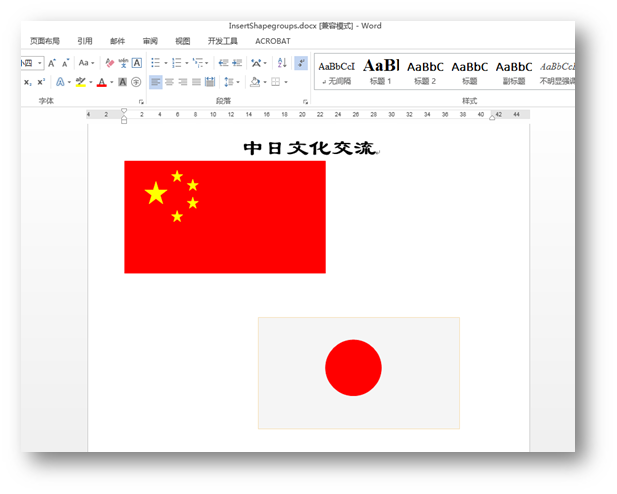
(此时的图形是组合后的效果,任意拖动图形不会出现各个形状分离、错位的情况。)
全部代码:


1  1 using Spire.Doc;
2  2 using Spire.Doc.Documents;
3  3 using Spire.Doc.Fields;
4  4 using System.Drawing;
5  5
6  6 namespace InsertShapesGroup_Doc
7  7 {
8  8     class Program
9  9     {
10 10         static void Main(string[] args)
11 11         {
12 12             //创建一个Document实例并添加section及paragraph
13 13             Document doc = new Document();
14 14             Section sec = doc.AddSection();
15 15             Paragraph para1 = sec.AddParagraph();
16 16             //添加文字,并应用格式到文字
17 17             para1.AppendText("中日文化交流");
18 18             ParagraphStyle style1 = new ParagraphStyle(doc);
19 19             style1.Name = "titleStyle";
20 20             style1.CharacterFormat.Bold = true;
21 21             style1.CharacterFormat.FontName = "隶书";
22 22             style1.CharacterFormat.FontSize = 30f;
23 23             doc.Styles.Add(style1);
24 24             para1.ApplyStyle("titleStyle");
25 25             para1.Format.HorizontalAlignment = HorizontalAlignment.Center;
26 26
27 27             //实例化段落2
28 28             Paragraph para2 = sec.AddParagraph();
29 29             //创建一个形状组合并设置大小
30 30             ShapeGroup shapegr = para2.AppendShapeGroup(300, 300);
31 31
32 32             //添加一个矩形到形状组合
33 33             shapegr.ChildObjects.Add(new ShapeObject(doc, ShapeType.Rectangle)
34 34             {
35 35                 Width = 900,
36 36                 Height = 500,
37 37                 LineStyle = ShapeLineStyle.Single,
38 38                 FillColor = Color.Red,
39 39                 StrokeColor = Color.Red,
40 40                 StrokeWeight = 1,
41 41             });
42 42
43 43             //添加第一个五角星到形状组合
44 44             shapegr.ChildObjects.Add(new ShapeObject(doc, ShapeType.Star)
45 45             {
46 46                 Width = 100,
47 47                 Height = 100,
48 48                 VerticalPosition = 90,
49 49                 HorizontalPosition = 90,
50 50                 LineStyle = ShapeLineStyle.Single,
51 51                 FillColor = Color.Yellow,
52 52                 StrokeColor = Color.Yellow,
53 53                 StrokeWeight = 1,
54 54             });
55 55             //添加第二个五角星到形状组合
56 56             shapegr.ChildObjects.Add(new ShapeObject(doc, ShapeType.Star)
57 57             {
58 58                 Width = 50,
59 59                 Height = 50,
60 60                 VerticalPosition = 40,
61 61                 HorizontalPosition = 210,
62 62                 LineStyle = ShapeLineStyle.Single,
63 63                 FillColor = Color.Yellow,
64 64                 StrokeColor = Color.Yellow,
65 65                 StrokeWeight = 1,
66 66             });
67 67             //添加第三个五角星到形状组合
68 68             shapegr.ChildObjects.Add(new ShapeObject(doc, ShapeType.Star)
69 69             {
70 70                 Width = 50,
71 71                 Height = 50,
72 72                 VerticalPosition = 80,
73 73                 HorizontalPosition = 280,
74 74                 LineStyle = ShapeLineStyle.Single,
75 75                 FillColor = Color.Yellow,
76 76                 StrokeColor = Color.Yellow,
77 77                 StrokeWeight = 1,
78 78             });
79 79             //添加第四个五角星到形状组合
80 80             shapegr.ChildObjects.Add(new ShapeObject(doc, ShapeType.Star)
81 81             {
82 82                 Width = 50,
83 83                 Height = 50,
84 84                 VerticalPosition = 160,
85 85                 HorizontalPosition = 280,
86 86                 LineStyle = ShapeLineStyle.Single,
87 87                 FillColor = Color.Yellow,
88 88                 StrokeColor = Color.Yellow,
89 89                 StrokeWeight = 1,
90 90             });
91 91             //添加第五个五角星到形状组合
92 92             shapegr.ChildObjects.Add(new ShapeObject(doc, ShapeType.Star)
93 93             {
94 94                 Width = 50,
95 95                 Height = 50,
96 96                 VerticalPosition = 220,
97 97                 HorizontalPosition = 210,
98 98                 LineStyle = ShapeLineStyle.Single,
99 99                 FillColor = Color.Yellow,
100100                 StrokeColor = Color.Yellow,
101101                 StrokeWeight = 1,
102102             });
103103
104104             //绘制一个矩形并添加到形状组合
105105             shapegr.ChildObjects.Add(new ShapeObject(doc, ShapeType.Rectangle)
106106             {
107107                 Width = 900,
108108                 Height = 500,
109109                 VerticalPosition = 700,
110110                 HorizontalPosition = 600,
111111                 LineStyle = ShapeLineStyle.Single,
112112                 FillColor = Color.WhiteSmoke,
113113                 StrokeColor = Color.Wheat,
114114                 StrokeWeight = 1,
115115             });
116116             //绘制一个圆形并添加到形状组合
117117             shapegr.ChildObjects.Add(new ShapeObject(doc, ShapeType.Ellipse)
118118             {
119119                 Width = 250,
120120                 Height = 250,
121121                 VerticalPosition = 800,
122122                 HorizontalPosition = 900,
123123                 LineStyle = ShapeLineStyle.Single,
124124                 FillColor = Color.Red,
125125                 StrokeColor = Color.Red,
126126                 StrokeWeight = 1,
127127             });
128128
129129             //保存并打开文档
130130             doc.SaveToFile("InsertShapegroups.docx", FileFormat.Docx2010);
131131             System.Diagnostics.Process.Start("InsertShapegroups.docx");
132132         }
133133     }
134134 }
View Code
以上全部是关于Word中绘制图形形状的内容。如需转载,请注明出处!
感谢阅读!