
前言
pageHelper是一款优秀的Mybatis分页插件,在项目中可以非常便利的使用,使开发效率得到很大的提升,但不支持一对多结果映射的分页查询,所以在平时的使用时,对于一对多分页会出现分页错误,这篇文章主要对pageHelper分页错误进行重现以及提出解决方案。
分析
mybatis进行一对多查询时,映射文件(mapper.xml)中的sql语句中使用的左连接,pageHelper会自动对这条左连接sql语句进行select count(0)的处理,并把结果作为分页结构的记录总数,然后自动将limit拼接到sql语句末尾进行分页,由于左连接查询时,连接条件on条件不唯一(即一对多)时,结果会产生笛卡尔积,所以经过pagehelper插件分页得到的记录总数和分页结果并不是预期的结果。
数据准备
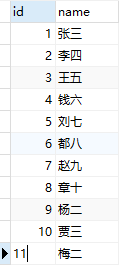
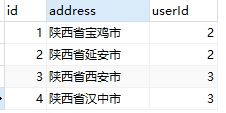
共两个表:user、address,用户id与收货地址表中userId对应。
用户表【user】:11条数据
收货地址信息表【address】:4条数据
数据结构
1public class UserDto {
2    public int id;
3    public String name;
4    List<Address> addressList;
5}
预期结果
要求对数据进行分页(每页5条),获得用户信息,每个用户信息带出对应收货信息, 用户id为2和3的用户各有两条收货地址信息,其余没有。期望结果如下
1{
2  "code": 200,
3  "message": "success",
4  "data": {
5    "pageNum": 1,
6    "pageSize": 5,
7    "pages": 3,
8    "size": 5,
9    "total": 11,
10    "data": [
11      {
12        "id": 1,
13        "name": "张三",
14        "addressList": []
15      },
16      {
17        "id": 2,
18        "name": "李四",
19        "addressList": [
20          {
21            "id": 1,
22            "address": "陕西省宝鸡市",
23            "userId": 2
24          },
25          {
26            "id": 2,
27            "address": "陕西省延安市",
28            "userId": 2
29          }
30        ]
31      },
32      {
33        "id": 3,
34        "name": "王五",
35        "addressList": [
36          {
37            "id": 3,
38            "address": "陕西省西安市",
39            "userId": 3
40          },
41          {
42            "id": 4,
43            "address": "陕西省汉中市",
44            "userId": 3
45          }
46        ]
47      },
48      {
49        "id": 4,
50        "name": "钱六",
51        "addressList": []
52      },
53      {
54        "id": 5,
55        "name": "刘七",
56        "addressList": []
57      }
58    ]
59  }
60}
问题重现
mybatis映射文件
1<resultMap id="list" type="UserDto">
2    <id property="id" column="id" />
3    <result property="name" column="name"/>
4    <collection property="addressList" ofType="Address">
5        <result property="address" column="address"/>
6        <result property="userId" column="userId"/>
7    </collection>
8</resultMap>
9
10<select id="findAll"  resultMap="list" >
11    SELECT
12    a.*,b.address,b.userId
13    FROM user a
14    LEFT JOIN address b on a.id=b.userId
15</select>
然后我们使用pageHelper进行分页,并输出日志
1SELECT count(0) FROM user a LEFT JOIN address b ON a.id = b.userId
2Preparing: SELECT a.*,b.address,b.userId FROM user a LEFT JOIN address b on a.id=b.userId LIMIT ?
3Parameters: 5(Integer)
4Total: 5
日志分析
第1行:进行数据总数的查询,作为数据的总条数total
第2-4行:进行分页结果的查询,查询出5条数据
从日志中可以看出
-
pageHelper插件拼接后的sql语句就不会输出正确的结果,更不会输出符合期望的结果
-
pageHelper插件分两步查询,第一步查询出记录总数,第二步查询出分页结果
解决方案
方案一 思路:先分页查询出user表数据,然后在serviec服务层根据用户id查询对应的收货地址信息,并关联用户信息与收货信息。
service文件
1public List<UserDto> findAll(){
2    List<UserDto> userList=userMapper.findUser();
3    userList.forEach((item)-> {
4    item.setAddressList(userMapper.findByUserId(item.id));
5    });
6    return userList;
7}
mybatis映射文件
1<select id="findUser" resultType="UserDto">
2    SELECT * FROM user
3</select>
4<select id="findByUserId" parameterType="integer" resultType="Address">
5    SELECT * FROM address where userId=#{userId}
6</select>
方案二 思路:使用mybatis的嵌套子查询
1<resultMap id="getList" type="UserDto">
2    <id property="id" column="id" />
3    <result property="name" column="name"/>
4    <collection property="addressList" ofType="Address" javaType="List" column="{userId=id}" select="getValueById" >
5        <id property="id" column="id" />
6        <result property="address" column="address"/>
7        <result property="userId" column="userId"/>
8    </collection>
9</resultMap>
10<!-- 主查询 -->
11<select id="findAll" resultMap="getList">
12    select * from user
13</select>
14<!-- 子查询 -->
15<select id="getValueById" resultType="Address" >
16    select a.* from address a where a.userId=#{userId}
17</select>
与嵌套映射结构的resultMap格式基本一致,一对多查询采用的依旧是collection,区别在于collection中多了select与column属性,select用于加载子查询映射语句的id,它会从column属性指定的列中检索数据,作为参数传递给目标select语句即子查询。
缺点:这种方式虽然可以解决pagehelper一对多分页的问题,但在大型数据表与数据集上性能表现不佳,即产生'1+N'问题。
输出以下sql日志:首先通过主查询语句获得主表的数据总量作为分页的total,第二步通过limit获得前5条分页数据(就是‘1’),第三步将第二步获得结果作为参数通过子查询获得地址表的信息(就是‘N’)
1Preparing: SELECT count(0) FROM user
2Parameters:
3Total: 1
4Preparing: select * from user LIMIT ?
5Parameters: 5(Integer)
6Preparing: select a.* from address a where a.userId=?
7Parameters: 1(Integer)
8Total: 0
9Preparing: select a.* from address a where a.userId=?
10Parameters: 2(Integer)
11Total: 2
12Preparing: select a.* from address a where a.userId=?
13Parameters: 3(Integer)
14Total: 2
15Preparing: select a.* from address a where a.userId=?
16Parameters: 4(Integer)
17Total: 0
18Preparing: select a.* from address a where a.userId=?
19Parameters: 5(Integer)
20Total: 0
方案三 思路:弃用pageHelper插件,自定义分页查询,先对主表(user)进行分页,并把分页结果作为虚拟表与副表(address)进行左连接查询
1<resultMap id="list" type="UserDto">
2        <id property="id" column="id" />
3        <result property="name" column="name"/>
4        <collection property="addressList" ofType="Address">
5            <result property="address" column="address"/>
6            <result property="userId" column="userId"/>
7        </collection>
8 </resultMap>
9<select id="findAll" resultMap="list"  parameterType="integer">
10    SELECT
11        a.*,
12        b.address,
13        b.userId
14    FROM
15            ( SELECT * FROM user LIMIT #{size} ) a
16                LEFT JOIN address b ON a.id = b.userid
17</select>