邮件发送是一个非常常见的功能,最初 Sun 公司提供了 JavaMail 用来实现邮件发送,但是配置烦琐。后来 Spring 中提供了 JavaMailsender 用来简化邮件配置,而 Spring Boot 则提供了 MailSenderAutoConfiguration 对邮件的发送做了进一步简化。
在开始之前我们需要申请开通 POP3/SMTP 服务或者 IMAP/SMTP服务。
这里我使用的163邮箱开通:开通 POP3/SMTP 服务或者 IMAP/SMTP服务
一、添加依赖
1<dependency>
2    <groupId>org.springframework.boot</groupId>
3    <artifactId>spring-boot-starter-mail</artifactId>
4</dependency>
二、添加配置信息
1# 配置邮件服务器的地址
2spring.mail.host=smtp.163.com
3# 配置邮件服务器的端口(465或587)
4spring.mail.port=465
5# 配置用户的账号
6spring.mail.username=2333@163.com
7# 配置用户的密码(即上面我们申请到的授权码)
8spring.mail.password=TSSCBFCCJUTABBTB
9# 配置默认编码
10spring.mail.default-encoding=UTF-8
11# SSL 连接配置
12spring.mail.properties.mail.smtp.socketFactory.class=javax.net.ssl.SSLSocketFactory
13# 开启 debug,这样方便开发者查看邮件发送日志
14spring.mail.properties.mail.debug=true
三、开发代码
(1)编写请求接口
1import com.example.demo.service.MailService;
2import org.springframework.beans.factory.annotation.Autowired;
3import org.springframework.web.bind.annotation.GetMapping;
4import org.springframework.web.bind.annotation.RestController;
5
6import java.io.File;
7
8@RestController
9public class MailController {
10
11    private final static String FROM_MAIL = "2333@163.com";
12    private final static String TO_MAIL = "123@qq.com";
13
14    @Autowired
15    MailService mailService;
16
17    @GetMapping("/sendMail")
18    public String sendMail() {
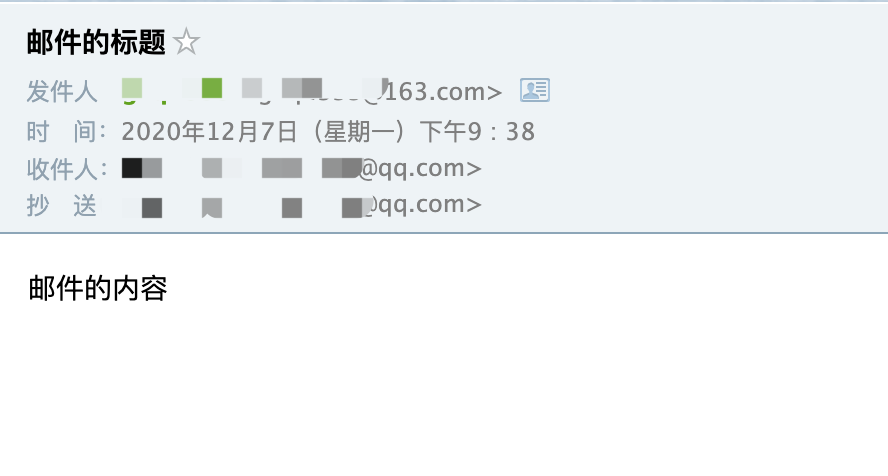
19        mailService.sendSimpleMail(FROM_MAIL, TO_MAIL, TO_MAIL, "邮件的标题", "邮件的内容");
20
21        return "发送成功";
22    }
23
24    @GetMapping("/sendAttachFileMail")
25    public String sendAttachFileMail() {
26        File file = new File("/Users/gongzhiqiang/Downloads/邮件发送附件.txt");
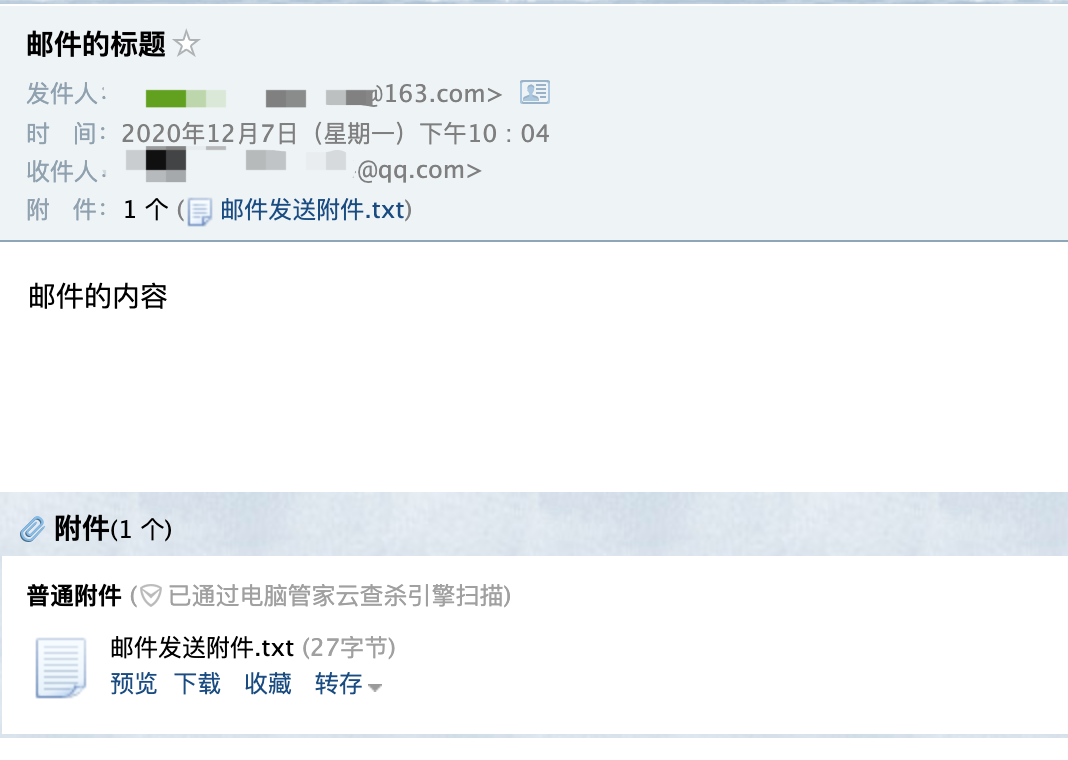
27        mailService.sendAttachFileMail(FROM_MAIL, TO_MAIL, "邮件的标题", "邮件的内容", file);
28
29        return "发送成功";
30    }
31
32
33    @GetMapping("/sendMailWithImg")
34    public String sendMailWithImg() {
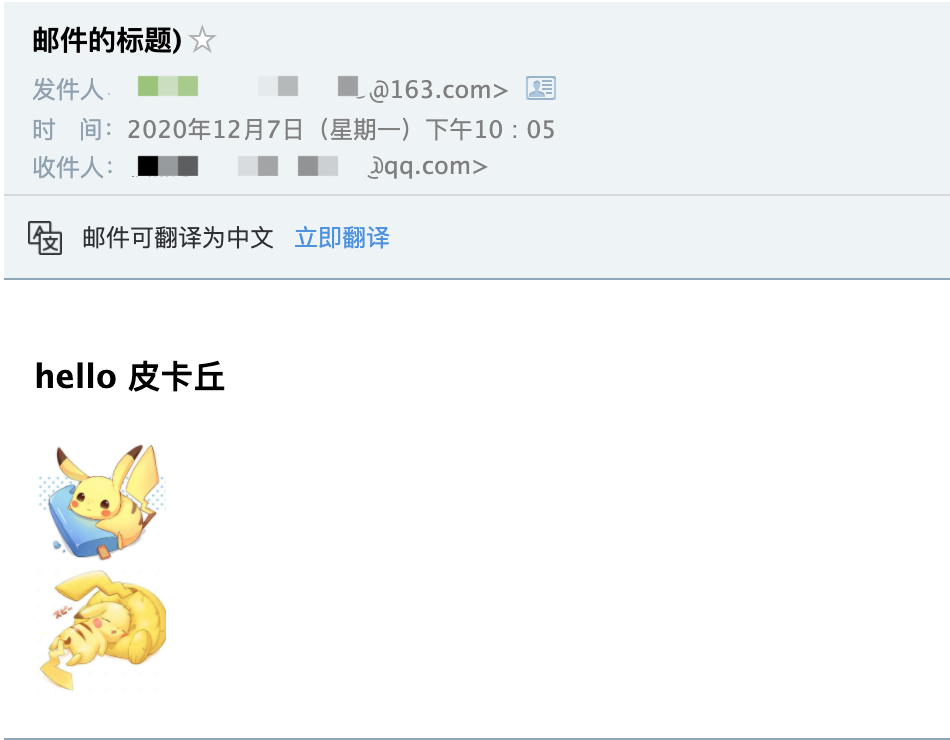
35        String html = "<h3>hello 皮卡丘</h3>" +
36                "<div><img width='66px' src='cid:p1'/></div>" +
37                "<div><img width='66px' src='cid:p2'/></div>";
38        String[] imgUrlArr = {"/Users/gongzhiqiang/Downloads/pikaqiu.jpeg", "/Users/gongzhiqiang/Downloads/pikaqiu1.jpeg"};
39        String[] valArr = {"p1", "p2"};
40        mailService.sendMailWithImg(FROM_MAIL, TO_MAIL, "邮件的标题", html, imgUrlArr, valArr);
41
42        return "发送成功";
43    }
44
45}
(2)编写服务
1import java.io.File;
2
3public interface MailService {
4
5    void sendSimpleMail(String from, String to, String cc, String subject, String content);
6
7    void sendAttachFileMail(String from, String to, String subject, String content, File file);
8
9    void sendMailWithImg(String from, String to, String subject, String content,
10                         String[] srcPath,String[] resIds);
11
12}
13
14import com.example.demo.service.MailService;
15import lombok.extern.slf4j.Slf4j;
16import org.springframework.beans.factory.annotation.Autowired;
17import org.springframework.core.io.FileSystemResource;
18import org.springframework.mail.SimpleMailMessage;
19import org.springframework.mail.javamail.JavaMailSender;
20import org.springframework.mail.javamail.MimeMessageHelper;
21import org.springframework.stereotype.Service;
22
23import javax.mail.MessagingException;
24import javax.mail.internet.MimeMessage;
25import java.io.File;
26
27@Service
28@Slf4j
29public class MailServiceImpl implements MailService {
30
31    @Autowired
32    JavaMailSender javaMailSender;
33
34    /**
35     * 发送邮件
36     * @param from 邮件发送者
37     * @param to 收件人
38     * @param cc 抄送人
39     * @param subject 邮件主题
40     * @param content 邮件内容
41     */
42    @Override
43    public void sendSimpleMail(String from, String to, String cc, String subject, String content) {
44        // 简单邮件直接构建一个 SimpleMailMessage 对象进行配置并发送即可
45        SimpleMailMessage simpMsg = new SimpleMailMessage();
46        simpMsg.setFrom(from);
47        simpMsg.setTo(to);
48        simpMsg.setCc(cc);
49        simpMsg.setSubject(subject);
50        simpMsg.setText(content);
51        javaMailSender.send(simpMsg);
52    }
53
54    /**
55     * 发送待附件的邮件
56     * @param from 邮件发送者
57     * @param to 收件人
58     * @param subject 邮件主题
59     * @param content 邮件内容
60     * @param file 附件
61     */
62    @Override
63    public void sendAttachFileMail(String from, String to, String subject, String content, File file) {
64        try {
65            MimeMessage message = javaMailSender.createMimeMessage();
66            // 这里使用 MimeMessageHelper 简化了邮件配置
67            // 第二个参数true表示构造一个 multipart message 类型邮件
68            // multipart message类型邮件包含多个正文、附件以及内嵌资源,邮件表现形式更加丰富
69            MimeMessageHelper helper = new MimeMessageHelper(message,true);
70            helper.setFrom(from);
71            helper.setTo(to);
72            helper.setSubject(subject);
73            helper.setText(content);
74            helper.addAttachment(file.getName(), file);
75            javaMailSender.send(message);
76        } catch (MessagingException e) {
77            e.printStackTrace();
78        }
79    }
80
81    @Override
82    public void sendMailWithImg(String from, String to, String subject, String content,
83                                String[] srcPath,String[] resIds) {
84        if (srcPath.length != resIds.length) {
85            log.error("发送失败");
86            return;
87        }
88
89        try {
90            MimeMessage message = javaMailSender.createMimeMessage();
91            MimeMessageHelper helper = new MimeMessageHelper(message,true);
92            helper.setFrom(from);
93            helper.setTo(to);
94            helper.setSubject(subject);
95            //第二个参数true表示邮件正文是HTML格式(默认为false)
96            helper.setText(content,true);
97            for (int i = 0; i < srcPath.length; i++) {
98                //通过FileSystemResource构造静态资源,让后调用addInline方法将资源加入到邮件对象中
99                FileSystemResource res = new FileSystemResource(new File(srcPath[i]));
100                helper.addInline(resIds[i], res);
101            }
102            javaMailSender.send(message);
103        } catch (MessagingException e) {
104            log.error("发送失败");
105        }
106    }
107
108}
四、验证结果
(1)请求发送邮箱接口:http://127.0.0.1:8082/sendMail
(2)请求发送带附件邮箱接口:http://127.0.0.1:8082/sendAttachFileMail
(3)请求发送带图片邮箱接口:http://127.0.0.1:8082/sendMailWithImg