
1 目标
不在现有查询代码逻辑上做任何改动,实现dao维度的数据源切换(即表维度)
2 使用场景
节约bdp的集群资源。接入新的宽表时,通常uat验证后就会停止集群释放资源,在对应的查询服务器uat环境时需要查询的是生产库的表数据(uat库表因为bdp实时任务停止,没有数据落入),只进行服务器配置文件的改动而无需进行代码的修改变更,即可按需切换查询的数据源。
2.1 实时任务对应的集群资源
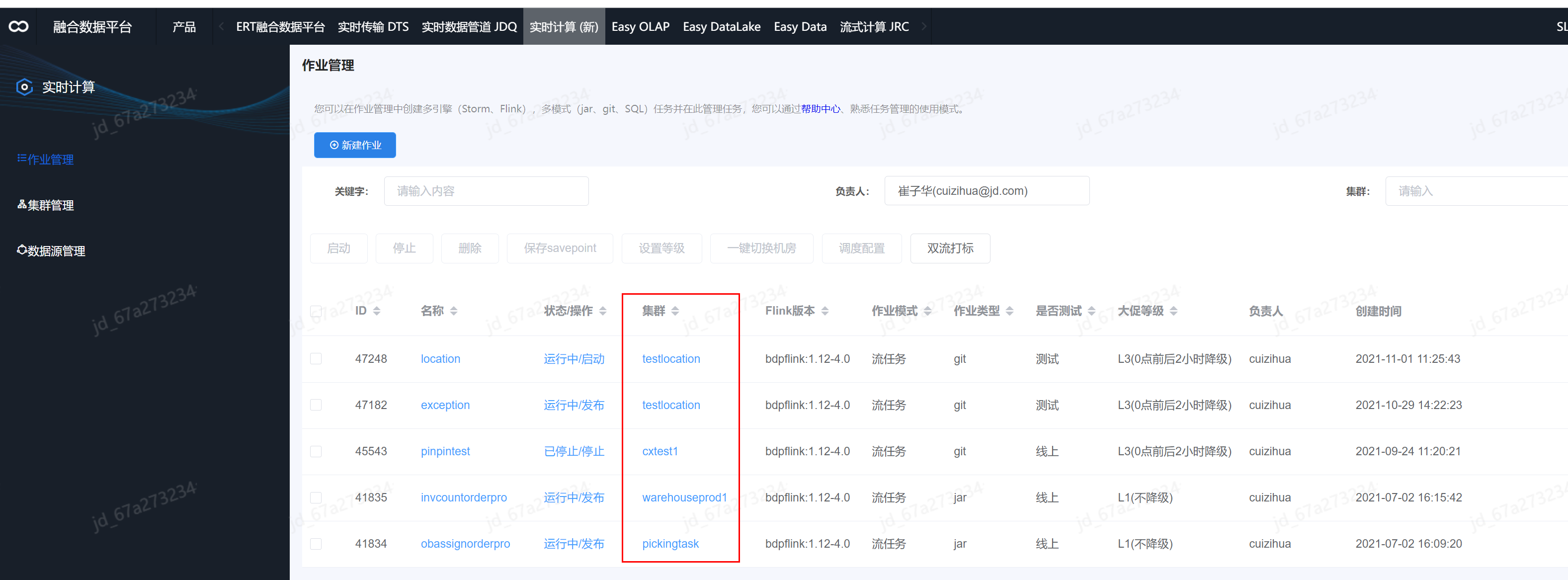
2.2 实时任务产生的数据进行存储的两套环境
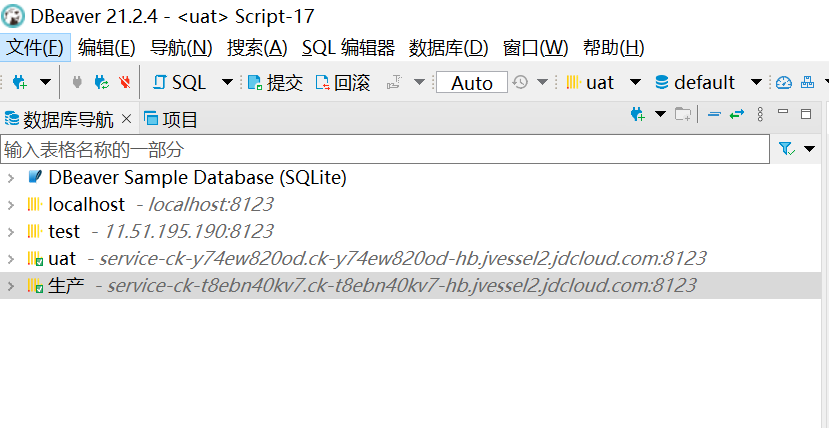
2.3 数据使用系统的两套环境(查询展示数据)

即需要在zhongyouex-bigdata-uat中查询生产库的数据。
3 实现过程
3.1 实现重点
- org.springframework.jdbc.datasource.lookup.AbstractRoutingDataSource
spring提供的这个类是本次实现的核心,能够让我们实现运行时多数据源的动态切换,但是数据源是需要事先配置好的,无法动态的增加数据源。 - Spring提供的Aop拦截执行的mapper,进行切换判断并进行切换。
注:另外还有一个就是ThreadLocal类,用于保存每个线程正在使用的数据源。
3.2 AbstractRoutingDataSource解析
1public abstract class AbstractRoutingDataSource extends AbstractDataSource
2implements InitializingBean{
3    @Nullable
4    private Map<Object, Object> targetDataSources;
5
6    @Nullable
7    private Object defaultTargetDataSource;
8
9    @Override
10    public Connection getConnection() throws SQLException {
11        return determineTargetDataSource().getConnection();
12    }
13    protected DataSource determineTargetDataSource() {
14        Assert.notNull(this.resolvedDataSources, "DataSource router not initialized");
15        Object lookupKey = determineCurrentLookupKey();
16        DataSource dataSource = this.resolvedDataSources.get(lookupKey);
17        if (dataSource == null && (this.lenientFallback || lookupKey == null)) {
18            dataSource = this.resolvedDefaultDataSource;
19        }
20        if (dataSource == null) {
21            throw new IllegalStateException("Cannot determine target DataSource for lookup key [" + lookupKey + "]");
22        }
23        return dataSource;
24    }
25    @Override
26    public void afterPropertiesSet() {
27        if (this.targetDataSources == null) {
28            throw new IllegalArgumentException("Property 'targetDataSources' is required");
29        }
30        this.resolvedDataSources = new HashMap<>(this.targetDataSources.size());
31        this.targetDataSources.forEach((key, value) -> {
32            Object lookupKey = resolveSpecifiedLookupKey(key);
33            DataSource dataSource = resolveSpecifiedDataSource(value);
34            this.resolvedDataSources.put(lookupKey, dataSource);
35        });
36        if (this.defaultTargetDataSource != null) {
37            this.resolvedDefaultDataSource = resolveSpecifiedDataSource(this.defaultTargetDataSource);
38        }
39    }
从上面源码可以看出它继承了AbstractDataSource,而AbstractDataSource是javax.sql.DataSource的实现类,拥有getConnection()方法。获取连接的getConnection()方法中,重点是determineTargetDataSource()方法,它的返回值就是你所要用的数据源dataSource的key值,有了这个key值,resolvedDataSource(这是个map,由配置文件中设置好后存入targetDataSources的,通过targetDataSources遍历存入该map)就从中取出对应的DataSource,如果找不到,就用配置默认的数据源。
看完源码,我们可以知道,只要扩展AbstractRoutingDataSource类,并重写其中的determineCurrentLookupKey()方法返回自己想要的key值,就可以实现指定数据源的切换!
3.3 运行流程
- 我们自己写的Aop拦截Mapper
- 判断当前执行的sql所属的命名空间,然后使用命名空间作为key读取系统配置文件获取当前mapper是否需要切换数据源
- 线程再从全局静态的HashMap中取出当前要用的数据源
- 返回对应数据源的connection去做相应的数据库操作
3.4 不切换数据源时的正常配置
1<?xml version="1.0" encoding="UTF-8"?>
2<beans xmlns="http://www.springframework.org/schema/beans"
3       xmlns:xsi="http://www.w3.org/2001/XMLSchema-instance" xmlns:tx="http://www.springframework.org/schema/tx"
4       xsi:schemaLocation="http://www.springframework.org/schema/beans http://www.springframework.org/schema/beans/spring-beans.xsd http://www.springframework.org/schema/tx http://www.springframework.org/schema/tx/spring-tx.xsd">
5
6<!-- clickhouse数据源   -->
7    <bean id="dataSourceClickhousePinpin" class="org.apache.commons.dbcp2.BasicDataSource" destroy-method="close" lazy-init="true">
8        <property name="url" value="${clickhouse.jdbc.pinpin.url}" />
9    </bean>
10
11    <bean id="singleSessionFactoryPinpin" class="org.mybatis.spring.SqlSessionFactoryBean">
12        <!-- ref直接指向 数据源dataSourceClickhousePinpin  -->
13<property name="dataSource" ref="dataSourceClickhousePinpin" />
14    </bean>
15
16</beans>
3.5 进行动态数据源切换时的配置
1<?xml version="1.0" encoding="UTF-8"?>
2<beans xmlns="http://www.springframework.org/schema/beans"       xmlns:xsi="http://www.w3.org/2001/XMLSchema-instance" xmlns:tx="http://www.springframework.org/schema/tx"       xsi:schemaLocation="http://www.springframework.org/schema/beans http://www.springframework.org/schema/beans/spring-beans.xsd http://www.springframework.org/schema/tx http://www.springframework.org/schema/tx/spring-tx.xsd">
3<!-- clickhouse数据源 1  -->
4    <bean id="dataSourceClickhousePinpin" class="org.apache.commons.dbcp2.BasicDataSource" destroy-method="close" lazy-init="true">
5        <property name="url" value="${clickhouse.jdbc.pinpin.url}" />
6    </bean>
7<!-- clickhouse数据源 2  -->
8    <bean id="dataSourceClickhouseOtherPinpin" class="org.apache.commons.dbcp2.BasicDataSource" destroy-method="close" lazy-init="true">
9        <property name="url" value="${clickhouse.jdbc.other.url}" />
10    </bean>
11 <!-- 新增配置 封装注册的两个数据源到multiDataSourcePinpin里 -->
12 <!-- 对应的key分别是 defaultTargetDataSource和targetDataSources-->
13    <bean id="multiDataSourcePinpin" class="com.zhongyouex.bigdata.common.aop.MultiDataSource">
14      <!-- 默认使用的数据源-->
15<property name="defaultTargetDataSource" ref="dataSourceClickhousePinpin"></property>
16        <!-- 存储其他数据源,对应源码中的targetDataSources -->
17<property name="targetDataSources">
18            <!-- 该map即为源码中的resolvedDataSources-->
19            <map>
20                <!-- dataSourceClickhouseOther 即为要切换的数据源对应的key -->
21<entry key="dataSourceClickhouseOther" value-ref="dataSourceClickhouseOtherPinpin"></entry>
22            </map>
23        </property>
24    </bean>
25
26    <bean id="singleSessionFactoryPinpin" class="org.mybatis.spring.SqlSessionFactoryBean">
27        <!-- ref指向封装后的数据源multiDataSourcePinpin  -->
28<property name="dataSource" ref="multiDataSourcePinpin" />
29    </bean>
30</beans>
核心是AbstractRoutingDataSource,由spring提供,用来动态切换数据源。我们需要继承它,来进行操作。这里我们自定义的com.zhongyouex.bigdata.common.aop.MultiDataSource就是继承了AbstractRoutingDataSource
1package com.zhongyouex.bigdata.common.aop;
2
3import org.springframework.jdbc.datasource.lookup.AbstractRoutingDataSource;
4/**
5 * @author: cuizihua
6 * @description: 动态数据源
7 * @date: 2021/9/7 20:24
8 * @return
9 */
10public class MultiDataSource extends AbstractRoutingDataSource {
11
12    /* 存储数据源的key值,InheritableThreadLocal用来保证父子线程都能拿到值。
13     */
14    private static final ThreadLocal<String> dataSourceKey = new InheritableThreadLocal<String>();
15
16    /**
17     * 设置dataSourceKey的值
18     *
19     * @param dataSource
20     */
21    public static void setDataSourceKey(String dataSource) {
22        dataSourceKey.set(dataSource);
23    }
24
25    /**
26     * 清除dataSourceKey的值
27     */
28    public static void toDefault() {
29        dataSourceKey.remove();
30    }
31
32    /**
33     * 返回当前dataSourceKey的值
34     */
35    @Override
36    protected Object determineCurrentLookupKey() {
37        return dataSourceKey.get();
38    }
39}
3.6 AOP代码
1package com.zhongyouex.bigdata.common.aop;
2import com.zhongyouex.bigdata.common.util.LoadUtil;
3import lombok.extern.slf4j.Slf4j;
4import org.aspectj.lang.JoinPoint;
5import org.aspectj.lang.reflect.MethodSignature;
6import java.lang.reflect.Method;
7
8/**
9 * 方法拦截  粒度在mapper上(对应的sql所属xml)
10 * @author cuizihua
11 * @desc 切换数据源
12 * @create 2021-09-03 16:29
13 **/
14@Slf4j
15public class MultiDataSourceInterceptor {
16//动态数据源对应的key
17    private final String otherDataSource = "dataSourceClickhouseOther";
18
19    public void beforeOpt(JoinPoint mi) {
20//默认使用默认数据源
21        MultiDataSource.toDefault();
22        //获取执行该方法的信息
23        MethodSignature signature = (MethodSignature) mi.getSignature();
24        Method method = signature.getMethod();
25        String namespace = method.getDeclaringClass().getName();
26//本项目命名空间统一的规范为xxx.xxx.xxxMapper
27        namespace = namespace.substring(namespace.lastIndexOf(".") + 1);
28//这里在配置文件配置的属性为xxxMapper.ck.switch=1 or 0  1表示切换
29        String isOtherDataSource = LoadUtil.loadByKey(namespace, "ck.switch");
30        if ("1".equalsIgnoreCase(isOtherDataSource)) {
31            MultiDataSource.setDataSourceKey(otherDataSource);
32            String methodName = method.getName();
33        }
34    }
35}
3.7 AOP代码逻辑说明
通过org.aspectj.lang.reflect.MethodSignature可以获取对应执行sql的xml空间名称,拿到sql对应的xml命名空间就可以获取配置文件中配置的属性决定该xml是否开启切换数据源了。
3.8 对应的aop配置
1<!--动态数据源-->
2<bean id="multiDataSourceInterceptor" class="com.zhongyouex.bigdata.common.aop.MultiDataSourceInterceptor" ></bean>
3<!--将自定义拦截器注入到spring中-->
4<aop:config proxy-target-class="true" expose-proxy="true">
5    <aop:aspect ref="multiDataSourceInterceptor">
6        <!--切入点,也就是你要监控哪些类下的方法,这里写的是DAO层的目录,表达式需要保证只扫描dao层-->
7        <aop:pointcut id="multiDataSourcePointcut" expression="execution(*  com.zhongyouex.bigdata.clickhouse..*.*(..)) "/>
8        <!--在该切入点使用自定义拦截器-->
9        <aop:before method="beforeOpt" pointcut-ref="multiDataSourcePointcut" />
10    </aop:aspect>
11</aop:config>
以上就是整个实现过程,希望能帮上有需要的小伙伴
作者:京东物流 崔子华
来源:京东云开发者社区