
简介
随着项目的发展,前端SPA应用的规模不断加大、业务代码耦合、编译慢,导致日常的维护难度日益增加。同时前端技术的发展迅猛,导致功能扩展吃力,重构成本高,稳定性低。
为了能够将前端模块解耦,通过相关技术调研,最终选择了无界微前端框架作为物流客服系统解耦支持。为了更好的使用无界微前端框架,我们对其运行机制进行了相关了解,以下是对无界运行机制的一些认识。
基本用法
主应用配置
1import WujieVue from 'wujie-vue2';
2
3const { setupApp, preloadApp, bus } = WujieVue;
4/*设置缓存*/
5setupApp({
6});
7/*预加载*/
8preloadApp({
9  name: 'vue2'
10})
11<WujieVue width="100%" height="100%" name="vue2" :url="vue2Url" :sync="true" :alive="true"></WujieVue
12
13
具体实践详细介绍参考:
http://3.cn/1GyPHN-i/shendeng
https://wujie-micro.github.io/doc/guide/start.html
无界源码解析
1 源码包目录结构
packages 包里包含无界框架核心代码wujie-core和对应不同技术栈应用包
examples 使用案例,main-xxx对应该技术栈主应用的使用案例,其他代表子应用的使用案例
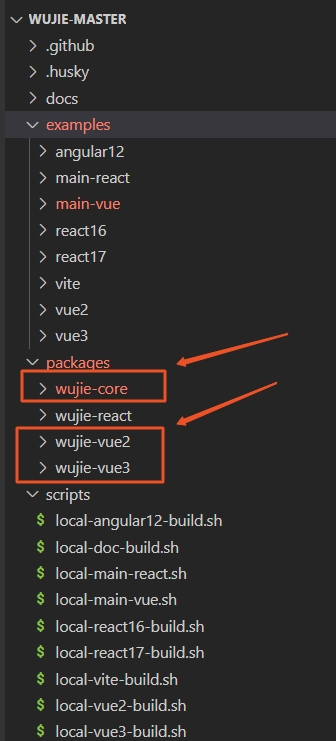
2 wujie-vue2组件
该组件默认配置了相关参数,简化了无界使用时的一些配置项,作为一个全局组件被主引用使用
这里使用wujie-vue2示例,其他wujie-react,wujie-vue3大家可自行阅读,基本作用和wujie-vue2相同都是用来简化无界配置,方便快速使用
1import Vue from "vue";
2import { bus, preloadApp, startApp as rawStartApp, destroyApp, setupApp } from "wujie";
3
4const wujieVueOptions = {
5  name: "WujieVue",
6  props: {
7       /*传入配置参数*/
8  },
9  data() {
10    return {
11      startAppQueue: Promise.resolve(),
12    };
13  },
14  mounted() {
15    bus.$onAll(this.handleEmit);
16    this.execStartApp();
17  },
18  methods: {
19    handleEmit(event, ...args) {
20      this.$emit(event, ...args);
21    },
22    async startApp() {
23      try {
24        // $props 是vue 2.2版本才有的属性,所以这里直接全部写一遍
25        await rawStartApp({
26          name: this.name,
27          url: this.url,
28          el: this.$refs.wujie,
29          loading: this.loading,
30          alive: this.alive,
31          fetch: this.fetch,
32          props: this.props,
33          attrs: this.attrs,
34          replace: this.replace,
35          sync: this.sync,
36          prefix: this.prefix,
37          fiber: this.fiber,
38          degrade: this.degrade,
39          plugins: this.plugins,
40          beforeLoad: this.beforeLoad,
41          beforeMount: this.beforeMount,
42          afterMount: this.afterMount,
43          beforeUnmount: this.beforeUnmount,
44          afterUnmount: this.afterUnmount,
45          activated: this.activated,
46          deactivated: this.deactivated,
47          loadError: this.loadError,
48        });
49      } catch (error) {
50        console.log(error);
51      }
52    },
53    execStartApp() {
54      this.startAppQueue = this.startAppQueue.then(this.startApp);
55    },
56    destroy() {
57      destroyApp(this.name);
58    },
59  },
60  beforeDestroy() {
61    bus.$offAll(this.handleEmit);
62  },
63  render(c) {
64    return c("div", {
65      style: {
66        width: this.width,
67        height: this.height,
68      },
69      ref: "wujie",
70    });
71  },
72};
73
74const WujieVue = Vue.extend(wujieVueOptions);
75
76WujieVue.setupApp = setupApp;
77WujieVue.preloadApp = preloadApp;
78WujieVue.bus = bus;
79WujieVue.destroyApp = destroyApp;
80WujieVue.install = function (Vue) {
81  Vue.component("WujieVue", WujieVue);
82};
83export default WujieVue;
84
85
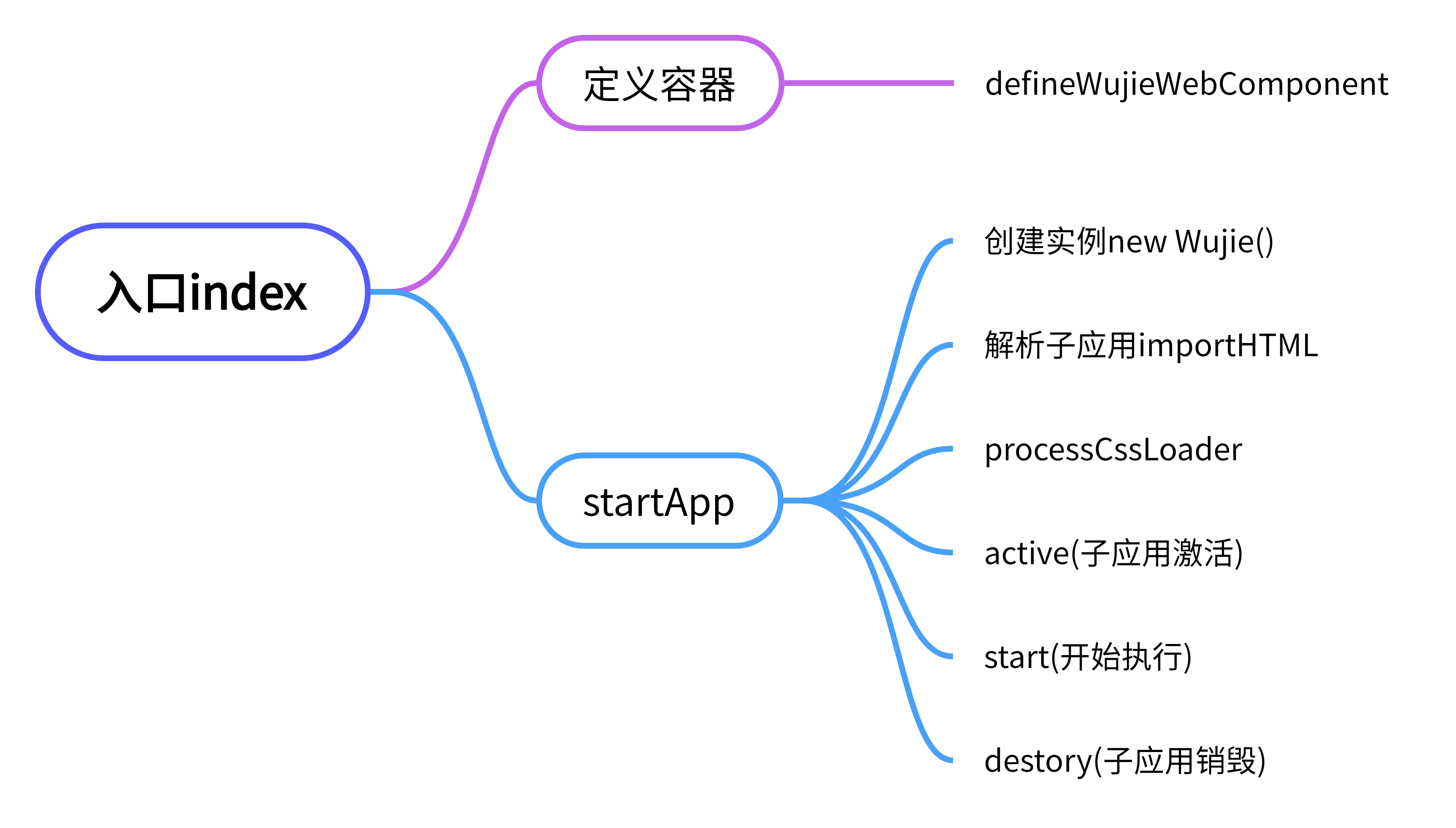
3 入口defineWujieWebComponent和StartApp
首先从入口文件index看起,defineWujieWebComponent
1import { defineWujieWebComponent } from "./shadow";
2// 定义webComponent容器
3defineWujieWebComponent();
4
5// 定义webComponent  存在shadow.ts 文件中
6export function defineWujieWebComponent() {
7  class WujieApp extends HTMLElement {
8    connectedCallback(){
9      if (this.shadowRoot) return;
10      const shadowRoot = this.attachShadow({ mode: "open" });
11      const sandbox = getWujieById(this.getAttribute(WUJIE_DATA_ID));
12      patchElementEffect(shadowRoot, sandbox.iframe.contentWindow);
13      sandbox.shadowRoot = shadowRoot;
14    }
15    disconnectedCallback() {
16      const sandbox = getWujieById(this.getAttribute(WUJIE_DATA_ID));
17      sandbox?.unmount();
18    }
19  }
20  customElements?.define("wujie-app", WujieApp);
21}
22
23
startApp方法
1startApp(options) {
2  const newSandbox = new WuJie({ name, url, attrs, degradeAttrs, fiber, degrade, plugins, lifecycles });
3  const { template, getExternalScripts, getExternalStyleSheets } = await importHTML({
4    url,
5    html,
6    opts: {
7      fetch: fetch || window.fetch,
8      plugins: newSandbox.plugins,
9      loadError: newSandbox.lifecycles.loadError,
10      fiber,
11    },
12  });
13  const processedHtml = await processCssLoader(newSandbox, template, getExternalStyleSheets);
14  await newSandbox.active({ url, sync, prefix, template: processedHtml, el, props, alive, fetch, replace });
15  await newSandbox.start(getExternalScripts);
16  return newSandbox.destroy;
17
18
19
20
4 实例化
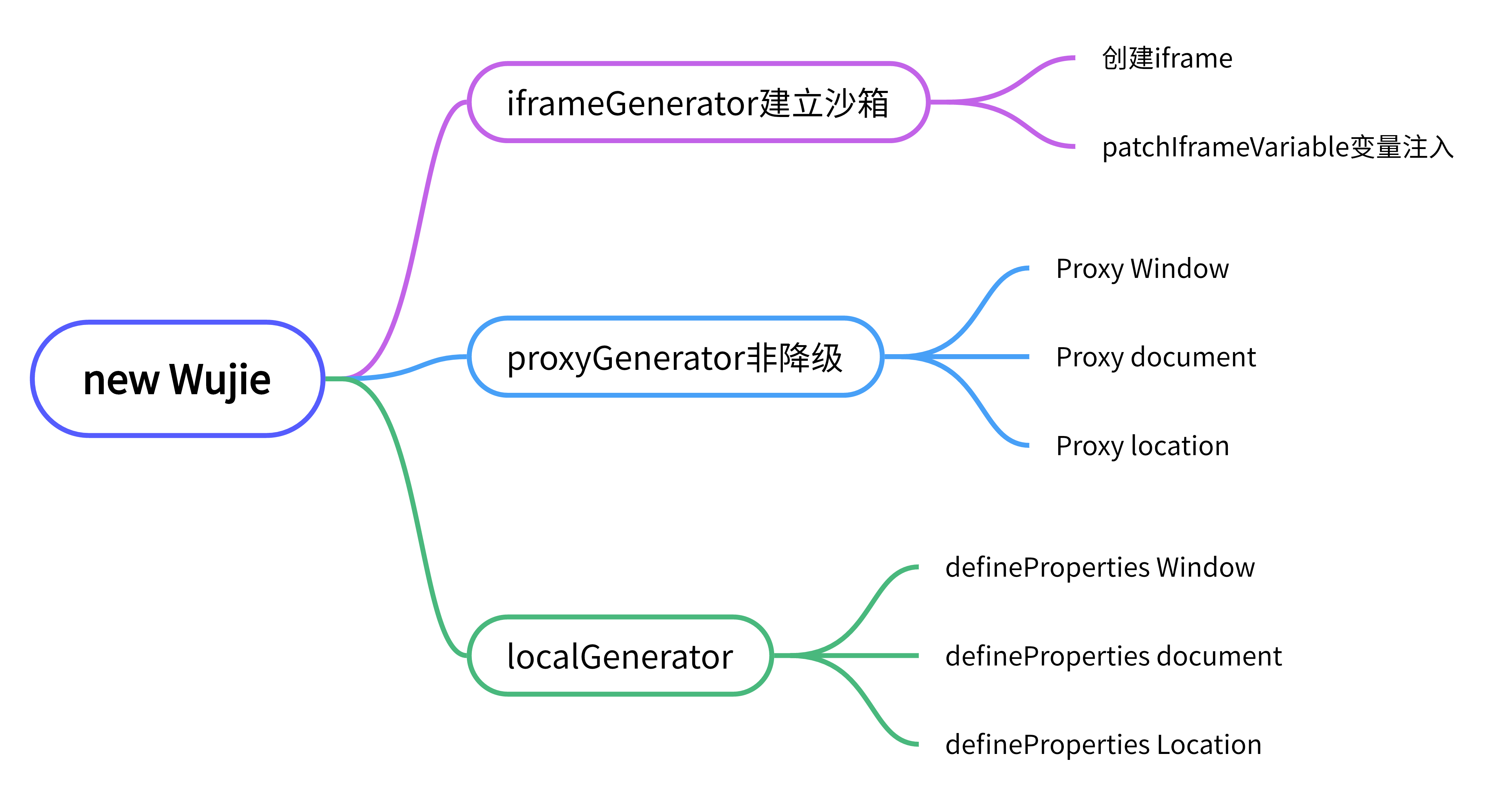
4-1, wujie (sandbox.ts)
1// wujie
2class wujie {
3  constructor(options) {
4    /** iframeGenerator在 iframe.ts中**/
5    this.iframe = iframeGenerator(this, attrs, mainHostPath, appHostPath, appRoutePath);
6
7    if (this.degrade) { // 降级模式
8      const { proxyDocument, proxyLocation } = localGenerator(this.iframe, urlElement, mainHostPath, appHostPath);
9      this.proxyDocument = proxyDocument;
10      this.proxyLocation = proxyLocation;
11    } else {           // 非降级模式
12      const { proxyWindow, proxyDocument, proxyLocation } = proxyGenerator();
13      this.proxy = proxyWindow;
14      this.proxyDocument = proxyDocument;
15      this.proxyLocation = proxyLocation;
16    }
17    this.provide.location = this.proxyLocation;
18    addSandboxCacheWithWujie(this.id, this);
19  }
20}
21
22
4-2.非降级Proxygenerator
非降级模式window、document、location代理
window代理拦截,修改this指向
1export function proxyGenerator(
2  iframe: HTMLIFrameElement,
3  urlElement: HTMLAnchorElement,
4  mainHostPath: string,
5  appHostPath: string
6): {
7  proxyWindow: Window;
8  proxyDocument: Object;
9  proxyLocation: Object;
10} {
11  const proxyWindow = new Proxy(iframe.contentWindow, {
12    get: (target: Window, p: PropertyKey): any => {
13      // location进行劫持
14      /*xxx*/
15      // 修正this指针指向
16      return getTargetValue(target, p);
17    },
18    set: (target: Window, p: PropertyKey, value: any) => {
19      checkProxyFunction(value);
20      target[p] = value;
21      return true;
22    },
23    /**其他方法属性**/
24  });
25
26  // proxy document
27  const proxyDocument = new Proxy(
28    {},
29    {
30      get: function (_fakeDocument, propKey) {
31        const document = window.document;
32        const { shadowRoot, proxyLocation } = iframe.contentWindow.__WUJIE;
33        const rawCreateElement = iframe.contentWindow.__WUJIE_RAW_DOCUMENT_CREATE_ELEMENT__;
34        const rawCreateTextNode = iframe.contentWindow.__WUJIE_RAW_DOCUMENT_CREATE_TEXT_NODE__;
35        // need fix
36        /* 包括元素创建,元素选择操作等
37         createElement,createTextNode, documentURI,URL,querySelector,querySelectorAll
38         documentElement,scrollingElement ,forms,images,links等等
39        */
40        // from shadowRoot
41        if (propKey === "getElementById") {
42          return new Proxy(shadowRoot.querySelector, {
43            // case document.querySelector.call
44            apply(target, ctx, args) {
45              if (ctx !== iframe.contentDocument) {
46                return ctx[propKey]?.apply(ctx, args);
47              }
48              return target.call(shadowRoot, `[id="${args[0]}"]`);
49            },
50          });
51        }
52      },
53    }
54  );
55
56  // proxy location
57  const proxyLocation = new Proxy(
58    {},
59    {
60      get: function (_fakeLocation, propKey) {
61        const location = iframe.contentWindow.location;
62        if (
63          propKey === "host" || propKey === "hostname" || propKey === "protocol" || propKey === "port" ||
64          propKey === "origin"
65        ) {
66          return urlElement[propKey];
67        }
68        /** 拦截相关propKey, 返回对应lication内容
69        propKey =="href","reload","replace"
70        **/
71        return getTargetValue(location, propKey);
72      },
73      set: function (_fakeLocation, propKey, value) {
74        // 如果是跳转链接的话重开一个iframe
75        if (propKey === "href") {
76          return locationHrefSet(iframe, value, appHostPath);
77        }
78        iframe.contentWindow.location[propKey] = value;
79        return true;
80      }
81    }
82  );
83  return { proxyWindow, proxyDocument, proxyLocation };
84}
85
86
87
4-3,降级模式localGenerator
1export function localGenerator(
2){
3  // 代理 document
4  Object.defineProperties(proxyDocument, {
5    createElement: {
6      get: () => {
7        return function (...args) {
8          const element = rawCreateElement.apply(iframe.contentDocument, args);
9          patchElementEffect(element, iframe.contentWindow);
10          return element;
11        };
12      },
13    },
14  });
15  // 普通处理
16  const {
17    modifyLocalProperties,
18    modifyProperties,
19    ownerProperties,
20    shadowProperties,
21    shadowMethods,
22    documentProperties,
23    documentMethods,
24  } = documentProxyProperties;
25  modifyProperties
26    .filter((key) => !modifyLocalProperties.includes(key))
27    .concat(ownerProperties, shadowProperties, shadowMethods, documentProperties, documentMethods)
28    .forEach((key) => {
29      Object.defineProperty(proxyDocument, key, {
30        get: () => {
31          const value = sandbox.document?.[key];
32          return isCallable(value) ? value.bind(sandbox.document) : value;
33        },
34      });
35    });
36
37  // 代理 location
38  const proxyLocation = {};
39  const location = iframe.contentWindow.location;
40  const locationKeys = Object.keys(location);
41  const constantKey = ["host", "hostname", "port", "protocol", "port"];
42  constantKey.forEach((key) => {
43    proxyLocation[key] = urlElement[key];
44  });
45  Object.defineProperties(proxyLocation, {
46    href: {
47      get: () => location.href.replace(mainHostPath, appHostPath),
48      set: (value) => {
49        locationHrefSet(iframe, value, appHostPath);
50      },
51    },
52    reload: {
53      get() {
54        warn(WUJIE_TIPS_RELOAD_DISABLED);
55        return () => null;
56      },
57    },
58  });
59  return { proxyDocument, proxyLocation };
60}
61
62
实例化化主要是建立起js运行时的沙箱iframe, 通过非降级模式下proxy和降级模式下对document,location,window等全局操作属性的拦截修改将其和对应的js沙箱操作关联起来
5 importHTML入口文件解析
importHtml方法(entry.ts)
1export default function importHTML(params: {
2  url: string;
3  html?: string;
4  opts: ImportEntryOpts;
5}): Promise<htmlParseResult> {
6  /*xxxx*/
7  const getHtmlParseResult = (url, html, htmlLoader) =>
8    (html
9      ? Promise.resolve(html)
10      : fetch(url).then( /** 使用fetch Api 加载子应用入口**/
11          (response) => response.text(),
12          (e) => {
13            embedHTMLCache[url] = null;
14            loadError?.(url, e);
15            return Promise.reject(e);
16          }
17        )
18    ).then((html) => {
19      const assetPublicPath = getPublicPath(url);
20      const { template, scripts, styles } = processTpl(htmlLoader(html), assetPublicPath);
21      return {
22        template: template,
23        assetPublicPath,
24        getExternalScripts: () =>
25          getExternalScripts(
26            scripts
27              .filter((script) => !script.src || !isMatchUrl(script.src, jsExcludes))
28              .map((script) => ({ ...script, ignore: script.src && isMatchUrl(script.src, jsIgnores) })),
29            fetch,
30            loadError,
31            fiber
32          ),
33        getExternalStyleSheets: () =>
34          getExternalStyleSheets(
35            styles
36              .filter((style) => !style.src || !isMatchUrl(style.src, cssExcludes))
37              .map((style) => ({ ...style, ignore: style.src && isMatchUrl(style.src, cssIgnores) })),
38            fetch,
39            loadError
40          ),
41      };
42    });
43
44  if (opts?.plugins.some((plugin) => plugin.htmlLoader)) {
45    return getHtmlParseResult(url, html, htmlLoader);
46    // 没有html-loader可以做缓存
47  } else {
48    return embedHTMLCache[url] || (embedHTMLCache[url] = getHtmlParseResult(url, html, htmlLoader));
49  }
50}
51
52
importHTML结构如图:

注意点: 通过Fetch url加载子应用资源,这里也是需要子应用支持跨域设置的原因
6 CssLoader和样式加载优化
1export async function processCssLoader(
2  sandbox: Wujie,
3  template: string,
4  getExternalStyleSheets: () => StyleResultList
5): Promise<string> {
6  const curUrl = getCurUrl(sandbox.proxyLocation);
7  /** css-loader */
8  const composeCssLoader = compose(sandbox.plugins.map((plugin) => plugin.cssLoader));
9  const processedCssList: StyleResultList = getExternalStyleSheets().map(({ src, ignore, contentPromise }) => ({
10    src,
11    ignore,
12    contentPromise: contentPromise.then((content) => composeCssLoader(content, src, curUrl)),
13  }));
14  const embedHTML = await getEmbedHTML(template, processedCssList);
15  return sandbox.replace ? sandbox.replace(embedHTML) : embedHTML;
16}
17
18

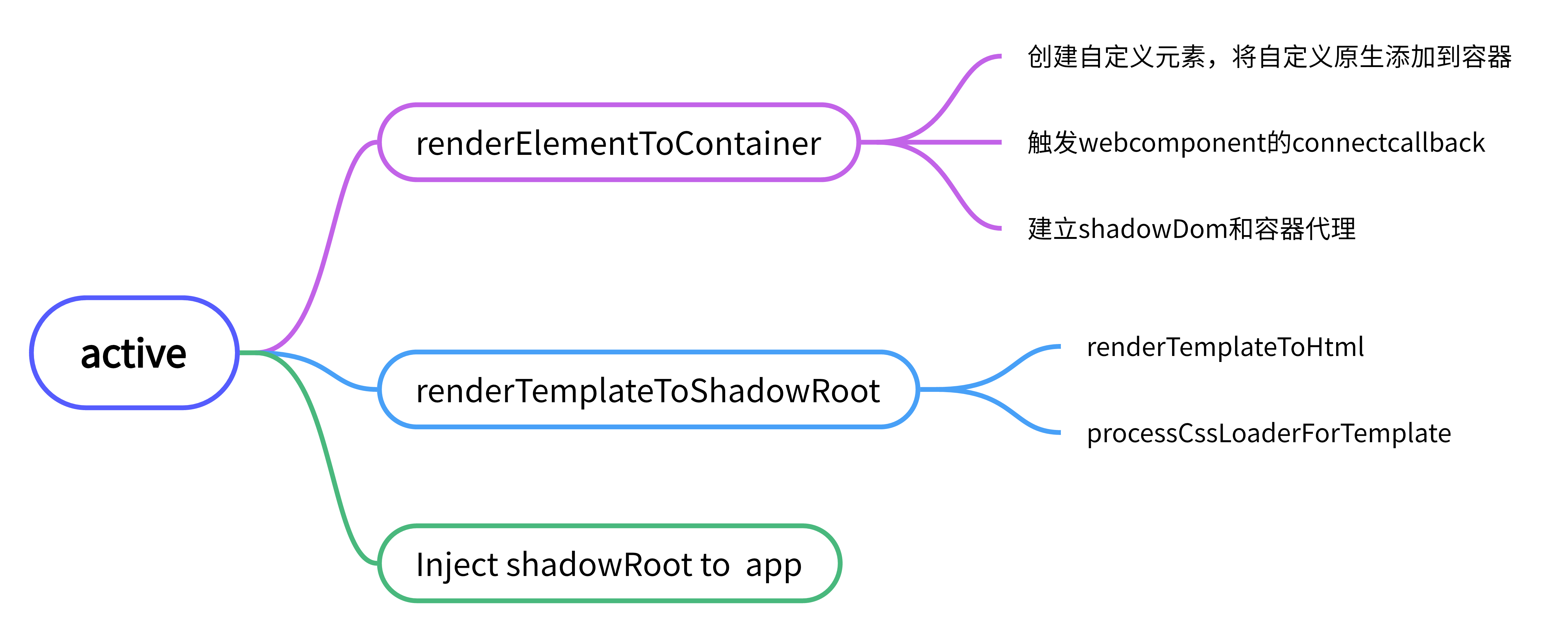
7 子应用active
active方法主要用于做 子应用激活, 同步路由,动态修改iframe的fetch, 准备shadow, 准备子应用注入
7-1, active方法(sandbox.ts)
1public async active(options){
2    /**  options的检查  **/
3    // 处理子应用自定义fetch
4    // TODO fetch检验合法性
5    const iframeWindow = this.iframe.contentWindow;
6    iframeWindow.fetch = iframeFetch;
7    this.fetch = iframeFetch;
8
9
10    // 处理子应用路由同步
11    if (this.execFlag && this.alive) {
12      // 当保活模式下子应用重新激活时,只需要将子应用路径同步回主应用
13      syncUrlToWindow(iframeWindow);
14    } else {
15      // 先将url同步回iframe,然后再同步回浏览器url
16      syncUrlToIframe(iframeWindow);
17      syncUrlToWindow(iframeWindow);
18    }
19
20    // inject template
21    this.template = template ?? this.template;
22
23    /* 降级处理 */
24    if (this.degrade) {
25      return;
26    }
27
28    if (this.shadowRoot) {
29      this.el = renderElementToContainer(this.shadowRoot.host, el);
30      if (this.alive) return;
31    } else {
32      // 预执行无容器,暂时插入iframe内部触发Web Component的connect
33      // rawDocumentQuerySelector.call(iframeWindow.document, "body") 相当于Document.prototype.querySelector('body')
34      const iframeBody = rawDocumentQuerySelector.call(iframeWindow.document, "body") as HTMLElement;
35
36      this.el = renderElementToContainer(createWujieWebComponent(this.id), el ?? iframeBody);
37    }
38
39    await renderTemplateToShadowRoot(this.shadowRoot, iframeWindow, this.template);
40    this.patchCssRules();
41
42    // inject shadowRoot to app
43    this.provide.shadowRoot = this.shadowRoot;
44  }
45
46
7-2,createWujieWebComponent, renderElementToContainer, renderTemplateToShadowRoot
1// createWujieWebComponent
2export function createWujieWebComponent(id: string): HTMLElement {
3  const contentElement = window.document.createElement("wujie-app");
4  contentElement.setAttribute(WUJIE_DATA_ID, id);
5  contentElement.classList.add(WUJIE_IFRAME_CLASS);
6  return contentElement;
7}
8
9/**
10 * 将准备好的内容插入容器
11 */
12export function renderElementToContainer(
13  element: Element | ChildNode,
14  selectorOrElement: string | HTMLElement
15): HTMLElement {
16  const container = getContainer(selectorOrElement);
17  if (container && !container.contains(element)) {
18    // 有 loading 无需清理,已经清理过了
19    if (!container.querySelector(`div[${LOADING_DATA_FLAG}]`)) {
20      // 清除内容
21      clearChild(container);
22    }
23    // 插入元素
24    if (element) {
25      //  rawElementAppendChild = HTMLElement.prototype.appendChild;
26      rawElementAppendChild.call(container, element);
27    }
28  }
29  return container;
30}
31/**
32 * 将template渲染到shadowRoot
33 */
34export async function renderTemplateToShadowRoot(
35  shadowRoot: ShadowRoot,
36  iframeWindow: Window,
37  template: string
38): Promise<void> {
39  const html = renderTemplateToHtml(iframeWindow, template);
40  // 处理 css-before-loader 和 css-after-loader
41  const processedHtml = await processCssLoaderForTemplate(iframeWindow.__WUJIE, html);
42  // change ownerDocument
43  shadowRoot.appendChild(processedHtml);
44  const shade = document.createElement("div");
45  shade.setAttribute("style", WUJIE_SHADE_STYLE);
46  processedHtml.insertBefore(shade, processedHtml.firstChild);
47  shadowRoot.head = shadowRoot.querySelector("head");
48  shadowRoot.body = shadowRoot.querySelector("body");
49
50  // 修复 html parentNode
51  Object.defineProperty(shadowRoot.firstChild, "parentNode", {
52    enumerable: true,
53    configurable: true,
54    get: () => iframeWindow.document,
55  });
56
57  patchRenderEffect(shadowRoot, iframeWindow.__WUJIE.id, false);
58}
59/**
60 * 将template渲染成html元素
61 */
62function renderTemplateToHtml(iframeWindow: Window, template: string): HTMLHtmlElement {
63  const sandbox = iframeWindow.__WUJIE;
64  const { head, body, alive, execFlag } = sandbox;
65  const document = iframeWindow.document;
66  let html = document.createElement("html");
67  html.innerHTML = template;
68  // 组件多次渲染,head和body必须一直使用同一个来应对被缓存的场景
69  if (!alive && execFlag) {
70    html = replaceHeadAndBody(html, head, body);
71  } else {
72    sandbox.head = html.querySelector("head");
73    sandbox.body = html.querySelector("body");
74  }
75  const ElementIterator = document.createTreeWalker(html, NodeFilter.SHOW_ELEMENT, null, false);
76  let nextElement = ElementIterator.currentNode as HTMLElement;
77  while (nextElement) {
78    patchElementEffect(nextElement, iframeWindow);
79    const relativeAttr = relativeElementTagAttrMap[nextElement.tagName];
80    const url = nextElement[relativeAttr];
81    if (relativeAttr) nextElement.setAttribute(relativeAttr, getAbsolutePath(url, nextElement.baseURI || ""));
82    nextElement = ElementIterator.nextNode() as HTMLElement;
83  }
84  if (!html.querySelector("head")) {
85    const head = document.createElement("head");
86    html.appendChild(head);
87  }
88  if (!html.querySelector("body")) {
89    const body = document.createElement("body");
90    html.appendChild(body);
91  }
92  return html;
93}
94/*
95// 保存原型方法
96// 子应用的Document.prototype已经被改写了
97export const rawElementAppendChild = HTMLElement.prototype.appendChild;
98export const rawElementRemoveChild = HTMLElement.prototype.removeChild;
99export const rawHeadInsertBefore = HTMLHeadElement.prototype.insertBefore;
100export const rawBodyInsertBefore = HTMLBodyElement.prototype.insertBefore;
101export const rawAddEventListener = Node.prototype.addEventListener;
102export const rawRemoveEventListener = Node.prototype.removeEventListener;
103export const rawWindowAddEventListener = window.addEventListener;
104export const rawWindowRemoveEventListener = window.removeEventListener;
105export const rawAppendChild = Node.prototype.appendChild;
106export const rawDocumentQuerySelector = window.__POWERED_BY_WUJIE__
107  ? window.__WUJIE_RAW_DOCUMENT_QUERY_SELECTOR__
108  : Document.prototype.querySelector;
109*/
110
111
112
8 子应用启动执行start
start 开始执行子应用,运行js,执行无界js插件列表
1public async start(getExternalScripts: () => ScriptResultList): Promise<void> {
2    this.execFlag = true;
3    // 执行脚本
4    const scriptResultList = await getExternalScripts();
5    const iframeWindow = this.iframe.contentWindow;
6    // 标志位,执行代码前设置
7    iframeWindow.__POWERED_BY_WUJIE__ = true;
8    // 用户自定义代码前
9    const beforeScriptResultList: ScriptObjectLoader[] = getPresetLoaders("jsBeforeLoaders", this.plugins);
10    // 用户自定义代码后
11    const afterScriptResultList: ScriptObjectLoader[] = getPresetLoaders("jsAfterLoaders", this.plugins);
12    // 同步代码
13    const syncScriptResultList: ScriptResultList = [];
14    // async代码无需保证顺序,所以不用放入执行队列
15    const asyncScriptResultList: ScriptResultList = [];
16    // defer代码需要保证顺序并且DOMContentLoaded前完成,这里统一放置同步脚本后执行
17    const deferScriptResultList: ScriptResultList = [];
18    scriptResultList.forEach((scriptResult) => {
19      if (scriptResult.defer) deferScriptResultList.push(scriptResult);
20      else if (scriptResult.async) asyncScriptResultList.push(scriptResult);
21      else syncScriptResultList.push(scriptResult);
22    });
23
24    // 插入代码前
25    beforeScriptResultList.forEach((beforeScriptResult) => {
26      this.execQueue.push(() =>
27        this.fiber
28          ? requestIdleCallback(() => insertScriptToIframe(beforeScriptResult, iframeWindow))
29          : insertScriptToIframe(beforeScriptResult, iframeWindow)
30      );
31    });
32    // 同步代码
33    syncScriptResultList.concat(deferScriptResultList).forEach((scriptResult) => {
34      /**xxxxx**/
35    });
36
37    // 异步代码
38    asyncScriptResultList.forEach((scriptResult) => {
39      scriptResult.contentPromise.then((content) => {
40        this.fiber
41          ? requestIdleCallback(() => insertScriptToIframe({ ...scriptResult, content }, iframeWindow))
42          : insertScriptToIframe({ ...scriptResult, content }, iframeWindow);
43      });
44    });
45
46    //框架主动调用mount方法
47    this.execQueue.push(this.fiber ? () => requestIdleCallback(() => this.mount()) : () => this.mount());
48
49    //触发 DOMContentLoaded 事件
50    const domContentLoadedTrigger = () => {
51      eventTrigger(iframeWindow.document, "DOMContentLoaded");
52      eventTrigger(iframeWindow, "DOMContentLoaded");
53      this.execQueue.shift()?.();
54    };
55    this.execQueue.push(this.fiber ? () => requestIdleCallback(domContentLoadedTrigger) : domContentLoadedTrigger);
56
57    // 插入代码后
58    afterScriptResultList.forEach((afterScriptResult) => {
59      /**xxxxx**/
60    });
61
62    //触发 loaded 事件
63    const domLoadedTrigger = () => {
64      eventTrigger(iframeWindow.document, "readystatechange");
65      eventTrigger(iframeWindow, "load");
66      this.execQueue.shift()?.();
67    };
68    this.execQueue.push(this.fiber ? () => requestIdleCallback(domLoadedTrigger) : domLoadedTrigger);
69    // 由于没有办法准确定位是哪个代码做了mount,保活、重建模式提前关闭loading
70    if (this.alive || !isFunction(this.iframe.contentWindow.__WUJIE_UNMOUNT)) removeLoading(this.el);
71    this.execQueue.shift()();
72
73    // 所有的execQueue队列执行完毕,start才算结束,保证串行的执行子应用
74    return new Promise((resolve) => {
75      this.execQueue.push(() => {
76        resolve();
77        this.execQueue.shift()?.();
78      });
79    });
80  }
81
82
1// getExternalScripts
2export function getExternalScripts(
3  scripts: ScriptObject[],
4  fetch: (input: RequestInfo, init?: RequestInit) => Promise<Response> = defaultFetch,
5  loadError: loadErrorHandler,
6  fiber: boolean
7): ScriptResultList {
8  // module should be requested in iframe
9  return scripts.map((script) => {
10    const { src, async, defer, module, ignore } = script;
11    let contentPromise = null;
12    // async
13    if ((async || defer) && src && !module) {
14      contentPromise = new Promise((resolve, reject) =>
15        fiber
16          ? requestIdleCallback(() => fetchAssets(src, scriptCache, fetch, false, loadError).then(resolve, reject))
17          : fetchAssets(src, scriptCache, fetch, false, loadError).then(resolve, reject)
18      );
19      // module || ignore
20    } else if ((module && src) || ignore) {
21      contentPromise = Promise.resolve("");
22      // inline
23    } else if (!src) {
24      contentPromise = Promise.resolve(script.content);
25      // outline
26    } else {
27      contentPromise = fetchAssets(src, scriptCache, fetch, false, loadError);
28    }
29    return { ...script, contentPromise };
30  });
31}
32
33// 加载assets资源
34// 如果存在缓存则从缓存中获取
35const fetchAssets = (
36  src: string,
37  cache: Object,
38  fetch: (input: RequestInfo, init?: RequestInit) => Promise<Response>,
39  cssFlag?: boolean,
40  loadError?: loadErrorHandler
41) =>
42  cache[src] ||
43  (cache[src] = fetch(src)
44    .then((response) => {
45     /**status > 400按error处理**/
46      return response.text();
47    })
48 }));
49
50// insertScriptToIframe
51export function insertScriptToIframe(
52  scriptResult: ScriptObject | ScriptObjectLoader,
53  iframeWindow: Window,
54  rawElement?: HTMLScriptElement
55) {
56  const { src, module, content, crossorigin, crossoriginType, async, callback, onload } =
57    scriptResult as ScriptObjectLoader;
58  const scriptElement = iframeWindow.document.createElement("script");
59  const nextScriptElement = iframeWindow.document.createElement("script");
60  const { replace, plugins, proxyLocation } = iframeWindow.__WUJIE;
61  const jsLoader = getJsLoader({ plugins, replace });
62  let code = jsLoader(content, src, getCurUrl(proxyLocation));
63
64  // 内联脚本处理
65  if (content) {
66    // patch location
67    if (!iframeWindow.__WUJIE.degrade && !module) {
68      code = `(function(window, self, global, location) {
69      ${code}
70}).bind(window.__WUJIE.proxy)(
71  window.__WUJIE.proxy,
72  window.__WUJIE.proxy,
73  window.__WUJIE.proxy,
74  window.__WUJIE.proxyLocation,
75);`;
76    }
77  } else {
78    // 外联自动触发onload
79    onload && (scriptElement.onload = onload as (this: GlobalEventHandlers, ev: Event) => any);
80    src && scriptElement.setAttribute("src", src);
81    crossorigin && scriptElement.setAttribute("crossorigin", crossoriginType);
82  }
83  // esm 模块加载
84  module && scriptElement.setAttribute("type", "module");
85  scriptElement.textContent = code || "";
86  // 执行script队列检测
87  nextScriptElement.textContent =
88    "if(window.__WUJIE.execQueue && window.__WUJIE.execQueue.length){ window.__WUJIE.execQueue.shift()()}";
89
90  const container = rawDocumentQuerySelector.call(iframeWindow.document, "head");
91  if (/^<!DOCTYPE html/i.test(code)) {
92    error(WUJIE_TIPS_SCRIPT_ERROR_REQUESTED, scriptResult);
93    return !async && container.appendChild(nextScriptElement);
94  }
95  container.appendChild(scriptElement);
96
97  // 调用回调
98  callback?.(iframeWindow);
99  // 执行 hooks
100  execHooks(plugins, "appendOrInsertElementHook", scriptElement, iframeWindow, rawElement);
101  // 外联转内联调用手动触发onload
102  content && onload?.();
103  // async脚本不在执行队列,无需next操作
104  !async && container.appendChild(nextScriptElement);
105}
106
107
108
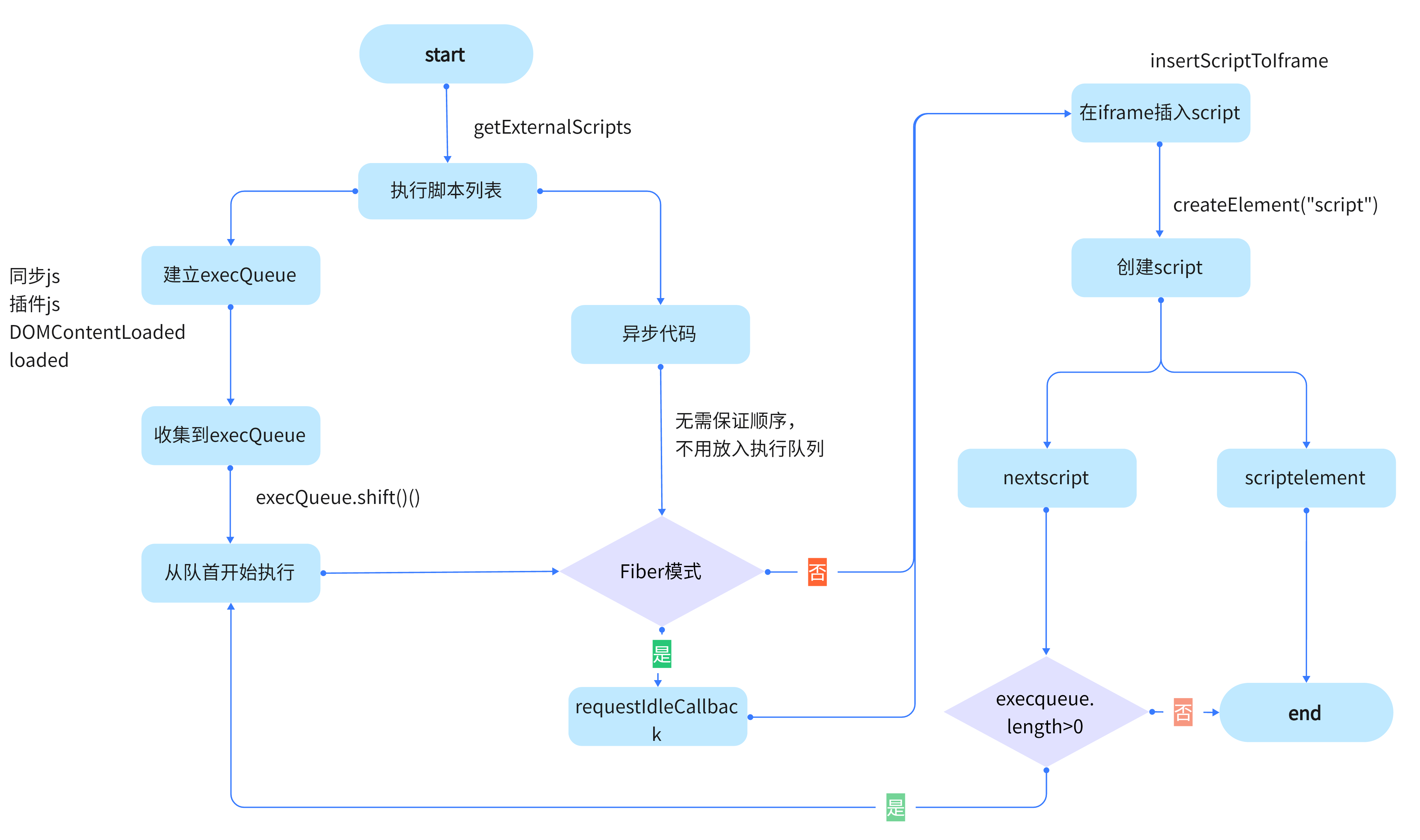
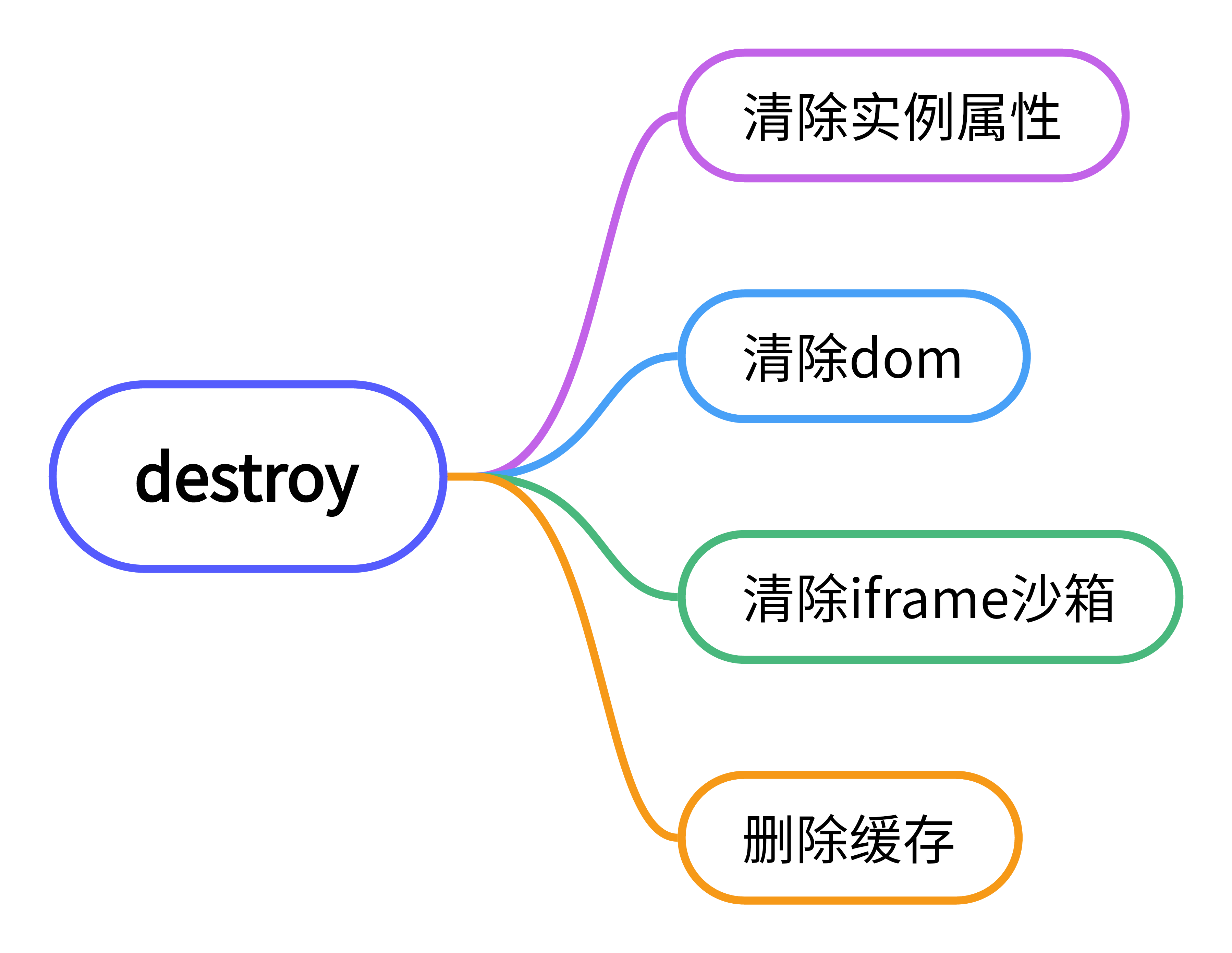
9 子应用销毁
1/** 销毁子应用 */
2  public destroy() {
3    this.bus.$clear();
4    // thi.xxx = null;
5    // 清除 dom
6    if (this.el) {
7      clearChild(this.el);
8      this.el = null;
9    }
10    // 清除 iframe 沙箱
11    if (this.iframe) {
12      this.iframe.parentNode?.removeChild(this.iframe);
13    }
14    // 删除缓存
15    deleteWujieById(this.id);
16  }
17
18
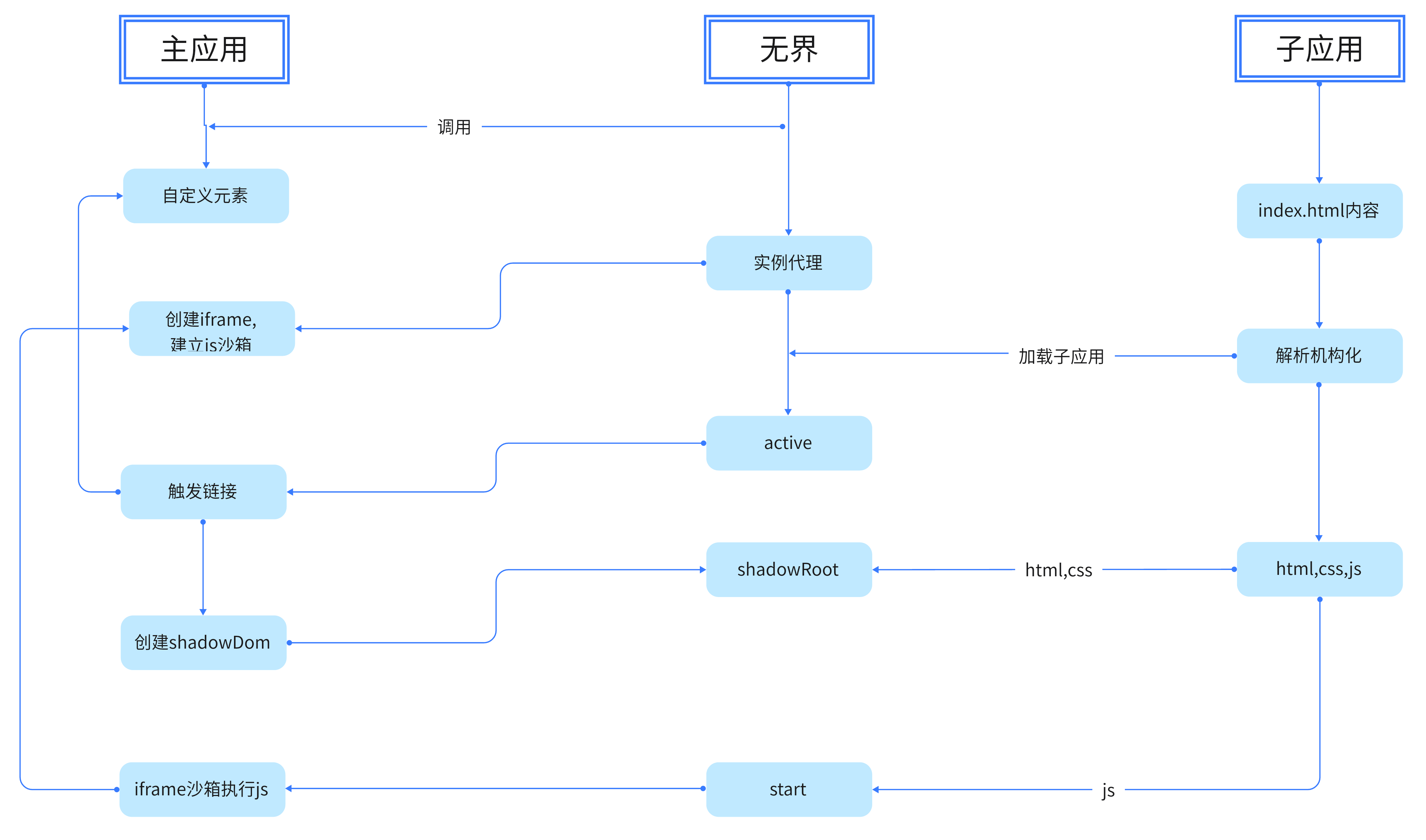
主应用,无界,子应用之间的关系
主应用创建自定义元素和创建iframe元素
无界将子应用解析后的html,css加入到自定义元素,进行元素和样式隔离
同时建立iframe代理,将iframe和自定义元素shadowDom进行关联,
将子应用中的js放入iframe执行,iframe中js执行的结果被代理到修改shadowDom结构和数据
作者:京东物流 张燕燕、刘海鼎
来源:京东云开发者社区 自猿其说Tech 转载请注明来源