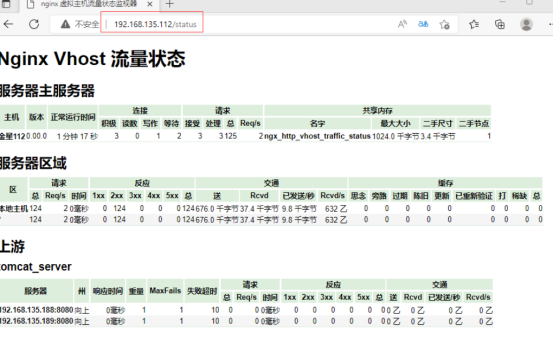
最近闲来无事,租了一个服务器,很便宜,用来学习Linux 一,监控nginx主要用到以下三个模块 1,nginx-module-vts: Nginx virtual host traffic status module, Nginx 的监控模块,能够提供JSON格式的数据产出。
2,nginx-vts-exporter: Simple server that scrapes Nginx vts stats and exports them via HTTP for Prome theus consumption. 主要用于收集nginx的监控数据,并给prometheus提供监控接口,默认端口号为9913
3,prometheus:监控nginx-vts-exporter提供的nginx数据,并且存储在时序数据库中,可以使用rromQL对时序数据进行查询和聚合。
二,安装流程 1,上传并且解压 上传nginx-module-vts-master.zip软件包并解压。
unzip nginx-module-vts-master.zip
mv nginx-module-vts-master /usr/local/
2,安装nginx依赖环境
yum -y install gcc gCC-C++ pcre pcre-devel zlib zl ib-devel openssl openssl-devel
3,编译安装nginx
cd /usr/local/ nginx-1.22.0
./configure --prefix=/usr/local/nginx --add-module=/usr/local/nginx-module-vts-master/ make && make install
4,优化管理
ln -s /usr/local/nginx/sbin/nginx /usr/local/sbin
5,检查开启的模块
nginx -V log_format main '{ "@timestamp": "$time_local", ' '"@fields": { ' '"uri":"$request_uri",' '"url":"$uri",' '"upstream_addr":"$upstream_addr",' '"remote_addr": "$remote_addr", ' '"remote_user": "$remote_user", ' '"body_bytes_sent": "$body_bytes_sent", ' '"host":"$host",' '"server_addr":"$server_addr",' '"request_time": "$request_time", ' '"request_time":"$request_time",' '"status":"$status",' '"request": "$request", ' '"request_method": "$request_method", ' '"size":$body_bytes_sent,' '"upstream_time":"$upstream_response_time"' '"http_referrer": "$http_referer", ' '"body_bytes_sent":"$body_bytes_sent", ' '"http_x_forwarded_for": "$http_x_forwarded_for", ' '"http_user_agent": "$http_user_agent" } }';
在server模块中,添加一直llocation 指向以/status结尾的,跳转。
检查并且关闭防火墙
七, 访问该模块
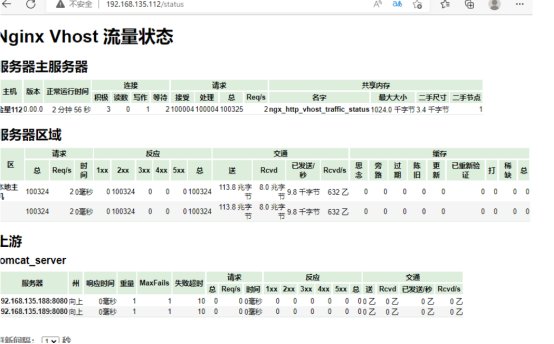
八,使用ab压测,观察vts监控流量状态