
文件编程
文件描述符 fd --->>>数字(文件的身份证,代表文件身份),通过 fd 可找到正在操作或需要打开的文件。
基本函数操作:
1)打开/创建文件
1int open (const char* pathname, int flag, mode_t mode)
2    成功:返回文件的fd        失败:返回-1
3    文件路径    打开标志    文件权限
4eg: fd = open("/home/S3-app/test.c", O_RDWR|O_CREAT, 0777);
2)读文件
1ssize_t read(int fd, void *buf, ssize_t count)
2    成功:返回读取字节数    失败:-1
3    要读取的文件fd    读取的数据存到buf指向的空间    希望读取的字节数
4    int fd;    char buf[1024];
5eg: read(fd, buf, 1024);
3)写文件
1ssize_t write(int fd,const void *buf, ssize_t count)
2    成功:返回写入字节数    失败:-1
3    要写入的文件fd    指向要写入的数据的位置地址    希望写入的字节数
4    int fd;    char buf[1024];
5eg: write(fd, "hello", 6);
发送、接收文件
1//发送文件内容    先把要发送d 文件数据读到buf中->再通过buf写入发送的目标文件中
2            while((count=read(fd,(void *)buf,1024))>0)    //buf:读取来的数据存到buf指向的空间  希望读取的字节数 返回读取的字节数
3            {
4                 write(new_fd, &buf,count);   //&buf->整个数据数组
5            }
6            close(fd);
7
8//接收文件内容    先把要接收的数据读到buf中->再通过buf写入接收文件中
9            while((count=read(new_fd,(void *)buf,1024))>0)//buf:读取来的数据存到buf指向的空间  希望读取的字节数 返回读取的字节数
10            {
11                write(fd, &buf,count);    //&buf->整个数据数组         tmpsize += count;          if(tmpsize == filesize) break;            }          clode(fd);
Linux时间编程
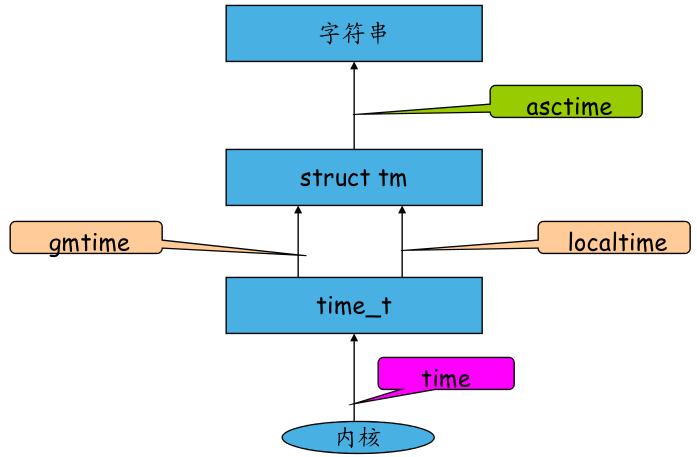
1/*  time_t time(NULL)    日历时间--从标准时间到现在的秒数*/
2time_t ctime = time(NULL);   //不保存数值地址
3printf("%d",ctime);   int型
4
5/*  struct tm *gmtime(time_t *ct)    格林威治时间--世界标准时间*/
6/*  struct tm *localtime(time_t *ct)    本地时间    (同上)*/
7struct tm *tm;        //结构体
8tm = gmtime(&ctime);
9printf("%d:%d",tm->tm_hour,tm->tm_min);  struct tm*结构体
10
11/*   char* asctime(const struct tm *tm)      以字符串方式显示 */
12char* asc;
13asc = asctime(tm);
14printf("%s", asc);   指针字符串