

飞书是字节跳动旗下一款企业级协同办公软件,本文将介绍如何基于飞书开放平台的身份验证能力,使用 Lua 实现企业级组织架构的登录认证网关。
登录流程
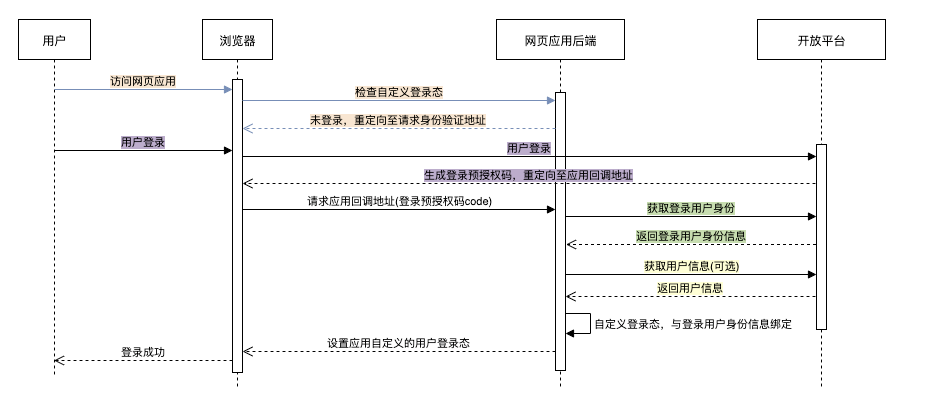
让我们首先看一下飞书第三方网站免登的整体流程:
第一步: 网页后端发现用户未登录,请求身份验证; 第二步: 用户登录后,开放平台生成登录预授权码,302跳转至重定向地址; 第三步: 网页后端调用获取登录用户身份校验登录预授权码合法性,获取到用户身份; 第四步: 如需其他用户信息,网页后端可调用获取用户信息(身份验证)。
Lua 实现
飞书接口部分实现
获取应用的 access_token
1function _M:get_app_access_token()
2    local url = "https://open.feishu.cn/open-apis/auth/v3/tenant_access_token/internal/"
3    local body = {
4        app_id = self.app_id,
5        app_secret = self.app_secret
6    }
7    local res, err = http_post(url, body, nil)
8    if not res then
9        return nil, err
10    end
11    if res.status ~= 200 then
12        return nil, res.body
13    end
14    local data = json.decode(res.body)
15    if data["code"] ~= 0 then
16        return nil, res.body
17    end
18    return data["tenant_access_token"]
19end
通过回调 code 获取登录用户信息
1function _M:get_login_user(code)
2    local app_access_token, err = self:get_app_access_token()
3    if not app_access_token then
4        return nil, "get app_access_token failed: " .. err
5    end
6    local url = "https://open.feishu.cn/open-apis/authen/v1/access_token"
7    local headers = {
8        Authorization = "Bearer " .. app_access_token
9    }
10    local body = {
11        grant_type = "authorization_code",
12        code = code
13    }
14    ngx.log(ngx.ERR, json.encode(body))
15    local res, err = http_post(url, body, headers)
16    if not res then
17        return nil, err
18    end
19    local data = json.decode(res.body)
20    if data["code"] ~= 0 then
21        return nil, res.body
22    end
23    return data["data"]
24end
获取用户详细信息
获取登录用户信息时无法获取到用户的部门信息,故这里需要使用登录用户信息中的 open_id 获取用户的详细信息,同时 user_access_token 也是来自于获取到的登录用户信息。
1function _M:get_user(user_access_token, open_id)
2    local url = "https://open.feishu.cn/open-apis/contact/v3/users/" .. open_id
3    local headers = {
4        Authorization = "Bearer " .. user_access_token
5    }
6    local res, err = http_get(url, nil, headers)
7    if not res then
8        return nil, err
9    end
10    local data = json.decode(res.body)
11    if data["code"] ~= 0 then
12        return nil, res.body
13    end
14    return data["data"]["user"], nil
15end
登录信息
JWT 登录凭证
我们使用 JWT 作为登录凭证,同时用于保存用户的 open_id 和 department_ids。
1-- 生成 token
2function _M:sign_token(user)
3    local open_id = user["open_id"]
4    if not open_id or open_id == "" then
5        return nil, "invalid open_id"
6    end
7    local department_ids = user["department_ids"]
8    if not department_ids or type(department_ids) ~= "table" then
9        return nil, "invalid department_ids"
10    end
11
12    return jwt:sign(
13        self.jwt_secret,
14        {
15            header = {
16                typ = "JWT",
17                alg = jwt_header_alg,
18                exp = ngx.time() + self.jwt_expire
19            },
20            payload = {
21                open_id = open_id,
22                department_ids = json.encode(department_ids)
23            }
24        }
25    )
26end
27
28-- 验证与解析 token
29function _M:verify_token()
30    local token = ngx.var.cookie_feishu_auth_token
31    if not token then
32        return nil, "token not found"
33    end
34
35    local result = jwt:verify(self.jwt_secret, token)
36    ngx.log(ngx.ERR, "jwt_obj: ", json.encode(result))
37    if result["valid"] then
38        local payload = result["payload"]
39        if payload["department_ids"] and payload["open_id"] then
40            return payload
41        end
42        return nil, "invalid token: " .. json.encode(result)
43    end
44    return nil, "invalid token: " .. json.encode(result)
45end
使用 Cookie 存储登录凭证
1ngx.header["Set-Cookie"] = self.cookie_key .. "=" .. token
组织架构白名单
我们在用户登录时获取用户的部门信息,或者在用户后续访问应用时解析登录凭证中的部门信息,根据设置的部门白名单,判断用户是否拥有访问应用的权限。
1-- 部门白名单配置
2_M.department_whitelist = {}
3
4function _M:check_user_access(user)
5    if type(self.department_whitelist) ~= "table" then
6        ngx.log(ngx.ERR, "department_whitelist is not a table")
7        return false
8    end
9    if #self.department_whitelist == 0 then
10        return true
11    end
12
13    local department_ids = user["department_ids"]
14    if not department_ids or department_ids == "" then
15        return false
16    end
17    if type(department_ids) ~= "table" then
18        department_ids = json.decode(department_ids)
19    end
20    for i=1, #department_ids do
21        if has_value(self.department_whitelist, department_ids[i]) then
22            return true
23        end
24    end
25    return false
26end
更多网关配置
同时支持 IP 黑名单和路由白名单配置。
1-- IP 黑名单配置
2_M.ip_blacklist = {}
3-- 路由白名单配置
4_M.uri_whitelist = {}
5
6function _M:auth()
7    local request_uri = ngx.var.uri
8    ngx.log(ngx.ERR, "request uri: ", request_uri)
9
10    if has_value(self.uri_whitelist, request_uri) then
11        ngx.log(ngx.ERR, "uri in whitelist: ", request_uri)
12        return
13    end
14
15    local request_ip = ngx.var.remote_addr
16    if has_value(self.ip_blacklist, request_ip) then
17        ngx.log(ngx.ERR, "forbided ip: ", request_ip)
18        return ngx.exit(ngx.HTTP_FORBIDDEN)
19    end
20
21    if request_uri == self.logout_uri then
22        return self:logout()
23    end
24
25    local payload, err = self:verify_token()
26    if payload then
27        if self:check_user_access(payload) then
28            return
29        end
30
31        ngx.log(ngx.ERR, "user access not permitted")
32        self:clear_token()
33        return self:sso()
34    end
35    ngx.log(ngx.ERR, "verify token failed: ", err)
36
37    if request_uri ~= self.callback_uri then
38        return self:sso()
39    end
40    return self:sso_callback()
41end
使用
本文就不赘述 OpenResty 的安装了,可以参考我的另一篇文章《在 Ubuntu 上使用源码安装 OpenResty》。
下载
1cd /path/to
2git clone git@github.com:ledgetech/lua-resty-http.git
3git clone git@github.com:SkyLothar/lua-resty-jwt.git
4git clone git@github.com:k8scat/lua-resty-feishu-auth.git
配置
1lua_package_path "/path/to/lua-resty-feishu-auth/lib/?.lua;/path/to/lua-resty-jwt/lib/?.lua;/path/to/lua-resty-http/lib/?.lua;/path/to/lua-resty-redis/lib/?.lua;/path/to/lua-resty-redis-lock/lib/?.lua;;";
2
3server {
4    access_by_lua_block {
5        local feishu_auth = require "resty.feishu_auth"
6        feishu_auth.app_id = ""
7        feishu_auth.app_secret = ""
8        feishu_auth.callback_uri = "/feishu_auth_callback"
9        feishu_auth.logout_uri = "/feishu_auth_logout"
10        feishu_auth.app_domain = "feishu-auth.example.com"
11
12        feishu_auth.jwt_secret = "thisisjwtsecret"
13
14        feishu_auth.ip_blacklist = {"47.1.2.3"}
15        feishu_auth.uri_whitelist = {"/"}
16        feishu_auth.department_whitelist = {"0"}
17
18        feishu_auth:auth()
19    }
20}
配置说明
app_id用于设置飞书企业自建应用的App IDapp_secret用于设置飞书企业自建应用的App Secretcallback_uri用于设置飞书网页登录后的回调地址(需在飞书企业自建应用的安全设置中设置重定向 URL)logout_uri用于设置登出地址app_domain用于设置访问域名(需和业务服务的访问域名一致)jwt_secret用于设置 JWT secretip_blacklist用于设置 IP 黑名单uri_whitelist用于设置地址白名单,例如首页不需要登录认证department_whitelist用于设置部门白名单(字符串)
应用权限说明
- 获取部门基础信息
- 获取部门组织架构信息
- 以应用身份读取通讯录
- 获取用户组织架构信息
- 获取用户基本信息
开源
本项目已完成且已在 GitHub 上开源:k8scat/lua-resty-feishu-auth,希望大家可以动动手指点个 Star,表示对本项目的肯定与支持!