
Hadoop生态圈-CentOs7.5单机部署ClickHouse
作者:尹正杰
版权声明:原创作品,谢绝转载!否则将追究法律责任。
到了新的公司,认识了新的同事,生产环境也得你去适应新的集群环境,我新入职的公司的大数据开发同时并不看好hbase,而是对clickhouse青睐有加,听他们口头把ClickHouse吹的那么的出神入化,听的我是有种迫不及待想要对它一探究竟。
最新的一手资料请参考官网:https://clickhouse.yandex/
一.ClickHouse的独特功能
1>.真正的面向列的DBMS
因为有些系统可以单独存储不同列的值,但由于它们针对其他场景进行了优化,因此无法有效地处理分析查询。例如HBase,BigTable,Cassandra和HyperTable。在这些系统中,您将获得大约每秒十万行的吞吐量,但不会达到每秒数亿行。
值得注意的是,ClickHouse是一个数据库管理系统,而不是一个数据库。ClickHouse允许在运行时创建表和数据库,加载数据和运行查询,而无需重新配置和重新启动服务器。
2>.适用于在线查询
低延迟意味着可以在没有延迟的情况下处理查询,而无需在加载用户界面页面的同一时间提前准备答案。换句话说,在线。
3>.数据复制和数据完整性支持
使用异步多主机复制。写入任何可用副本后,数据将分发到后台的所有剩余副本。系统在不同的副本上维护相同的数据。在大多数故障后自动执行恢复,在复杂情况下 - 半自动执行。
4>.支持近似计算
ClickHouse提供了各种交易性能准确度的方法:
4.1>.聚合函数,用于近似计算不同值,中位数和分位数的数量。
4.2>.基于数据的一部分(样本)运行查询并获得近似结果。在这种情况下,从磁盘中检索的数据比例较少。
4.2>.为有限数量的随机密钥运行聚合,而不是为所有密钥运行聚合。在数据中密钥分发的某些条件下,这在使用较少资源的同时提供了相当准确的结果。
5>.SQL支持
ClickHouse支持基于SQL的声明性查询语言,在许多情况下与SQL标准相同。支持的查询包括GROUP BY,ORDER BY,FROM,IN和JOIN子句中的子查询以及标量子查询。不支持从属子查询和窗口函数。
以上说明并非我个人对ClickHouse的夸张说法,而是摘自官方文档的说明,可能官网对其软件有一定的夸张手法在里面,官网文档请参考:https://clickhouse.yandex/docs/en/
二.部署ClickHouse
推荐的安装方法参考: https://github.com/Altinity/clickhouse-rpm-install。文档写的头头是道,说下载一个安装shell脚本,结果你按照它的方法做会跑出一系列的坑,我在这里就不吐槽了,喜欢被虐的小伙伴可以去试试,我生产环境用的操作系统基本上都是CentOs的操作系统,我参考了网上多位网友的部署方法,找到了一种最简单有效的部署方法,我这里一句把坑给大家踩过了,只要我的按照步骤来部署就能成功!
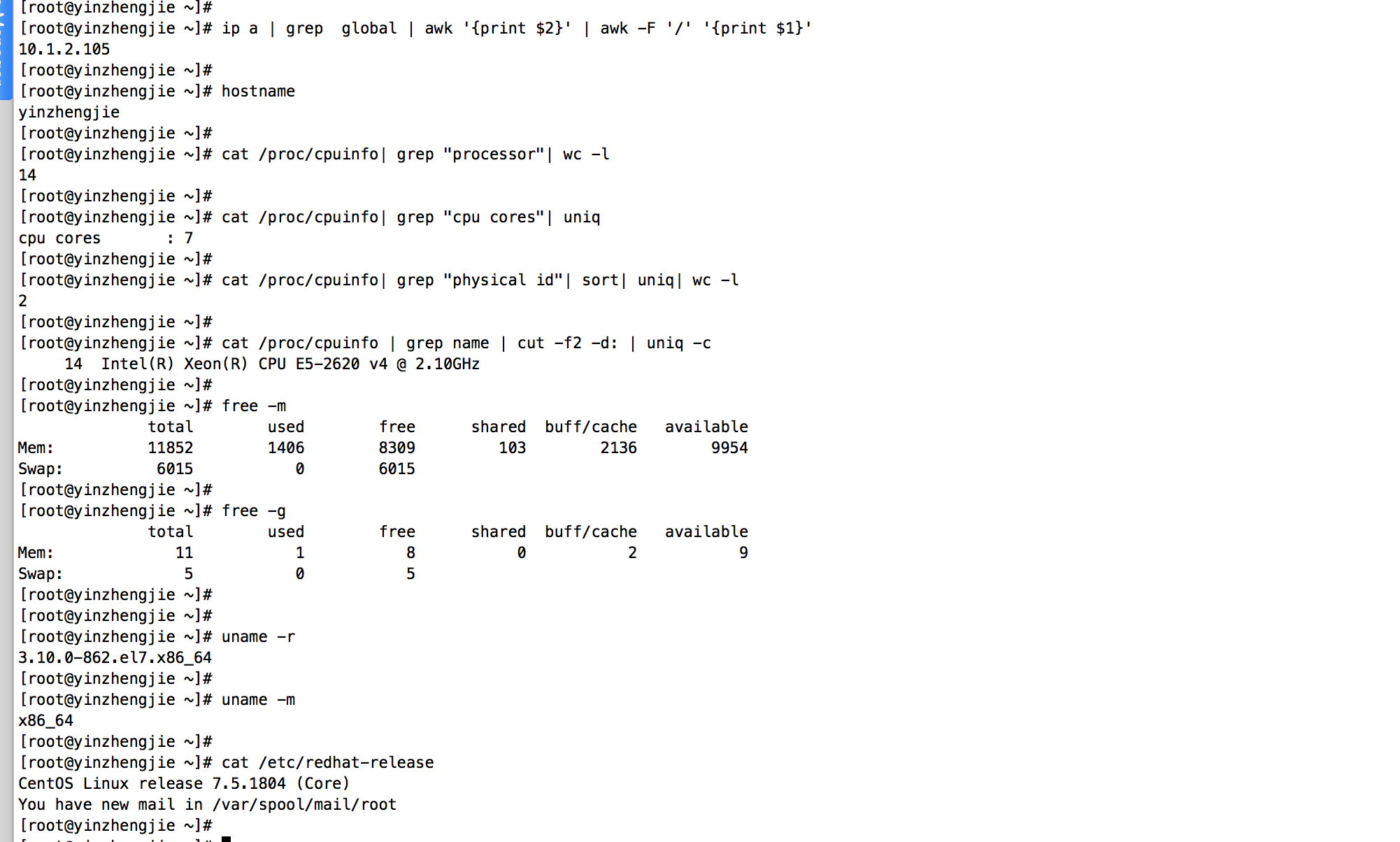
1>.操作平台介绍
1[root@yinzhengjie ~]# ip a | grep  global | awk '{print $2}' | awk -F '/' '{print $1}'
210.1.2.105
3[root@yinzhengjie ~]#
4[root@yinzhengjie ~]# hostname
5yinzhengjie
6[root@yinzhengjie ~]#
7[root@yinzhengjie ~]# cat /proc/cpuinfo| grep "processor"| wc -l
814
9[root@yinzhengjie ~]#
10[root@yinzhengjie ~]# cat /proc/cpuinfo| grep "cpu cores"| uniq
11cpu cores       : 7
12[root@yinzhengjie ~]#
13[root@yinzhengjie ~]# cat /proc/cpuinfo| grep "physical id"| sort| uniq| wc -l
142
15[root@yinzhengjie ~]#
16[root@yinzhengjie ~]# cat /proc/cpuinfo | grep name | cut -f2 -d: | uniq -c
17     14  Intel(R) Xeon(R) CPU E5-2620 v4 @ 2.10GHz
18[root@yinzhengjie ~]#
19[root@yinzhengjie ~]# free -m
20              total        used        free      shared  buff/cache   available
21Mem:          11852        1406        8309         103        2136        9954
22Swap:          6015           0        6015
23[root@yinzhengjie ~]#
24[root@yinzhengjie ~]# free -g
25              total        used        free      shared  buff/cache   available
26Mem:             11           1           8           0           2           9
27Swap:             5           0           5
28[root@yinzhengjie ~]#
29[root@yinzhengjie ~]#
30[root@yinzhengjie ~]# uname -r
313.10.0-862.el7.x86_64
32[root@yinzhengjie ~]#
33[root@yinzhengjie ~]# uname -m
34x86_64
35[root@yinzhengjie ~]#
36[root@yinzhengjie ~]# cat /etc/redhat-release
37CentOS Linux release 7.5.1804 (Core)
38You have new mail in /var/spool/mail/root
39[root@yinzhengjie ~]#
2>.检查是否支持SSE4.2
1[root@yinzhengjie ~]# grep -q sse4_2 /proc/cpuinfo && echo "SSE 4.2 supported" || echo "SSE 4.2 not supported"
2SSE 4.2 supported
3[root@yinzhengjie ~]#
****
3>.下载依赖包
下载地址: http://repo.red-soft.biz/repos/clickhouse/stable/el7/
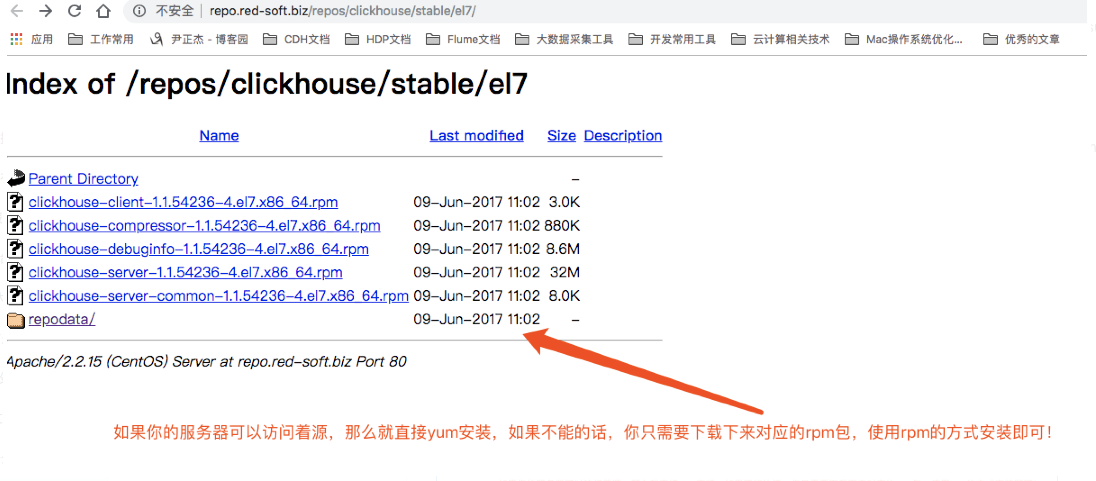
我已经将上面的rpm包下载好了,以及需要的依赖包都下载好啦~大家可以直接下载来用即可。百度云链接:https://pan.baidu.com/s/16gPGxOnHKfRZj2ytOil7qQ 密码:rs4u
1[root@yinzhengjie download]# ll
2total 42916
3-rw-r--r-- 1 root root 43945614 Oct 10 20:10 yinzhengjie-clickhouse.tar.gz
4[root@yinzhengjie download]#
5[root@yinzhengjie download]#
6[root@yinzhengjie download]# tar zxf yinzhengjie-clickhouse.tar.gz -C ./
7[root@yinzhengjie download]#
8[root@yinzhengjie download]# ll
9total 42920
10drwxr-xr-x 2 root root     4096 Oct 10 20:03 clickhouse
11-rw-r--r-- 1 root root 43945614 Oct 10 20:10 yinzhengjie-clickhouse.tar.gz
12[root@yinzhengjie download]#
13[root@yinzhengjie download]# cd clickhouse/
14[root@yinzhengjie clickhouse]#
15[root@yinzhengjie clickhouse]# ll
16total 43080
17-rw-r--r-- 1 root root     3048 Oct 10 17:16 clickhouse-client-1.1.54236-4.el7.x86_64.rpm
18-rw-r--r-- 1 root root   901472 Oct 10 17:16 clickhouse-compressor-1.1.54236-4.el7.x86_64.rpm
19-rw-r--r-- 1 root root  9043256 Oct 10 17:16 clickhouse-debuginfo-1.1.54236-4.el7.x86_64.rpm
20-rw-r--r-- 1 root root 33680608 Oct 10 17:18 clickhouse-server-1.1.54236-4.el7.x86_64.rpm
21-rw-r--r-- 1 root root     8164 Oct 10 17:16 clickhouse-server-common-1.1.54236-4.el7.x86_64.rpm
22-rw-r--r-- 1 root root    49036 Oct 10 18:35 libtool-ltdl-2.4.2-21.el7_2.x86_64.rpm
23-rw-r--r-- 1 root root   421792 Oct 10 18:20 unixODBC-2.3.1-11.el7.x86_64.rpm
24[root@yinzhengjie clickhouse]#
4>.安装ClickHouse的依赖及其rpm包


1[root@yinzhengjie clickhouse]# ll 2total 43080 3-rw-r--r-- 1 root root 3048 Oct 10 17:16 clickhouse-client-1.1.54236-4.el7.x86_64.rpm 4-rw-r--r-- 1 root root 901472 Oct 10 17:16 clickhouse-compressor-1.1.54236-4.el7.x86_64.rpm 5-rw-r--r-- 1 root root 9043256 Oct 10 17:16 clickhouse-debuginfo-1.1.54236-4.el7.x86_64.rpm 6-rw-r--r-- 1 root root 33680608 Oct 10 17:18 clickhouse-server-1.1.54236-4.el7.x86_64.rpm 7-rw-r--r-- 1 root root 8164 Oct 10 17:16 clickhouse-server-common-1.1.54236-4.el7.x86_64.rpm 8-rw-r--r-- 1 root root 49036 Oct 10 18:35 libtool-ltdl-2.4.2-21.el7_2.x86_64.rpm 9-rw-r--r-- 1 root root 421792 Oct 10 18:20 unixODBC-2.3.1-11.el7.x86_64.rpm 10[root@yinzhengjie clickhouse]# 11[root@yinzhengjie clickhouse]# 12You have new mail in /var/spool/mail/root 13[root@yinzhengjie clickhouse]# 14[root@yinzhengjie clickhouse]# yum -y localinstall *.rpm 15Loaded plugins: fastestmirror 16Examining clickhouse-client-1.1.54236-4.el7.x86_64.rpm: clickhouse-client-1.1.54236-4.el7.x86_64 17Marking clickhouse-client-1.1.54236-4.el7.x86_64.rpm to be installed 18Examining clickhouse-compressor-1.1.54236-4.el7.x86_64.rpm: clickhouse-compressor-1.1.54236-4.el7.x86_64 19Marking clickhouse-compressor-1.1.54236-4.el7.x86_64.rpm to be installed 20Examining clickhouse-debuginfo-1.1.54236-4.el7.x86_64.rpm: clickhouse-debuginfo-1.1.54236-4.el7.x86_64 21Marking clickhouse-debuginfo-1.1.54236-4.el7.x86_64.rpm to be installed 22Examining clickhouse-server-1.1.54236-4.el7.x86_64.rpm: clickhouse-server-1.1.54236-4.el7.x86_64 23Marking clickhouse-server-1.1.54236-4.el7.x86_64.rpm to be installed 24Examining clickhouse-server-common-1.1.54236-4.el7.x86_64.rpm: clickhouse-server-common-1.1.54236-4.el7.x86_64 25Marking clickhouse-server-common-1.1.54236-4.el7.x86_64.rpm to be installed 26Examining libtool-ltdl-2.4.2-21.el7_2.x86_64.rpm: libtool-ltdl-2.4.2-21.el7_2.x86_64 27Marking libtool-ltdl-2.4.2-21.el7_2.x86_64.rpm to be installed 28Examining unixODBC-2.3.1-11.el7.x86_64.rpm: unixODBC-2.3.1-11.el7.x86_64 29Marking unixODBC-2.3.1-11.el7.x86_64.rpm to be installed 30Resolving Dependencies 31--> Running transaction check 32---> Package clickhouse-client.x86_64 0:1.1.54236-4.el7 will be installed 33---> Package clickhouse-compressor.x86_64 0:1.1.54236-4.el7 will be installed 34--> Processing Dependency: libicudata.so.50()(64bit) for package: clickhouse-compressor-1.1.54236-4.el7.x86_64 35Determining fastest mirrors 3610gen | 2.5 kB 00:00:00 37base | 3.6 kB 00:00:00 38centosplus | 3.4 kB 00:00:00 39epel | 3.2 kB 00:00:00 40extras | 3.4 kB 00:00:00 41updates | 3.4 kB 00:00:00 42(1/3): epel/x86_64/updateinfo | 948 kB 00:00:00 43(2/3): epel/x86_64/primary | 3.6 MB 00:00:01 44(3/3): updates/7/x86_64/primary_db | 6.0 MB 00:00:01 45epel 12723/12723 46--> Processing Dependency: libicui18n.so.50()(64bit) for package: clickhouse-compressor-1.1.54236-4.el7.x86_64 47--> Processing Dependency: libicuuc.so.50()(64bit) for package: clickhouse-compressor-1.1.54236-4.el7.x86_64 48---> Package clickhouse-debuginfo.x86_64 0:1.1.54236-4.el7 will be installed 49---> Package clickhouse-server.x86_64 0:1.1.54236-4.el7 will be installed 50---> Package clickhouse-server-common.x86_64 0:1.1.54236-4.el7 will be installed 51---> Package libtool-ltdl.x86_64 0:2.4.2-21.el7_2 will be installed 52---> Package unixODBC.x86_64 0:2.3.1-11.el7 will be installed 53--> Running transaction check 54---> Package libicu.x86_64 0:50.1.2-15.el7 will be installed 55--> Finished Dependency Resolution 56 57Dependencies Resolved 58 59=================================================================================================================================================================================================================== 60 Package Arch Version Repository Size 61=================================================================================================================================================================================================================== 62Installing: 63 clickhouse-client x86_64 1.1.54236-4.el7 /clickhouse-client-1.1.54236-4.el7.x86_64 110 64 clickhouse-compressor x86_64 1.1.54236-4.el7 /clickhouse-compressor-1.1.54236-4.el7.x86_64 2.9 M 65 clickhouse-debuginfo x86_64 1.1.54236-4.el7 /clickhouse-debuginfo-1.1.54236-4.el7.x86_64 48 M 66 clickhouse-server x86_64 1.1.54236-4.el7 /clickhouse-server-1.1.54236-4.el7.x86_64 133 M 67 clickhouse-server-common x86_64 1.1.54236-4.el7 /clickhouse-server-common-1.1.54236-4.el7.x86_64 16 k 68 libtool-ltdl x86_64 2.4.2-21.el7_2 /libtool-ltdl-2.4.2-21.el7_2.x86_64 66 k 69 unixODBC x86_64 2.3.1-11.el7 /unixODBC-2.3.1-11.el7.x86_64 1.2 M 70Installing for dependencies: 71 libicu x86_64 50.1.2-15.el7 base 6.9 M 72 73Transaction Summary 74=================================================================================================================================================================================================================== 75Install 7 Packages (+1 Dependent package) 76 77Total size: 192 M 78Total download size: 6.9 M 79Installed size: 209 M 80Downloading packages: 81libicu-50.1.2-15.el7.x86_64.rpm | 6.9 MB 00:00:00 82Running transaction check 83Running transaction test 84Transaction test succeeded 85Running transaction 86 Installing : libtool-ltdl-2.4.2-21.el7_2.x86_64 1/8 87 Installing : unixODBC-2.3.1-11.el7.x86_64 2/8 88 Installing : clickhouse-server-common-1.1.54236-4.el7.x86_64 3/8 89 Installing : libicu-50.1.2-15.el7.x86_64 4/8 90 Installing : clickhouse-server-1.1.54236-4.el7.x86_64 5/8 91 Installing : clickhouse-client-1.1.54236-4.el7.x86_64 6/8 92 Installing : clickhouse-compressor-1.1.54236-4.el7.x86_64 7/8 93 Installing : clickhouse-debuginfo-1.1.54236-4.el7.x86_64 8/8 94 Verifying : clickhouse-debuginfo-1.1.54236-4.el7.x86_64 1/8 95 Verifying : libtool-ltdl-2.4.2-21.el7_2.x86_64 2/8 96 Verifying : unixODBC-2.3.1-11.el7.x86_64 3/8 97 Verifying : libicu-50.1.2-15.el7.x86_64 4/8 98 Verifying : clickhouse-server-1.1.54236-4.el7.x86_64 5/8 99 Verifying : clickhouse-client-1.1.54236-4.el7.x86_64 6/8 100 Verifying : clickhouse-compressor-1.1.54236-4.el7.x86_64 7/8 101 Verifying : clickhouse-server-common-1.1.54236-4.el7.x86_64 8/8 102 103Installed: 104 clickhouse-client.x86_64 0:1.1.54236-4.el7 clickhouse-compressor.x86_64 0:1.1.54236-4.el7 clickhouse-debuginfo.x86_64 0:1.1.54236-4.el7 clickhouse-server.x86_64 0:1.1.54236-4.el7 105 clickhouse-server-common.x86_64 0:1.1.54236-4.el7 libtool-ltdl.x86_64 0:2.4.2-21.el7_2 unixODBC.x86_64 0:2.3.1-11.el7 106 107Dependency Installed: 108 libicu.x86_64 0:50.1.2-15.el7 109 110Complete! 111[root@yinzhengjie clickhouse]#
[root@yinzhengjie clickhouse]# yum -y localinstall *.rpm #直接通过yum安装即可
三.配置clickhouse
1>.备份clickhouse-server配置文件config.xml
1[root@yinzhengjie ~]# cp /etc/clickhouse-server/config.xml  /etc/clickhouse-server/config.xml.`date +%F`
2[root@yinzhengjie ~]#
2>.修改clickhouse-server配置文件config.xml(指定clickhouse-server的主机地址)
1[root@yinzhengjie ~]# sed -i 's#<listen_host>127.0.0.1</listen_host>#<listen_host>10.1.2.105</listen_host>#' /etc/clickhouse-server/config.xml
2[root@yinzhengjie ~]#

3>.修改clickhouse-server配置文件config.xml(修改默认的9000端口,我们自定义该服务的端口为9999)
1[root@yinzhengjie ~]# sed -i 's#<tcp_port>9000</tcp_port>#<tcp_port>9999</tcp_port>#' /etc/clickhouse-server/config.xml
2[root@yinzhengjie ~]#

4>.备份clickhouse-server配置文件users.xml
1[root@yinzhengjie ~]# cp /etc/clickhouse-server/users.xml /etc/clickhouse-server/users.xml.`date +%F`
2[root@yinzhengjie ~]#
**5>.**修改clickhouse-server配置文件users.xml(修改/etc/clickhouse-server/users.xml配置文件的第83行,改地址改为你当前部署的服务器IP地址,不推荐使用主机名!下图是我修改后的值)

四.clickhouse管理方式
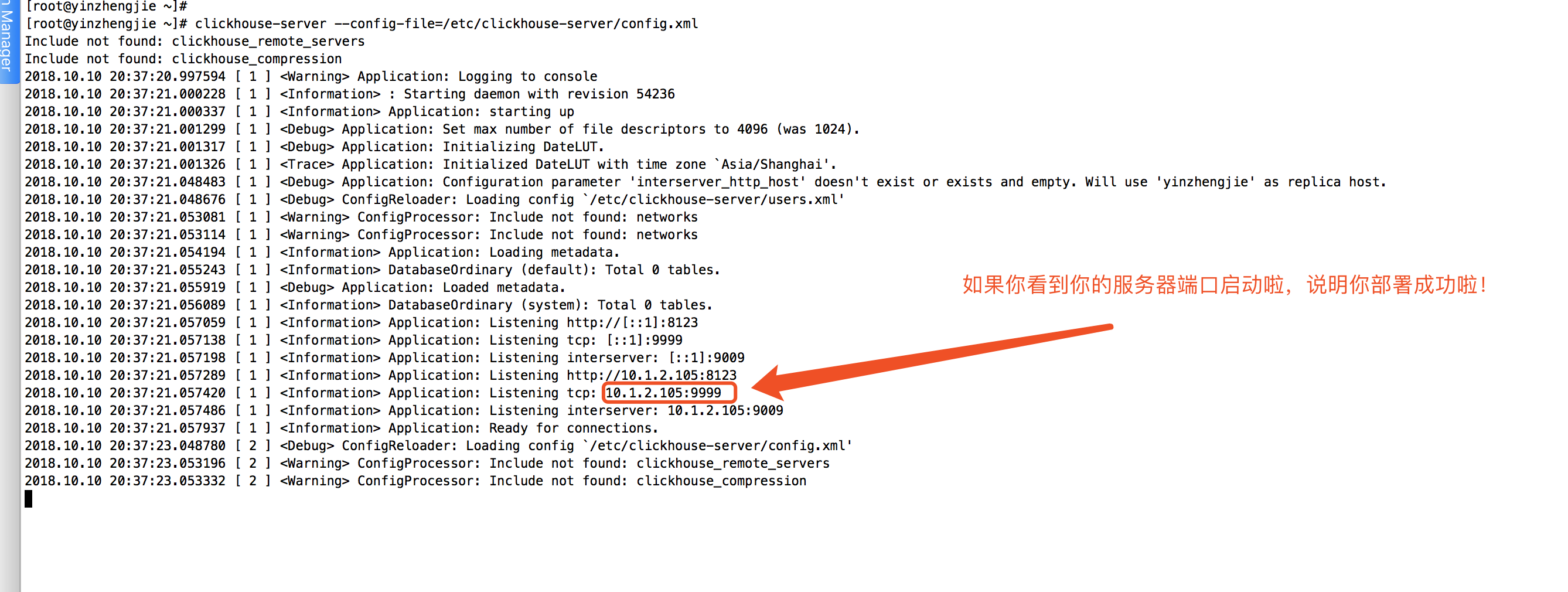
1>.启动clickhouse


1[root@yinzhengjie ~]# clickhouse-server --config-file=/etc/clickhouse-server/config.xml
2Include not found: clickhouse_remote_servers
3Include not found: clickhouse_compression
42018.10.10 20:37:20.997594 [ 1 ] <Warning> Application: Logging to console
52018.10.10 20:37:21.000228 [ 1 ] <Information> : Starting daemon with revision 54236
62018.10.10 20:37:21.000337 [ 1 ] <Information> Application: starting up
72018.10.10 20:37:21.001299 [ 1 ] <Debug> Application: Set max number of file descriptors to 4096 (was 1024).
82018.10.10 20:37:21.001317 [ 1 ] <Debug> Application: Initializing DateLUT.
92018.10.10 20:37:21.001326 [ 1 ] <Trace> Application: Initialized DateLUT with time zone `Asia/Shanghai'.
102018.10.10 20:37:21.048483 [ 1 ] <Debug> Application: Configuration parameter 'interserver_http_host' doesn't exist or exists and empty. Will use 'yinzhengjie' as replica host.
112018.10.10 20:37:21.048676 [ 1 ] <Debug> ConfigReloader: Loading config `/etc/clickhouse-server/users.xml'
122018.10.10 20:37:21.053081 [ 1 ] <Warning> ConfigProcessor: Include not found: networks
132018.10.10 20:37:21.053114 [ 1 ] <Warning> ConfigProcessor: Include not found: networks
142018.10.10 20:37:21.054194 [ 1 ] <Information> Application: Loading metadata.
152018.10.10 20:37:21.055243 [ 1 ] <Information> DatabaseOrdinary (default): Total 0 tables.
162018.10.10 20:37:21.055919 [ 1 ] <Debug> Application: Loaded metadata.
172018.10.10 20:37:21.056089 [ 1 ] <Information> DatabaseOrdinary (system): Total 0 tables.
182018.10.10 20:37:21.057059 [ 1 ] <Information> Application: Listening http://[::1]:8123
192018.10.10 20:37:21.057138 [ 1 ] <Information> Application: Listening tcp: [::1]:9999
202018.10.10 20:37:21.057198 [ 1 ] <Information> Application: Listening interserver: [::1]:9009
212018.10.10 20:37:21.057289 [ 1 ] <Information> Application: Listening http://10.1.2.105:8123
222018.10.10 20:37:21.057420 [ 1 ] <Information> Application: Listening tcp: 10.1.2.105:9999
232018.10.10 20:37:21.057486 [ 1 ] <Information> Application: Listening interserver: 10.1.2.105:9009
242018.10.10 20:37:21.057937 [ 1 ] <Information> Application: Ready for connections.
252018.10.10 20:37:23.048780 [ 2 ] <Debug> ConfigReloader: Loading config `/etc/clickhouse-server/config.xml'
262018.10.10 20:37:23.053196 [ 2 ] <Warning> ConfigProcessor: Include not found: clickhouse_remote_servers
272018.10.10 20:37:23.053332 [ 2 ] <Warning> ConfigProcessor: Include not found: clickhouse_compression
[root@yinzhengjie ~]# clickhouse-server --config-file=/etc/clickhouse-server/config.xml
2>.查看clickhouse服务是否启动
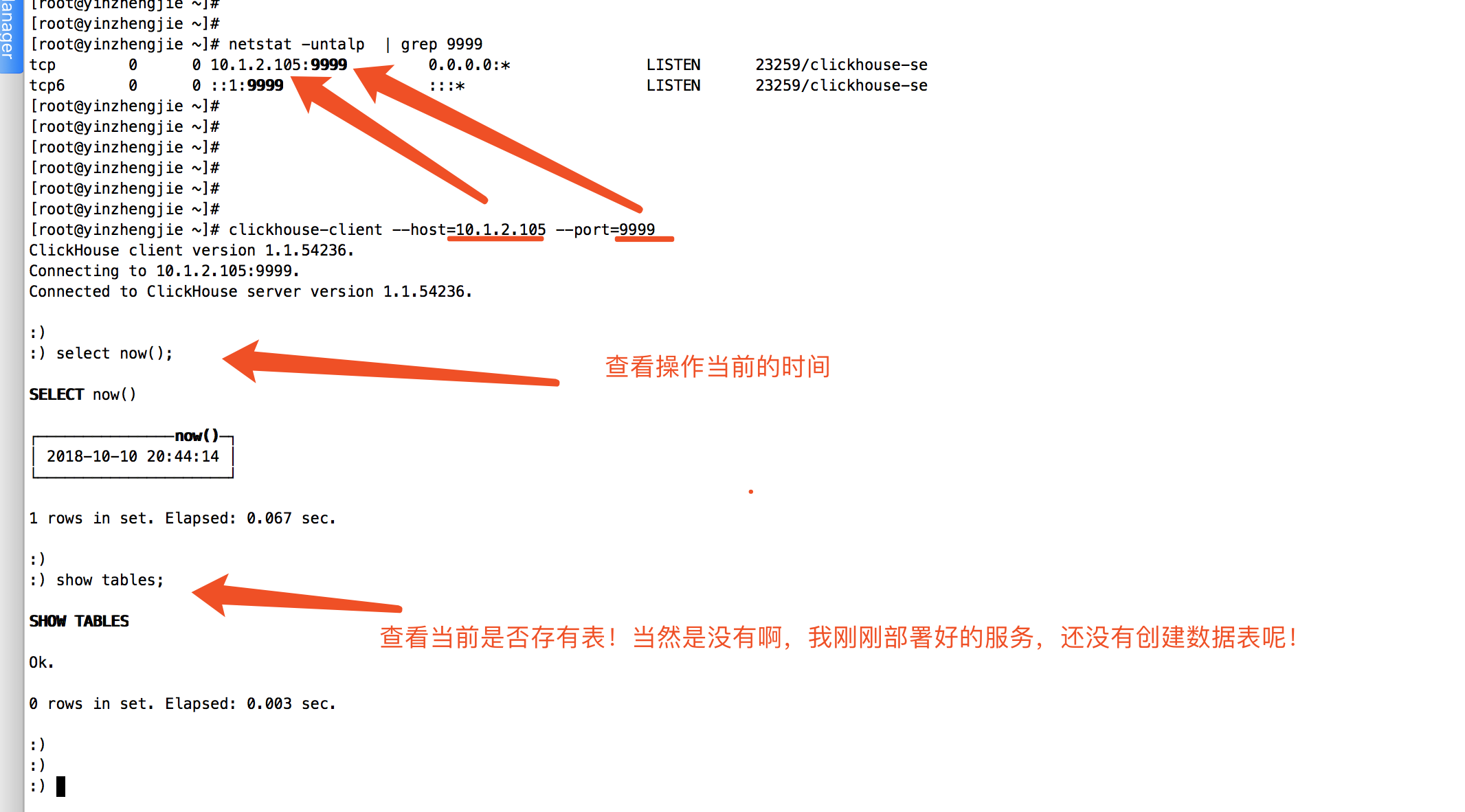
1[root@yinzhengjie ~]# netstat -untalp  | grep 9999
2tcp        0      0 10.1.2.105:9999         0.0.0.0:*               LISTEN      23259/clickhouse-se
3tcp6       0      0 ::1:9999                :::*                    LISTEN      23259/clickhouse-se
4[root@yinzhengjie ~]#
3>.使用客户端链接测试


1[root@yinzhengjie ~]# clickhouse-client --host=10.1.2.105 --port=9999
2ClickHouse client version 1.1.54236.
3Connecting to 10.1.2.105:9999.
4Connected to ClickHouse server version 1.1.54236.
5
6:)
7:) select now();
8
9SELECT now()
10
11┌───────────────now()─┐
12│ 2018-10-10 20:44:14 │
13└─────────────────────┘
14
151 rows in set. Elapsed: 0.067 sec.
16
17:)
18:) show tables;
19
20SHOW TABLES
21
22Ok.
23
240 rows in set. Elapsed: 0.003 sec.
25
26:)
27:)
[root@yinzhengjie ~]# clickhouse-client --host=10.1.2.105 --port=9999
4>.关闭clickhouse服务


1[root@yinzhengjie ~]# ps -aux|grep clickhouse-server | grep -v grep
2root     24998  0.1  0.3 319708 43372 pts/1    Sl+  20:48   0:00 clickhouse-server --config-file=/etc/clickhouse-server/config.xml
3[root@yinzhengjie ~]#
4[root@yinzhengjie ~]# kill -9 `ps -aux|grep clickhouse-server | grep -v grep | awk '{print $2}'`
5[root@yinzhengjie ~]#
6You have new mail in /var/spool/mail/root
7[root@yinzhengjie ~]#
8[root@yinzhengjie ~]# ps -aux|grep clickhouse-server | grep -v grep
9[root@yinzhengjie ~]#
10[root@yinzhengjie ~]#
[root@yinzhengjie ~]# kill -9 `ps -aux|grep clickhouse-server | grep -v grep | awk '{print $2}'`

5>.为clickhouse-server添加守护进程
1[root@yinzhengjie ~]# nohup clickhouse-server --config-file=/etc/clickhouse-server/config.xml >/var/log/yinzhengjie-clickhouse.log 2>&1 &           #会在"/var/log"目录下生成一个名称为“yinzhengjie-clickhouse.log”的日志文件
2[1] 26619
3[root@yinzhengjie ~]#
4[root@yinzhengjie ~]# tail -10f /var/log/yinzhengjie-clickhouse.log
52018.10.10 20:58:53.981429 [ 1 ] <Information> Application: Listening http://[::1]:8123
62018.10.10 20:58:53.981479 [ 1 ] <Information> Application: Listening tcp: [::1]:9999
72018.10.10 20:58:53.981516 [ 1 ] <Information> Application: Listening interserver: [::1]:9009
82018.10.10 20:58:53.981554 [ 1 ] <Information> Application: Listening http://10.1.2.105:8123
92018.10.10 20:58:53.981590 [ 1 ] <Information> Application: Listening tcp: 10.1.2.105:9999
102018.10.10 20:58:53.981624 [ 1 ] <Information> Application: Listening interserver: 10.1.2.105:9009
112018.10.10 20:58:53.981796 [ 1 ] <Information> Application: Ready for connections.
122018.10.10 20:58:55.973241 [ 2 ] <Debug> ConfigReloader: Loading config `/etc/clickhouse-server/config.xml'
132018.10.10 20:58:55.977391 [ 2 ] <Warning> ConfigProcessor: Include not found: clickhouse_remote_servers
142018.10.10 20:58:55.977455 [ 2 ] <Warning> ConfigProcessor: Include not found: clickhouse_compression
152018.10.10 20:59:09.185410 [ 3 ] <Trace> TCPConnectionFactory: TCP Request. Address: 10.1.2.105:41874
162018.10.10 20:59:09.185660 [ 3 ] <Debug> TCPHandler: Connected ClickHouse client version 1.1.54236, user: default.
172018.10.10 20:59:18.439436 [ 3 ] <Debug> executeQuery: (from 10.1.2.105:41874) select now()
182018.10.10 20:59:18.440437 [ 3 ] <Trace> InterpreterSelectQuery: FetchColumns -> Complete
192018.10.10 20:59:18.440867 [ 3 ] <Debug> executeQuery: Query pipeline:
20Expression
21 Expression
22  One
23
242018.10.10 20:59:18.441657 [ 3 ] <Information> executeQuery: Read 1 rows, 1.00 B in 0.002 sec., 510 rows/sec., 510.97 B/sec.
252018.10.10 20:59:18.441764 [ 3 ] <Debug> MemoryTracker: Peak memory usage (for query): 1.00 MiB.
262018.10.10 20:59:18.441804 [ 3 ] <Debug> MemoryTracker: Peak memory usage (for user): 1.00 MiB.
272018.10.10 20:59:18.441849 [ 3 ] <Debug> MemoryTracker: Peak memory usage (total): 1.00 MiB.
282018.10.10 20:59:18.441882 [ 3 ] <Information> TCPHandler: Processed in 0.003 sec.
好啦~分享就到这里了,时间过的咋就这么快呢?一不小心就晚上九点多了,关于ClickHouse集群的部署等我后期研究好了也会分享给大家的,我得赶紧走了,不然赶不上地铁啦!晚安,兄弟们!