
好买网 www.goodmai.com IT技术交易平台
将JAVA程序连接至数据库
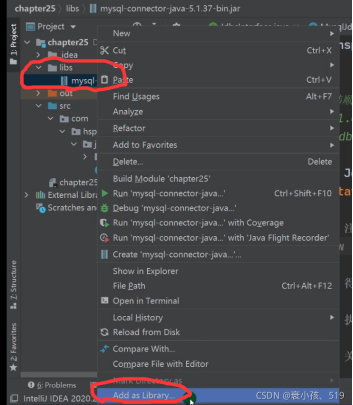
1.下载 mysql 驱动 jar 包
2.添加入JAVA程序文件中
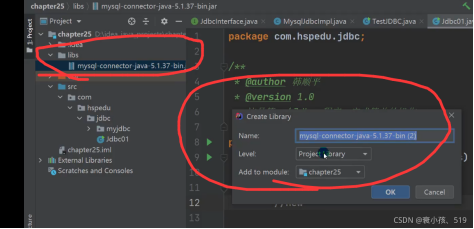
3.添加到 library 库中
获取数据库的五种方式 mysqL驱动5.1.6可以无需CLass . forName(“com.mysql.jdbc.Driver”); 从jdk1.5以后使用了jdbc4,不再需要显示调用class.forName()注册驱动而是自动调用驱动jar包下META-INF\services\java .sql.Driver文本中的类名称去注册 建议还是写上 CLass . forName(“com.mysql.jdbc.Driver”),更加明确
1package com.ftn.jdbc.myjdbc;
2
3//数据库的不同连接方式
4import com.mysql.cj.jdbc.Driver;
5import org.junit.jupiter.api.Test;
6
7import java.io.FileInputStream;
8import java.sql.Connection;
9import java.sql.DriverManager;
10import java.sql.SQLException;
11import java.util.Properties;
12
13public class JdbcConn {
14    public static void main(String[] args) {
15    }
16
17    //方式一
18    //直接加载Driver对象,获取连接
19    @Test
20    public void connect01() throws SQLException {
21        Driver driver = new Driver();
22        Properties properties = new Properties();
23        properties.setProperty("user","root");
24        properties.setProperty("password","122800");
25        Connection connect = driver.connect("jdbc:mysql://localhost:3306/db_03", properties);
26        System.out.println("第三种连接方式:" + connect);
27        connect.close();
28    }
29
30    //方式二
31    //使用反射加载 Driver 类,动态加载,更加灵活,减少依赖性
32    @Test
33    public void connect02() throws Exception {
34        Class<?> aClass = Class.forName("com.mysql.cj.jdbc.Driver");
35        Driver driver =(Driver) aClass.newInstance();
36
37        //创建 url,user和 password
38        Properties properties = new Properties();
39        properties.setProperty("user","root");
40        properties.setProperty("password","122800");
41        Connection connect = driver.connect("jdbc:mysql://localhost:3306/db_03", properties);
42        System.out.println("第三种连接方式:" + connect);
43        connect.close();
44    }
45
46    //方式三
47    //使用DriverManager代替Driver进行统一管理
48    @Test
49    public void connect03() throws Exception {
50        //使用反射加载 Driver
51        Class<?> aClass = Class.forName("com.mysql.cj.jdbc.Driver");
52        Driver driver = (Driver) aClass.newInstance();
53
54        //创建 url,user和 password
55        String url = "jdbc:mysql://localhost:3306/db_03";
56        String user = "root";
57        String password = "122800";
58
59        DriverManager.registerDriver(driver);   //注册 Driver 驱动
60        Connection connection = DriverManager.getConnection(url, user, password);
61        System.out.println("第三种连接方式:" + connection);
62        connection.close();
63    }
64
65    //方式四
66    //使用 Class.forName 自动完成注册驱动,简化代码
67    /*
68    1. mysqL驱动 5.1.6可以无需 CLass . forName("com.mysql.jdbc.Driver");
69    2. 从jdk1.5以后使用了jdbc4,不再需要显示调用class.forName()注册驱动而是自动调用驱动
70    jar包下 META-INF\services\java .sql.Driver文本中的类名称去注册
71    3. 建议还是写上CLass . forName("com.mysql.jdbc.Driver"), 更加明确
72    */
73    @Test
74    public void connect04() throws Exception {
75        //使用反射加载 Driver
76        /*
77        Driver 类源码中的静态代码块
78        1. 在类加载时,会执行 DriverManager.registerDriver(new Driver());
79        2. 即 Driver 会自动注册
80        static {
81                try {
82                DriverManager.registerDriver(new Driver());
83                } catch (SQLException var1) {
84                throw new RuntimeException("Can't register driver!");
85            }
86        }
87         */
88
89        Class<?> aClass = Class.forName("com.mysql.cj.jdbc.Driver");
90        //创建 url,user和 password
91        String url = "jdbc:mysql://localhost:3306/db_03";
92        String user = "root";
93        String password = "122800";
94
95        Connection connection = DriverManager.getConnection(url, user, password);
96        System.out.println("第四种方式:" + connection);
97        connection.close();
98    }
99
100    //方式五
101    //在方式四基础上改进,增加配置文件,让连接 mysql 更加灵活
102    @Test
103    public void connect05() throws Exception {
104        //通过 Properties 对象获取配置文件的信息
105        Properties properties = new Properties();
106        properties.load(new FileInputStream("src\\mysql.properties"));
107
108        //获取相关的值
109        String url = properties.getProperty("url");
110        String user = properties.getProperty("user");
111        String password = properties.getProperty("password");
112        String driver = properties.getProperty("driver");
113
114        Class<?> aClass = Class.forName(driver);
115
116        Connection connection = DriverManager.getConnection(url, user, password);
117        System.out.println("第五种方式:" + connection);
118        connection.close();
119    }
120}
121