

从一段指定的字符串中,取得期望的数据,正常人都会想到正则表达式吧?
写过正则表达式的人都知道,正则表达式入门不难,写起来也容易。
但是正则表达式几乎没有可读性可言,维护起来,真的会让人抓狂,别以为这段正则是你写的就可以驾驭它,过个一个月你可能就不认识它了。
完全可以说,天下苦正则久矣。
今天给你介绍一个好东西,可以让你摆脱正则的噩梦,那就是 Python 中一个非常冷门的库 -- parse 。
1. 真实案例
拿一个最近使用 parse 的真实案例来举例说明。
下面是 ovs 一个条流表,现在我需要收集提取一个虚拟机(网口)里有多少流量、多少包流经了这条流表。也就是每个 in_port 对应的 n_bytes、n_packets 的值 。
1cookie=0x9816da8e872d717d, duration=298506.364s, table=0, n_packets=480, n_bytes=20160, priority=10,ip,in_port="tapbbdf080b-c2" actions=NORMAL
2
如果是你,你会怎么做呢?
先以逗号分隔开来,再以等号分隔取出值来?
你不防可以尝试一下,写出来的代码应该和我想象的一样,没有一丝美感而言。
我来给你展示一下,我是怎么做的?
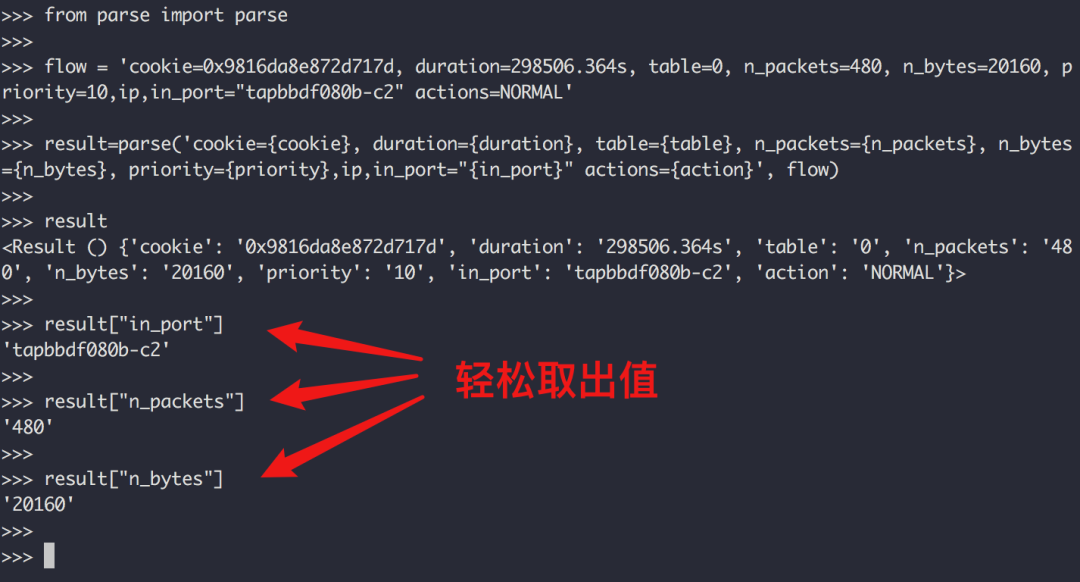
可以看到,我使用了一个叫做 parse 的第三方包,是需要自行安装的
1$ python -m pip install parse
2
从上面这个案例中,你应该能感受到 parse 对于解析规范的字符串,是非常强大的。
2. parse 的结果
parse 的结果只有两种结果:
- 没有匹配上,parse 的值为None
1>>> parse("halo", "hello") is None
2True
3>>>
4
- 如果匹配上,parse 的值则 为 Result 实例
1>>> parse("hello", "hello world")
2>>> parse("hello", "hello")
3<Result () {}>
4>>>
如果你编写的解析规则,没有为字段定义字段名,也就是匿名字段, Result 将是一个 类似 list 的实例,演示如下:
1>>> profile = parse("I am {}, {} years old, {}", "I am Jack, 27 years old, male")
2>>> profile
3<Result ('Jack', '27', 'male') {}>
4>>> profile[0]
5'Jack'
6>>> profile[1]
7'27'
8>>> profile[2]
9'male'
10
而如果你编写的解析规则,为字段定义了字段名, Result 将是一个 类似 字典 的实例,演示如下:
1>>> profile = parse("I am {name}, {age} years old, {gender}", "I am Jack, 27 years old, male")
2>>> profile
3<Result () {'gender': 'male', 'age': '27', 'name': 'Jack'}>
4>>> profile['name']
5'Jack'
6>>> profile['age']
7'27'
8>>> profile['gender']
9'male'
10
3. 重复利用 pattern
和使用 re 一样,parse 同样支持 pattern 复用。
1>>> from parse import compile
2>>>
3>>> pattern = compile("I am {}, {} years old, {}")
4>>> pattern.parse("I am Jack, 27 years old, male")
5<Result ('Jack', '27', 'male') {}>
6>>>
7>>> pattern.parse("I am Tom, 26 years old, male")
8<Result ('Tom', '26', 'male') {}>
9
4. 类型转化
从上面的例子中,你应该能注意到,parse 在获取年龄的时候,变成了一个"27" ,这是一个字符串,有没有一种办法,可以在提取的时候就按照我们的类型进行转换呢?
你可以这样写。
1>>> from parse import parse
2>>> profile = parse("I am {name}, {age:d} years old, {gender}", "I am Jack, 27 years old, male")
3>>> profile
4<Result () {'gender': 'male', 'age': 27, 'name': 'Jack'}>
5>>> type(profile["age"])
6<type 'int'>
7
除了将其转为 整型,还有其他格式吗?
内置的格式还有很多,比如
匹配时间
1>>> parse('Meet at {:tg}', 'Meet at 1/2/2011 11:00 PM')
2<Result (datetime.datetime(2011, 2, 1, 23, 0),) {}>
3
更多类型请参考官方文档:
| Type | Characters Matched | Output |
|---|---|---|
| l | Letters (ASCII) | str |
| w | Letters, numbers and underscore | str |
| W | Not letters, numbers and underscore | str |
| s | Whitespace | str |
| S | Non-whitespace | str |
| d | Digits (effectively integer numbers) | int |
| D | Non-digit | str |
| n | Numbers with thousands separators (, or .) | int |
| % | Percentage (converted to value/100.0) | float |
| f | Fixed-point numbers | float |
| F | Decimal numbers | Decimal |
| e | Floating-point numbers with exponent e.g. 1.1e-10, NAN (all case insensitive) | float |
| g | General number format (either d, f or e) | float |
| b | Binary numbers | int |
| o | Octal numbers | int |
| x | Hexadecimal numbers (lower and upper case) | int |
| ti | ISO 8601 format date/time e.g. 1972-01-20T10:21:36Z (“T” and “Z” optional) | datetime |
| te | RFC2822 e-mail format date/time e.g. Mon, 20 Jan 1972 10:21:36 +1000 | datetime |
| tg | Global (day/month) format date/time e.g. 20/1/1972 10:21:36 AM +1:00 | datetime |
| ta | US (month/day) format date/time e.g. 1/20/1972 10:21:36 PM +10:30 | datetime |
| tc | ctime() format date/time e.g. Sun Sep 16 01:03:52 1973 | datetime |
| th | HTTP log format date/time e.g. 21/Nov/2011:00:07:11 +0000 | datetime |
| ts | Linux system log format date/time e.g. Nov 9 03:37:44 | datetime |
| tt | Time e.g. 10:21:36 PM -5:30 | time |
5. 提取时去除空格
去除两边空格
1>>> parse('hello {} , hello python', 'hello     world    , hello python')
2<Result ('    world   ',) {}>
3>>>
4>>>
5>>> parse('hello {:^} , hello python', 'hello     world    , hello python')
6<Result ('world',) {}>
7
去除左边空格
1>>> parse('hello {:>} , hello python', 'hello     world    , hello python')
2<Result ('world   ',) {}>
3
去除右边空格
1>>> parse('hello {:<} , hello python', 'hello     world    , hello python')
2<Result ('    world',) {}>
3
6. 大小写敏感开关
Parse 默认是大小写不敏感的,你写 hello 和 HELLO 是一样的。
如果你需要区分大小写,那可以加个参数,演示如下:
1>>> parse('SPAM', 'spam')
2<Result () {}>
3>>> parse('SPAM', 'spam') is None
4False
5>>> parse('SPAM', 'spam', case_sensitive=True) is None
6True
7
7. 匹配字符数
精确匹配:指定最大字符数
1>>> parse('{:.2}{:.2}', 'hello')  # 字符数不符
2>>>
3>>> parse('{:.2}{:.2}', 'hell')   # 字符数相符
4<Result ('he', 'll') {}>
5
模糊匹配:指定最小字符数
1>>> parse('{:.2}{:2}', 'hello')
2<Result ('h', 'ello') {}>
3>>>
4>>> parse('{:2}{:2}', 'hello')
5<Result ('he', 'llo') {}>
6
若要在精准/模糊匹配的模式下,再进行格式转换,可以这样写
1>>> parse('{:2}{:2}', '1024')
2<Result ('10', '24') {}>
3>>>
4>>>
5>>> parse('{:2d}{:2d}', '1024')
6<Result (10, 24) {}>
7
8. 三个重要属性
Parse 里有三个非常重要的属性
-
fixed:利用位置提取的匿名字段的元组
-
named:存放有命名的字段的字典
-
spans:存放匹配到字段的位置
下面这段代码,带你了解他们之间有什么不同
1>>> profile = parse("I am {name}, {age:d} years old, {}", "I am Jack, 27 years old, male")
2>>> profile.fixed
3('male',)
4>>> profile.named
5{'age': 27, 'name': 'Jack'}
6>>> profile.spans
7{0: (25, 29), 'age': (11, 13), 'name': (5, 9)}
8>>>
9. 自定义类型的转换
匹配到的字符串,会做为参数传入对应的函数
比如我们之前讲过的,将字符串转整型
1>>> parse("I am {:d}", "I am 27")
2<Result (27,) {}>
3>>> type(_[0])
4<type 'int'>
5>>>
其等价于
1>>> def myint(string):
2...     return int(string)
3...
4>>>
5>>>
6>>> parse("I am {:myint}", "I am 27", dict(myint=myint))
7<Result (27,) {}>
8>>> type(_[0])
9<type 'int'>
10>>>
11
利用它,我们可以定制很多的功能,比如我想把匹配的字符串弄成全大写
1>>> def shouty(string):
2...    return string.upper()
3...
4>>> parse('{:shouty} world', 'hello world', dict(shouty=shouty))
5<Result ('HELLO',) {}>
6>>>
7
10 总结一下
parse 库在字符串解析处理场景中提供的便利,肉眼可见,上手简单。
在一些简单的场景中,使用 parse 可比使用 re 去写正则开发效率不知道高几个 level,用它写出来的代码富有美感,可读性高,后期维护起代码来一点压力也没有,推荐你使用。
-------------------********************************** End **********-------------**-----********-**********************************
往期精彩文章推荐:

本文转自 https://mp.weixin.qq.com/s/lVK5OAgYuwHMtaQIAYCv6g,如有侵权,请联系删除。