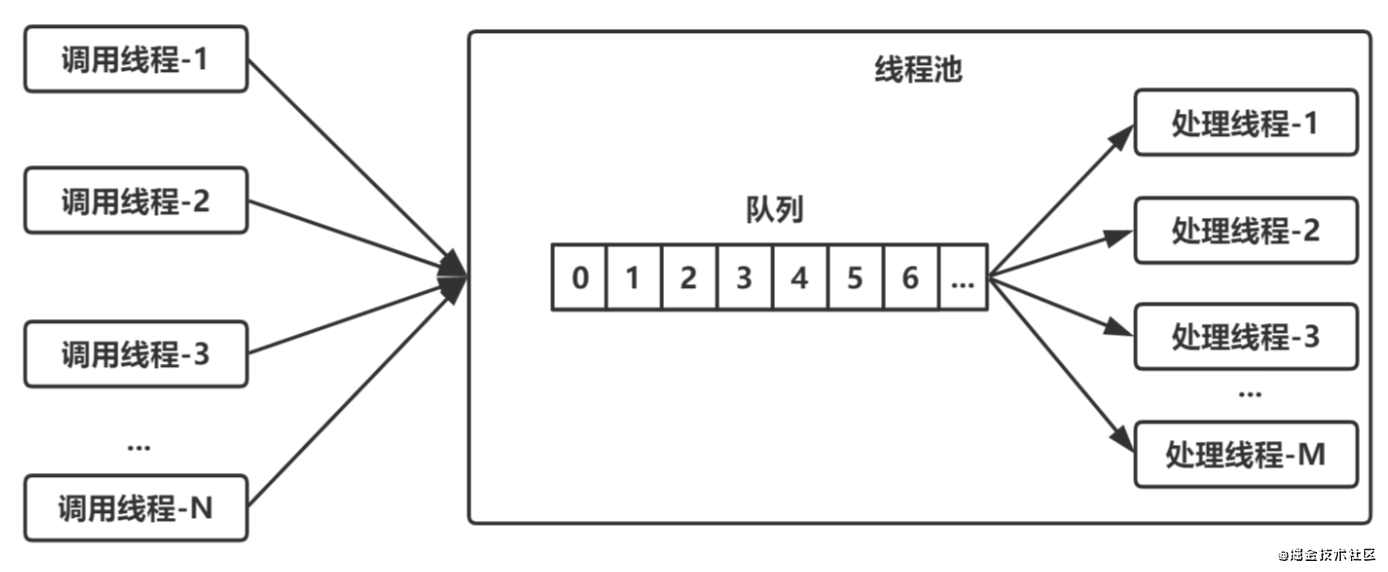
<section id="nice" data-tool="mdnice编辑器" data-website="https://www.mdnice.com" style="line-height: 1.6; word-break: break-word; word-wrap: break-word; text-align: left; font-family: Optima-Regular, Optima, PingFangSC-light, PingFangTC-light, 'PingFang SC', Cambria, Cochin, Georgia, Times, 'Times New Roman', serif; padding: 5px; font-size: 16px; color: #353535; word-spacing: 0.8px; letter-spacing: 0.8px; border-radius: 16px;"><p data-tool="mdnice编辑器" style="padding-top: 8px; padding-bottom: 8px; line-height: 1.75; margin: 0.8em 0; font-size: 16px; color: #353535;"> 有些人可能对线程池比较陌生,并且更不熟悉线程池的工作原理。所以他们在使用线程的时候,多数情况下都是new Thread来实现多线程。但是,往往良好的多线程设计大多都是使用线程池来实现的。</p> <h2 data-tool="mdnice编辑器" style="margin-top: 30px; margin-bottom: 15px; padding: 0px; font-weight: bold; color: black; font-size: 22px; text-align: left; margin: 20px 10px 0px 0px;"><span class="prefix" style="display: none;"></span><span class="content" style="font-size: 18px; font-weight: 700; color: #222; display: inline-block; padding-left: 10px; border-left: 5px solid rgb(248, 57, 41);">为什么要使用线程池</span><span class="suffix"></span></h2> <blockquote class="multiquote-2" data-tool="mdnice编辑器" style="border: none; box-shadow: 1px 1px 10px rgba(0,0,0,0.2); padding: 20px; margin-bottom: 20px; margin-top: 20px;"> <blockquote style="border: none;"> <ol style="margin-top: 8px; margin-bottom: 8px; padding-left: 25px; list-style-type: decimal; color: #f83929; font-size: 16px;"> <li><section style="margin-top: 5px; margin-bottom: 5px; line-height: 26px; text-align: left; font-weight: 500; color: #353535;">可以降低线程创建和销毁的资源消耗。</section></li><li><section style="margin-top: 5px; margin-bottom: 5px; line-height: 26px; text-align: left; font-weight: 500; color: #353535;">可以提高响应速度。线程的创建时间为T1,执行时间T2,销毁时间T3,通过使用线程池,可以免去T1和T3的时间</section></li><li><section style="margin-top: 5px; margin-bottom: 5px; line-height: 26px; text-align: left; font-weight: 500; color: #353535;">可以提高线程的可管理性</section></li></ol> </blockquote> </blockquote> <p data-tool="mdnice编辑器" style="padding-top: 8px; padding-bottom: 8px; line-height: 1.75; margin: 0.8em 0; font-size: 16px; color: #353535;">下图所示为线程池的实现原理: <br> 调用方不断向线程池中提交任务,线程池中的线程不断地从队列中取任务,这是一个典型的生产者-消费者模型。</p> <h2 data-tool="mdnice编辑器" style="margin-top: 30px; margin-bottom: 15px; padding: 0px; font-weight: bold; color: black; font-size: 22px; text-align: left; margin: 20px 10px 0px 0px;"><span class="prefix" style="display: none;"></span><span class="content" style="font-size: 18px; font-weight: 700; color: #222; display: inline-block; padding-left: 10px; border-left: 5px solid rgb(248, 57, 41);">实战:手写简易线程池</span><span class="suffix"></span></h2> <p data-tool="mdnice编辑器" style="padding-top: 8px; padding-bottom: 8px; line-height: 1.75; margin: 0.8em 0; font-size: 16px; color: #353535;"> 现在来带大家手写一个简单的线程池,让大家更加理解线程池的工作原理</p> <pre class="custom" data-tool="mdnice编辑器" style="margin-top: 10px; margin-bottom: 10px; border-radius: 5px; box-shadow: rgba(0, 0, 0, 0.55) 0px 2px 10px;"><span style="display: block; background: url(https://files.mdnice.com/user/3441/876cad08-0422-409d-bb5a-08afec5da8ee.svg); height: 30px; width: 100%; background-size: 40px; background-repeat: no-repeat; background-color: #282c34; margin-bottom: -7px; border-radius: 5px; background-position: 10px 10px;"></span><code class="hljs" style="overflow-x: auto; padding: 16px; color: #abb2bf; display: -webkit-box; font-family: Operator Mono, Consolas, Monaco, Menlo, monospace; font-size: 12px; -webkit-overflow-scrolling: touch; padding-top: 15px; background: #282c34; border-radius: 5px;"><span class="hljs-comment" style="color: #5c6370; font-style: italic; line-height: 26px;">/**<br> * 自定义线程池<br> */</span><br><span class="hljs-keyword" style="color: #c678dd; line-height: 26px;">public</span> <span class="hljs-class" style="line-height: 26px;"><span class="hljs-keyword" style="color: #c678dd; line-height: 26px;">class</span> <span class="hljs-title" style="color: #e6c07b; line-height: 26px;">ThreadPool</span> </span>{<br><br> <span class="hljs-comment" style="color: #5c6370; font-style: italic; line-height: 26px;">/** 默认线程池中的线程的数量 */</span><br> <span class="hljs-keyword" style="color: #c678dd; line-height: 26px;">private</span> <span class="hljs-keyword" style="color: #c678dd; line-height: 26px;">static</span> <span class="hljs-keyword" style="color: #c678dd; line-height: 26px;">final</span> <span class="hljs-keyword" style="color: #c678dd; line-height: 26px;">int</span> WORK_NUM = <span class="hljs-number" style="color: #d19a66; line-height: 26px;">5</span>;<br><br> <span class="hljs-comment" style="color: #5c6370; font-style: italic; line-height: 26px;">/** 默认处理任务的数量 */</span><br> <span class="hljs-keyword" style="color: #c678dd; line-height: 26px;">private</span> <span class="hljs-keyword" style="color: #c678dd; line-height: 26px;">static</span> <span class="hljs-keyword" style="color: #c678dd; line-height: 26px;">final</span> <span class="hljs-keyword" style="color: #c678dd; line-height: 26px;">int</span> TASK_NUM = <span class="hljs-number" style="color: #d19a66; line-height: 26px;">100</span>;<br><br> <span class="hljs-comment" style="color: #5c6370; font-style: italic; line-height: 26px;">/** 存放任务 */</span><br> <span class="hljs-keyword" style="color: #c678dd; line-height: 26px;">private</span> <span class="hljs-keyword" style="color: #c678dd; line-height: 26px;">final</span> BlockingQueue<Runnable> taskQueue;<br><br> <span class="hljs-keyword" style="color: #c678dd; line-height: 26px;">private</span> <span class="hljs-keyword" style="color: #c678dd; line-height: 26px;">final</span> Set<WorkThread> workThreads;<span class="hljs-comment" style="color: #5c6370; font-style: italic; line-height: 26px;">//保存线程的集合</span><br><br> <span class="hljs-keyword" style="color: #c678dd; line-height: 26px;">private</span> <span class="hljs-keyword" style="color: #c678dd; line-height: 26px;">int</span> workNumber;<span class="hljs-comment" style="color: #5c6370; font-style: italic; line-height: 26px;">//线程数量</span><br><br> <span class="hljs-keyword" style="color: #c678dd; line-height: 26px;">private</span> <span class="hljs-keyword" style="color: #c678dd; line-height: 26px;">int</span> taskNumber;<span class="hljs-comment" style="color: #5c6370; font-style: italic; line-height: 26px;">//任务数量</span><br><br> <span class="hljs-function" style="line-height: 26px;"><span class="hljs-keyword" style="color: #c678dd; line-height: 26px;">public</span> <span class="hljs-title" style="color: #61aeee; line-height: 26px;">ThreadPool</span><span class="hljs-params" style="line-height: 26px;">()</span></span>{<br> <span class="hljs-keyword" style="color: #c678dd; line-height: 26px;">this</span>(WORK_NUM , TASK_NUM);<br> }<br><br> <span class="hljs-function" style="line-height: 26px;"><span class="hljs-keyword" style="color: #c678dd; line-height: 26px;">public</span> <span class="hljs-title" style="color: #61aeee; line-height: 26px;">ThreadPool</span><span class="hljs-params" style="line-height: 26px;">(<span class="hljs-keyword" style="color: #c678dd; line-height: 26px;">int</span> workNumber , <span class="hljs-keyword" style="color: #c678dd; line-height: 26px;">int</span> taskNumber)</span> </span>{<br> <span class="hljs-keyword" style="color: #c678dd; line-height: 26px;">if</span> (taskNumber<=<span class="hljs-number" style="color: #d19a66; line-height: 26px;">0</span>){<br> taskNumber = TASK_NUM;<br> }<br> <span class="hljs-keyword" style="color: #c678dd; line-height: 26px;">if</span> (workNumber<=<span class="hljs-number" style="color: #d19a66; line-height: 26px;">0</span>){<br> workNumber = WORK_NUM;<br> }<br> <span class="hljs-keyword" style="color: #c678dd; line-height: 26px;">this</span>.taskQueue = <span class="hljs-keyword" style="color: #c678dd; line-height: 26px;">new</span> ArrayBlockingQueue<Runnable>(taskNumber);<br> <span class="hljs-keyword" style="color: #c678dd; line-height: 26px;">this</span>.workNumber = workNumber;<br> <span class="hljs-keyword" style="color: #c678dd; line-height: 26px;">this</span>.taskNumber = taskNumber;<br><br> workThreads = <span class="hljs-keyword" style="color: #c678dd; line-height: 26px;">new</span> HashSet<>();<br><br> <span class="hljs-comment" style="color: #5c6370; font-style: italic; line-height: 26px;">//工作线程准备好了</span><br> <span class="hljs-comment" style="color: #5c6370; font-style: italic; line-height: 26px;">//启动一定数量的线程数,从队列中获取任务处理</span><br> <span class="hljs-keyword" style="color: #c678dd; line-height: 26px;">for</span> (<span class="hljs-keyword" style="color: #c678dd; line-height: 26px;">int</span> i=<span class="hljs-number" style="color: #d19a66; line-height: 26px;">0</span>;i<workNumber;i++) {<br> WorkThread workThread = <span class="hljs-keyword" style="color: #c678dd; line-height: 26px;">new</span> WorkThread(<span class="hljs-string" style="color: #98c379; line-height: 26px;">"thead_"</span>+i);<br> workThread.start();<br> workThreads.add(workThread);<br> }<br> }<br><br> <span class="hljs-comment" style="color: #5c6370; font-style: italic; line-height: 26px;">/**<br> * 线程池执行任务的方法,其实就是往BlockingQueue中添加元素<br> * <span class="hljs-doctag" style="color: #c678dd; line-height: 26px;">@param</span> task<br> */</span><br> <span class="hljs-function" style="line-height: 26px;"><span class="hljs-keyword" style="color: #c678dd; line-height: 26px;">public</span> <span class="hljs-keyword" style="color: #c678dd; line-height: 26px;">void</span> <span class="hljs-title" style="color: #61aeee; line-height: 26px;">execute</span><span class="hljs-params" style="line-height: 26px;">(Runnable task)</span> </span>{<br> <span class="hljs-keyword" style="color: #c678dd; line-height: 26px;">try</span> {<br> taskQueue.put(task);<br> } <span class="hljs-keyword" style="color: #c678dd; line-height: 26px;">catch</span> (InterruptedException e) {<br> <span class="hljs-comment" style="color: #5c6370; font-style: italic; line-height: 26px;">// TODO Auto-generated catch block</span><br> e.printStackTrace();<br> }<br> }<br><br><br> <span class="hljs-comment" style="color: #5c6370; font-style: italic; line-height: 26px;">/**<br> * 销毁线程池<br> */</span><br> <span class="hljs-function" style="line-height: 26px;"><span class="hljs-keyword" style="color: #c678dd; line-height: 26px;">public</span> <span class="hljs-keyword" style="color: #c678dd; line-height: 26px;">void</span> <span class="hljs-title" style="color: #61aeee; line-height: 26px;">destroy</span><span class="hljs-params" style="line-height: 26px;">()</span></span>{<br> System.out.println(<span class="hljs-string" style="color: #98c379; line-height: 26px;">"ready close pool..."</span>);<br> <span class="hljs-keyword" style="color: #c678dd; line-height: 26px;">for</span> (WorkThread workThread : workThreads) {<br> workThread.stopWorker();<br> workThread = <span class="hljs-keyword" style="color: #c678dd; line-height: 26px;">null</span>;<span class="hljs-comment" style="color: #5c6370; font-style: italic; line-height: 26px;">//help gc</span><br> }<br> workThreads.clear();<br> }<br><br> <span class="hljs-comment" style="color: #5c6370; font-style: italic; line-height: 26px;">/** 内部类,工作线程的实现 */</span><br> <span class="hljs-keyword" style="color: #c678dd; line-height: 26px;">private</span> <span class="hljs-class" style="line-height: 26px;"><span class="hljs-keyword" style="color: #c678dd; line-height: 26px;">class</span> <span class="hljs-title" style="color: #e6c07b; line-height: 26px;">WorkThread</span> <span class="hljs-keyword" style="color: #c678dd; line-height: 26px;">extends</span> <span class="hljs-title" style="color: #e6c07b; line-height: 26px;">Thread</span></span>{<br> <span class="hljs-function" style="line-height: 26px;"><span class="hljs-keyword" style="color: #c678dd; line-height: 26px;">public</span> <span class="hljs-title" style="color: #61aeee; line-height: 26px;">WorkThread</span><span class="hljs-params" style="line-height: 26px;">(String name)</span></span>{<br> <span class="hljs-keyword" style="color: #c678dd; line-height: 26px;">super</span>();<br> setName(name);<br> }<br> <span class="hljs-meta" style="color: #61aeee; line-height: 26px;">@Override</span><br> <span class="hljs-function" style="line-height: 26px;"><span class="hljs-keyword" style="color: #c678dd; line-height: 26px;">public</span> <span class="hljs-keyword" style="color: #c678dd; line-height: 26px;">void</span> <span class="hljs-title" style="color: #61aeee; line-height: 26px;">run</span><span class="hljs-params" style="line-height: 26px;">()</span> </span>{<br> <span class="hljs-keyword" style="color: #c678dd; line-height: 26px;">while</span> (!interrupted()) {<br> <span class="hljs-keyword" style="color: #c678dd; line-height: 26px;">try</span> {<br> Runnable runnable = taskQueue.take();<span class="hljs-comment" style="color: #5c6370; font-style: italic; line-height: 26px;">//获取任务</span><br> <span class="hljs-keyword" style="color: #c678dd; line-height: 26px;">if</span> (runnable !=<span class="hljs-keyword" style="color: #c678dd; line-height: 26px;">null</span>) {<br> System.out.println(getName()+<span class="hljs-string" style="color: #98c379; line-height: 26px;">" ready execute:"</span>+runnable.toString());<br> runnable.run();<span class="hljs-comment" style="color: #5c6370; font-style: italic; line-height: 26px;">//执行任务</span><br> }<br> runnable = <span class="hljs-keyword" style="color: #c678dd; line-height: 26px;">null</span>;<span class="hljs-comment" style="color: #5c6370; font-style: italic; line-height: 26px;">//help gc</span><br> } <span class="hljs-keyword" style="color: #c678dd; line-height: 26px;">catch</span> (Exception e) {<br> interrupt();<br> e.printStackTrace();<br> }<br> }<br> }<br><br> <span class="hljs-function" style="line-height: 26px;"><span class="hljs-keyword" style="color: #c678dd; line-height: 26px;">public</span> <span class="hljs-keyword" style="color: #c678dd; line-height: 26px;">void</span> <span class="hljs-title" style="color: #61aeee; line-height: 26px;">stopWorker</span><span class="hljs-params" style="line-height: 26px;">()</span></span>{<br> interrupt();<br> }<br> }<br>}<br></code></pre> <p data-tool="mdnice编辑器" style="padding-top: 8px; padding-bottom: 8px; line-height: 1.75; margin: 0.8em 0; font-size: 16px; color: #353535;"> 上面代码定义了默认的线程数量和默认处理任务数量,同时用户也可以自定义线程数量和处理任务数量。 <br> <br> 我们使用<code style="font-size: 14px; word-wrap: break-word; padding: 2px 4px; border-radius: 4px; margin: 0 2px; background-color: rgba(27,31,35,.05); font-family: Operator Mono, Consolas, Monaco, Menlo, monospace; word-break: break-all; color: rgb(271, 93, 108);">BlockingQueue</code>阻塞队列(之后会具体介绍)来存放任务。用<code style="font-size: 14px; word-wrap: break-word; padding: 2px 4px; border-radius: 4px; margin: 0 2px; background-color: rgba(27,31,35,.05); font-family: Operator Mono, Consolas, Monaco, Menlo, monospace; word-break: break-all; color: rgb(271, 93, 108);">set</code>来存放工作线程; <br> 构造方法中new对象的时候,循环启动线程,并把线程放入<code style="font-size: 14px; word-wrap: break-word; padding: 2px 4px; border-radius: 4px; margin: 0 2px; background-color: rgba(27,31,35,.05); font-family: Operator Mono, Consolas, Monaco, Menlo, monospace; word-break: break-all; color: rgb(271, 93, 108);">set</code>中。 <br> 通过实现实现<code style="font-size: 14px; word-wrap: break-word; padding: 2px 4px; border-radius: 4px; margin: 0 2px; background-color: rgba(27,31,35,.05); font-family: Operator Mono, Consolas, Monaco, Menlo, monospace; word-break: break-all; color: rgb(271, 93, 108);">Thread</code>来创建<code style="font-size: 14px; word-wrap: break-word; padding: 2px 4px; border-radius: 4px; margin: 0 2px; background-color: rgba(27,31,35,.05); font-family: Operator Mono, Consolas, Monaco, Menlo, monospace; word-break: break-all; color: rgb(271, 93, 108);">WorkThread</code>类; 因为有一个<code style="font-size: 14px; word-wrap: break-word; padding: 2px 4px; border-radius: 4px; margin: 0 2px; background-color: rgba(27,31,35,.05); font-family: Operator Mono, Consolas, Monaco, Menlo, monospace; word-break: break-all; color: rgb(271, 93, 108);">stop</code>方法,所以这里需要<code style="font-size: 14px; word-wrap: break-word; padding: 2px 4px; border-radius: 4px; margin: 0 2px; background-color: rgba(27,31,35,.05); font-family: Operator Mono, Consolas, Monaco, Menlo, monospace; word-break: break-all; color: rgb(271, 93, 108);">while</code>判断,之后从<code style="font-size: 14px; word-wrap: break-word; padding: 2px 4px; border-radius: 4px; margin: 0 2px; background-color: rgba(27,31,35,.05); font-family: Operator Mono, Consolas, Monaco, Menlo, monospace; word-break: break-all; color: rgb(271, 93, 108);">taskQueue</code>队列中获取任务。获取不到就阻塞,获取到的话<code style="font-size: 14px; word-wrap: break-word; padding: 2px 4px; border-radius: 4px; margin: 0 2px; background-color: rgba(27,31,35,.05); font-family: Operator Mono, Consolas, Monaco, Menlo, monospace; word-break: break-all; color: rgb(271, 93, 108);">runnable.run();</code>就执行任务,之后把任务变成null; 销毁线程只需要遍历<code style="font-size: 14px; word-wrap: break-word; padding: 2px 4px; border-radius: 4px; margin: 0 2px; background-color: rgba(27,31,35,.05); font-family: Operator Mono, Consolas, Monaco, Menlo, monospace; word-break: break-all; color: rgb(271, 93, 108);">set</code>,把每个线程停止,并且变为<code style="font-size: 14px; word-wrap: break-word; padding: 2px 4px; border-radius: 4px; margin: 0 2px; background-color: rgba(27,31,35,.05); font-family: Operator Mono, Consolas, Monaco, Menlo, monospace; word-break: break-all; color: rgb(271, 93, 108);">null</code>; 执行线程任务<code style="font-size: 14px; word-wrap: break-word; padding: 2px 4px; border-radius: 4px; margin: 0 2px; background-color: rgba(27,31,35,.05); font-family: Operator Mono, Consolas, Monaco, Menlo, monospace; word-break: break-all; color: rgb(271, 93, 108);">execute</code>。</p> <p data-tool="mdnice编辑器" style="padding-top: 8px; padding-bottom: 8px; line-height: 1.75; margin: 0.8em 0; font-size: 16px; color: #353535;">我们来测试一下:</p> <pre class="custom" data-tool="mdnice编辑器" style="margin-top: 10px; margin-bottom: 10px; border-radius: 5px; box-shadow: rgba(0, 0, 0, 0.55) 0px 2px 10px;"><span style="display: block; background: url(https://files.mdnice.com/user/3441/876cad08-0422-409d-bb5a-08afec5da8ee.svg); height: 30px; width: 100%; background-size: 40px; background-repeat: no-repeat; background-color: #282c34; margin-bottom: -7px; border-radius: 5px; background-position: 10px 10px;"></span><code class="hljs" style="overflow-x: auto; padding: 16px; color: #abb2bf; display: -webkit-box; font-family: Operator Mono, Consolas, Monaco, Menlo, monospace; font-size: 12px; -webkit-overflow-scrolling: touch; padding-top: 15px; background: #282c34; border-radius: 5px;"><span class="hljs-keyword" style="color: #c678dd; line-height: 26px;">public</span> <span class="hljs-class" style="line-height: 26px;"><span class="hljs-keyword" style="color: #c678dd; line-height: 26px;">class</span> <span class="hljs-title" style="color: #e6c07b; line-height: 26px;">TestMySelfThreadPool</span> </span>{<br><br> <span class="hljs-keyword" style="color: #c678dd; line-height: 26px;">private</span> <span class="hljs-keyword" style="color: #c678dd; line-height: 26px;">static</span> <span class="hljs-keyword" style="color: #c678dd; line-height: 26px;">final</span> <span class="hljs-keyword" style="color: #c678dd; line-height: 26px;">int</span> TASK_NUM = <span class="hljs-number" style="color: #d19a66; line-height: 26px;">50</span>;<span class="hljs-comment" style="color: #5c6370; font-style: italic; line-height: 26px;">//任务的个数</span><br><br> <span class="hljs-function" style="line-height: 26px;"><span class="hljs-keyword" style="color: #c678dd; line-height: 26px;">public</span> <span class="hljs-keyword" style="color: #c678dd; line-height: 26px;">static</span> <span class="hljs-keyword" style="color: #c678dd; line-height: 26px;">void</span> <span class="hljs-title" style="color: #61aeee; line-height: 26px;">main</span><span class="hljs-params" style="line-height: 26px;">(String[] args)</span> </span>{<br> ThreadPool myPool = <span class="hljs-keyword" style="color: #c678dd; line-height: 26px;">new</span> ThreadPool(<span class="hljs-number" style="color: #d19a66; line-height: 26px;">3</span>,<span class="hljs-number" style="color: #d19a66; line-height: 26px;">50</span>);<br> <span class="hljs-keyword" style="color: #c678dd; line-height: 26px;">for</span> (<span class="hljs-keyword" style="color: #c678dd; line-height: 26px;">int</span> i=<span class="hljs-number" style="color: #d19a66; line-height: 26px;">0</span>;i<TASK_NUM;i++) {<br> myPool.execute(<span class="hljs-keyword" style="color: #c678dd; line-height: 26px;">new</span> MyTask(<span class="hljs-string" style="color: #98c379; line-height: 26px;">"task_"</span>+i));<br> }<br><br> }<br><br> <span class="hljs-keyword" style="color: #c678dd; line-height: 26px;">static</span> <span class="hljs-class" style="line-height: 26px;"><span class="hljs-keyword" style="color: #c678dd; line-height: 26px;">class</span> <span class="hljs-title" style="color: #e6c07b; line-height: 26px;">MyTask</span> <span class="hljs-keyword" style="color: #c678dd; line-height: 26px;">implements</span> <span class="hljs-title" style="color: #e6c07b; line-height: 26px;">Runnable</span></span>{<br><br> <span class="hljs-keyword" style="color: #c678dd; line-height: 26px;">private</span> String name;<br> <span class="hljs-function" style="line-height: 26px;"><span class="hljs-keyword" style="color: #c678dd; line-height: 26px;">public</span> <span class="hljs-title" style="color: #61aeee; line-height: 26px;">MyTask</span><span class="hljs-params" style="line-height: 26px;">(String name)</span> </span>{<br> <span class="hljs-keyword" style="color: #c678dd; line-height: 26px;">this</span>.name = name;<br> }<br><br> <span class="hljs-function" style="line-height: 26px;"><span class="hljs-keyword" style="color: #c678dd; line-height: 26px;">public</span> String <span class="hljs-title" style="color: #61aeee; line-height: 26px;">getName</span><span class="hljs-params" style="line-height: 26px;">()</span> </span>{<br> <span class="hljs-keyword" style="color: #c678dd; line-height: 26px;">return</span> name;<br> }<br><br> <span class="hljs-function" style="line-height: 26px;"><span class="hljs-keyword" style="color: #c678dd; line-height: 26px;">public</span> <span class="hljs-keyword" style="color: #c678dd; line-height: 26px;">void</span> <span class="hljs-title" style="color: #61aeee; line-height: 26px;">setName</span><span class="hljs-params" style="line-height: 26px;">(String name)</span> </span>{<br> <span class="hljs-keyword" style="color: #c678dd; line-height: 26px;">this</span>.name = name;<br> }<br><br><br> <span class="hljs-meta" style="color: #61aeee; line-height: 26px;">@Override</span><br> <span class="hljs-function" style="line-height: 26px;"><span class="hljs-keyword" style="color: #c678dd; line-height: 26px;">public</span> <span class="hljs-keyword" style="color: #c678dd; line-height: 26px;">void</span> <span class="hljs-title" style="color: #61aeee; line-height: 26px;">run</span><span class="hljs-params" style="line-height: 26px;">()</span> </span>{<br> <span class="hljs-keyword" style="color: #c678dd; line-height: 26px;">try</span> {<br> Thread.sleep(<span class="hljs-number" style="color: #d19a66; line-height: 26px;">1000</span>);<br> } <span class="hljs-keyword" style="color: #c678dd; line-height: 26px;">catch</span> (InterruptedException e) {<br> <span class="hljs-comment" style="color: #5c6370; font-style: italic; line-height: 26px;">// TODO Auto-generated catch block</span><br> e.printStackTrace();<br> }<br> System.out.println(<span class="hljs-string" style="color: #98c379; line-height: 26px;">"task :"</span>+name+<span class="hljs-string" style="color: #98c379; line-height: 26px;">" end..."</span>);<br><br> }<br><br> <span class="hljs-meta" style="color: #61aeee; line-height: 26px;">@Override</span><br> <span class="hljs-function" style="line-height: 26px;"><span class="hljs-keyword" style="color: #c678dd; line-height: 26px;">public</span> String <span class="hljs-title" style="color: #61aeee; line-height: 26px;">toString</span><span class="hljs-params" style="line-height: 26px;">()</span> </span>{<br> <span class="hljs-comment" style="color: #5c6370; font-style: italic; line-height: 26px;">// TODO Auto-generated method stub</span><br> <span class="hljs-keyword" style="color: #c678dd; line-height: 26px;">return</span> <span class="hljs-string" style="color: #98c379; line-height: 26px;">"name = "</span>+name;<br> }<br> }<br>}<br></code></pre> <p data-tool="mdnice编辑器" style="padding-top: 8px; padding-bottom: 8px; line-height: 1.75; margin: 0.8em 0; font-size: 16px; color: #353535;">结果ok,没什么问题。</p> </section>