
1import 'package:flutter/material.dart';
2
3/// 温度显示 -- ok
4class TemperatureIndication extends StatefulWidget {
5  final ValueChanged<int> valueChanged;
6  final int choosedItem;
7
8  TemperatureIndication({this.valueChanged, this.choosedItem = 0});
9
10  @override
11  _TemperatureIndicationState createState() => _TemperatureIndicationState();
12}
13
14class _TemperatureIndicationState extends State<TemperatureIndication> {
15  int _choosedItem = 0;
16
17  @override
18  void initState() {
19    super.initState();   // 错误点在这里
20    _choosedItem = widget.choosedItem;
21    print('_TemperatureIndicationState initState:$_choosedItem');
22  }
23
24  @override
25  Widget build(BuildContext context) {
26//    _choosedItem = widget.choosedItem;
27//    print('_TemperatureIndicationState build:$_choosedItem');
28    return _buildItem();
29  }
30
31  Widget _buildItem() {
32    return Padding(
33      padding: const EdgeInsets.symmetric(horizontal: 32.0),
34      child: Column(
35        children: <Widget>[
36          _buildTextItem(),
37          Padding(padding: const EdgeInsets.only(top: 4.0)),
38          _buildButtonItem(),
39        ],
40      ),
41    );
42  }
43
44  Widget _buildTextItem() {
45    return Row(
46      children: <Widget>[
47        Expanded(
48          child: Center(child: Text('切')),
49        ),
50        Expanded(
51          child: Center(child: Text('低')),
52        ),
53        Expanded(
54          child: Center(child: Text('中')),
55        ),
56        Expanded(
57          child: Center(child: Text('高')),
58        ),
59      ],
60    );
61  }
62
63  Widget _buildButtonItem() {
64    return DecoratedBox(
65      decoration: BoxDecoration(border: Border.all(width: 1.5, color: Color(0xffd6def1))),
66      child: Row(
67        children: <Widget>[
68          Expanded(
69            child: GestureDetector(
70              behavior: HitTestBehavior.opaque,
71              onTap: () {
72                _choosedItem = 0;
73                setState(() {});
74                if (widget.valueChanged != null) {
75                  widget.valueChanged(0);
76                }
77              },
78              child: DecoratedBox(
79                decoration: _choosedItem == 0
80                    ? BoxDecoration(
81                        color: Colors.grey,
82                      )
83                    : BoxDecoration(),
84                child: Container(
85                  height: 28.0,
86                ),
87              ),
88            ),
89          ),
90          Expanded(
91            child: GestureDetector(
92              behavior: HitTestBehavior.opaque,
93              onTap: () {
94                _choosedItem = 1;
95                setState(() {});
96                if (widget.valueChanged != null) {
97                  widget.valueChanged(1);
98                }
99              },
100              child: DecoratedBox(
101                decoration: _choosedItem == 1
102                    ? BoxDecoration(
103                        color: Color(0xfffe0007),
104                      )
105                    : BoxDecoration(),
106                child: Container(
107                  height: 28.0,
108                ),
109              ),
110            ),
111          ),
112          Expanded(
113            child: GestureDetector(
114              behavior: HitTestBehavior.opaque,
115              onTap: () {
116                _choosedItem = 2;
117                setState(() {});
118                if (widget.valueChanged != null) {
119                  widget.valueChanged(2);
120                }
121              },
122              child: DecoratedBox(
123                decoration: _choosedItem == 2
124                    ? BoxDecoration(
125                        color: Color(0xfffe0007),
126                      )
127                    : BoxDecoration(),
128                child: Container(
129                  height: 28.0,
130                ),
131              ),
132            ),
133          ),
134          Expanded(
135            child: GestureDetector(
136              behavior: HitTestBehavior.opaque,
137              onTap: () {
138                _choosedItem = 3;
139                setState(() {});
140                if (widget.valueChanged != null) {
141                  widget.valueChanged(3);
142                }
143              },
144              child: DecoratedBox(
145                decoration: _choosedItem == 3
146                    ? BoxDecoration(
147                        color: Color(0xfffe0007),
148                      )
149                    : BoxDecoration(),
150                child: Container(
151                  height: 28.0,
152                ),
153              ),
154            ),
155          ),
156        ],
157      ),
158    );
159  }
160}
测试代码:
1@override
2  Widget build(BuildContext context) {
3    print('父类build问题:$chooseItem');
4    return Scaffold(
5      appBar: AppBar(),
6      body: TemperatureIndication(
7        valueChanged: (i) {
8          chooseItem = i;
9          print('点击选中的值:$chooseItem');
10          chooseItem = 0;
11          print('强制更改的值:$chooseItem');
12          setState(() {});
13        },
14        choosedItem: chooseItem,
15      ),
16    );
17  }
简单功能:就是把选中的值返回给调用者
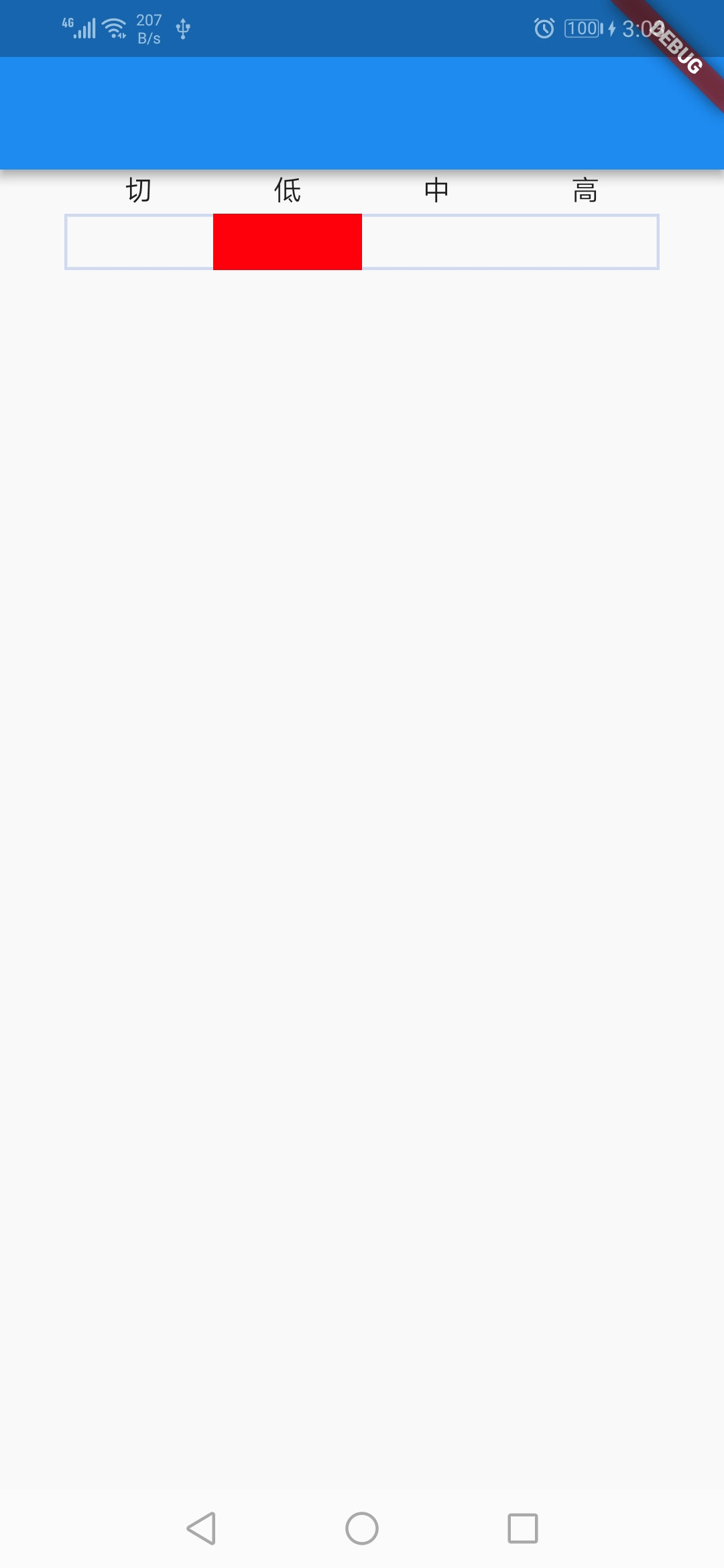
问题描述:在返回值函数里,强制把选中的值改为 0,发现没有效果?
结论:按照官网的文档说法,widget会由架构来判断是否会刷新,判断会刷新了才刷新。刚好,我这种写法是被判断为不刷新。
1@override
2  void initState() {
3    super.initState();
4    _choosedItem = widget.choosedItem;
5    print('_TemperatureIndicationState initState:$_choosedItem');
6  }
问题出在以上代码中。我在State类重新定义了一个属性在initState函数中接收StatefulWidget的属性,导致的出现这样子的问题。
正确的做法是在State的build方法中直接使用StatefulWidget的属性。即是widget.choosedItem在build方法中直接使用。
原因:State的initState只执行了一次,后面StatefulWidget的choosedItem更改了,但是没有再次执行initState方法,导致_choosedItem没有跟着更改。所以界面就不会跟着更改。
结论:StatefulWidget是State的配置文件,在State中直接使用StatefulWidget的属性。
以上代码改为:
1import 'package:flutter/material.dart';
2
3/// 温度显示 -- ok
4class TemperatureIndication extends StatefulWidget {
5  final ValueChanged<int> valueChanged;
6  final int choosedItem;
7
8  TemperatureIndication({this.valueChanged, this.choosedItem = 0});
9
10  @override
11  _TemperatureIndicationState createState() => _TemperatureIndicationState();
12}
13
14class _TemperatureIndicationState extends State<TemperatureIndication> {
15  @override
16  void initState() {
17    super.initState();
18  }
19
20  @override
21  Widget build(BuildContext context) {
22    return _buildItem();
23  }
24
25  Widget _buildItem() {
26    return Padding(
27      padding: const EdgeInsets.symmetric(horizontal: 32.0),
28      child: Column(
29        children: <Widget>[
30          _buildTextItem(),
31          Padding(padding: const EdgeInsets.only(top: 4.0)),
32          _buildButtonItem(),
33        ],
34      ),
35    );
36  }
37
38  Widget _buildTextItem() {
39    return Row(
40      children: <Widget>[
41        Expanded(
42          child: Center(child: Text('切')),
43        ),
44        Expanded(
45          child: Center(child: Text('低')),
46        ),
47        Expanded(
48          child: Center(child: Text('中')),
49        ),
50        Expanded(
51          child: Center(child: Text('高')),
52        ),
53      ],
54    );
55  }
56
57  Widget _buildButtonItem() {
58    return DecoratedBox(
59      decoration: BoxDecoration(border: Border.all(width: 1.5, color: Color(0xffd6def1))),
60      child: Row(
61        children: <Widget>[
62          Expanded(
63            child: GestureDetector(
64              behavior: HitTestBehavior.opaque,
65              onTap: () {
66                setState(() {});
67                if (widget.valueChanged != null) {
68                  widget.valueChanged(0);
69                }
70              },
71              child: DecoratedBox(
72                decoration: widget.choosedItem == 0
73                    ? BoxDecoration(
74                        color: Colors.grey,
75                      )
76                    : BoxDecoration(),
77                child: Container(
78                  height: 28.0,
79                ),
80              ),
81            ),
82          ),
83          Expanded(
84            child: GestureDetector(
85              behavior: HitTestBehavior.opaque,
86              onTap: () {
87                setState(() {});
88                if (widget.valueChanged != null) {
89                  widget.valueChanged(1);
90                }
91              },
92              child: DecoratedBox(
93                decoration: widget.choosedItem == 1
94                    ? BoxDecoration(
95                        color: Color(0xfffe0007),
96                      )
97                    : BoxDecoration(),
98                child: Container(
99                  height: 28.0,
100                ),
101              ),
102            ),
103          ),
104          Expanded(
105            child: GestureDetector(
106              behavior: HitTestBehavior.opaque,
107              onTap: () {
108                setState(() {});
109                if (widget.valueChanged != null) {
110                  widget.valueChanged(2);
111                }
112              },
113              child: DecoratedBox(
114                decoration: widget.choosedItem == 2
115                    ? BoxDecoration(
116                        color: Color(0xfffe0007),
117                      )
118                    : BoxDecoration(),
119                child: Container(
120                  height: 28.0,
121                ),
122              ),
123            ),
124          ),
125          Expanded(
126            child: GestureDetector(
127              behavior: HitTestBehavior.opaque,
128              onTap: () {
129                setState(() {});
130                if (widget.valueChanged != null) {
131                  widget.valueChanged(3);
132                }
133              },
134              child: DecoratedBox(
135                decoration: widget.choosedItem == 3
136                    ? BoxDecoration(
137                        color: Color(0xfffe0007),
138                      )
139                    : BoxDecoration(),
140                child: Container(
141                  height: 28.0,
142                ),
143              ),
144            ),
145          ),
146        ],
147      ),
148    );
149  }
150}