
有用的网站
鸿蒙官网:https://www.harmonyos.com/
鸿蒙系统开发者:https://developer.harmonyos.com/
华为开发者:https://developer.huawei.com/
在线体验:https://playground.harmonyos.com/
Gitee:https://gitee.com/openharmony
JS API:<https://developer.harmonyos.com/cn/docs/documentation/doc-
references/js-apis-overview-0000001056361791>
开发环境搭建 (DevEco Studio)
- DevEco Studio 是面向全场景多设备,提供一站式的分布式应用开发平台
- 下载地址:
- 安装
- 确保有网络环境
安装模拟器
- 安装菜单
- Tools -> Device Manager
- 注册华为开发者
- 注册账号
- 实名认证
- 银行卡认证(3分钟)
- 身份证认证(1-2个工作日)
模拟器(Simulator)与预览器(Previewer)的区别:
- 预览器支持热更新,模拟器不支持热更新
2.预览器中不能直接返回接口数据,模拟器可以返回接口数据
汉化菜单
- 点选菜单 File -> Settings,
- 然后点选 Plugins -> Marketplate,
- 然后搜索 Chinese,
- 然后选择 Chinese(Simplified)Language Pack / 中文语言包。
- 然后点击 install 执行安装
- 安装完成后重启 IDE
JS UI 框架
目录结构
- 文件组织
- 资源文件的分类
- 资源文件的使用
配置文件(config.json)
- 简介
- 常用配置
- 配置文件示例
生命周期
应用生命周期
- onCreate:应用启动时调用
- onDestroy:应用销毁时调用
⻚面生命周期
路由与导航
详情查看:<https://developer.harmonyos.com/cn/docs/documentation/doc- references/js-apis-basic-features-routes-0000000000611824>
声明路由
在 config.json 中声明路由
1{
2  // ...
3  "module": {
4    "js": [
5      {
6        "pages": [
7          "pages/index/index",
8          "pages/news/news",
9          "pages/profile/index",
10        ],
11        "name": "default",
12        "window": {
13          "designWidth": 720,
14          "autoDesignWidth": true
15        }
16      }
17    ]
18  }
19}
在 pages 目录下声明对应的三个文件
声明导航
引入 router
import router from '@system.router';
声明导航方法
1export default {
2	// ...
3
4	launch: function(){
5		router.push({
6			uri:'pages/details/details',
7		});
8	}
9}
JS语法
详情查看:<https://developer.harmonyos.com/cn/docs/documentation/doc- references/js-framework-syntax-js-0000000000611432>
支持 ES 6 语法(但不支持最新的 ES 语法)
鸿蒙 JS 是参考 Vue 2 封装的
JS应用
$def
- 在⻚面中,通过 this. a p p . app. app.def,获取在 app.js 中暴露的对象
数据绑定
- data | public:类型是对象或者函数
- private:数据只能由当前⻚面修改
数据修改
- this.$set(‘key’, value);
- this.$delete(‘key’);
获取 DOM 元素
-
$refs
// index.hml<text ref="target">内容</div>
// index.js const t = this.$refs.target; // 获取 ref 属性为 target 的 DOM 元素
-
$element
// index.hml<text id="target">内容</div>
// index.js const t = this.$element("target"); // 获取 id 属性为 target 的 DOM 元素
// 获取根组件对象 const t = this.$element();
JS架构
JS UI 框架
- 类 Web 范式编程的 UI 界面展示
- https://gitee.com/openharmony/ace_ace_engine
JS 应用开发框架
- 轻量级的 MVVM 实现(仿 Vue 2)
- https://gitee.com/openharmony/ace_engine_lite
JS 原生模块(NAPI)
- 实现 JS 与 C/C++ 代码互相访问
- https://gitee.com/openharmony/ace_napi
HML语法
详情查看:<https://developer.harmonyos.com/cn/docs/documentation/doc- references/js-framework-syntax-hml-0000000000611413>
CSS语法
详情查看:<https://developer.harmonyos.com/cn/docs/documentation/doc- references/js-framework-syntax-css-0000000000611425>
多语言支持
详情查看:<https://developer.harmonyos.com/cn/docs/documentation/doc- references/js-framework-multiple-languages-0000000000625923>
-
i18n 目录下存放语言包
语言-地区.json(zh-CN.json) -
$t() 获取对应的内容
-
切换系统语言时(模拟器或真机中),可以看到效果
组件
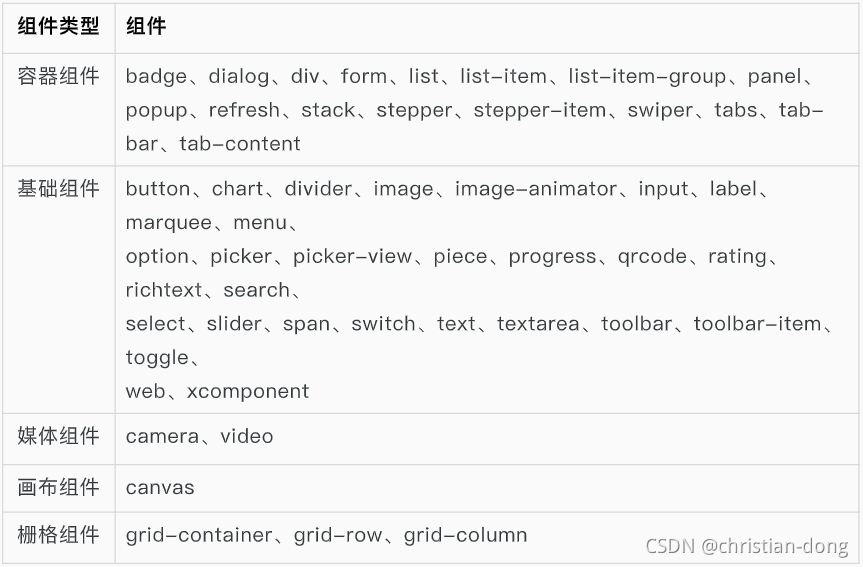
基础组件
button
提供按钮组件,包括胶囊按钮、圆形按钮、文本按钮、弧形按钮、下载按钮。
详情查看:<https://developer.harmonyos.com/cn/docs/documentation/doc- references/js-components-basic-button-0000000000621726>
容器组件
div
详情查看:<https://developer.harmonyos.com/cn/docs/documentation/doc- references/js-service-widget-container-div-0000001106548606>
通用组件
详情查看:<https://developer.harmonyos.com/cn/docs/documentation/doc- references/js-service-widget-common-attributes-0000001161259599>
自定义组件
详情查看:<https://developer.harmonyos.com/cn/docs/documentation/doc- references/js-service-widget-custom-basic-usage-0000001115938360>
基本用法
自定义组件通过element引入到宿主⻚面
1<element name='comp' src='../../common/component/comp.hml'></element>
2<div>
3	<comp prop1='xxxx'@child1="bindParentVmMethod"></comp>
4</div>
插槽
匿名插槽
父组件:<tag><text>内容</text></tag>
子组件:<slot></slot>
具名插槽
父组件:<tag><text slot=“slotname”>内容</text></tag>
子组件:<slot name=“slotname”></slot>
基本功能
详情查看:<https://developer.harmonyos.com/cn/docs/documentation/doc- references/js-apis-basic-features-app-context-0000000000611801>
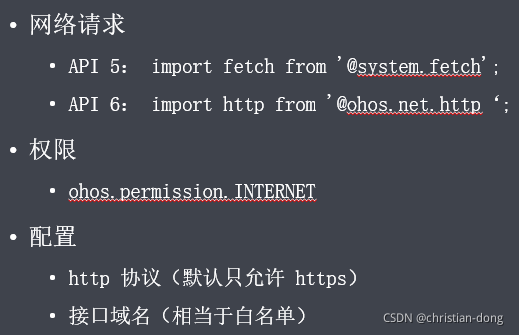
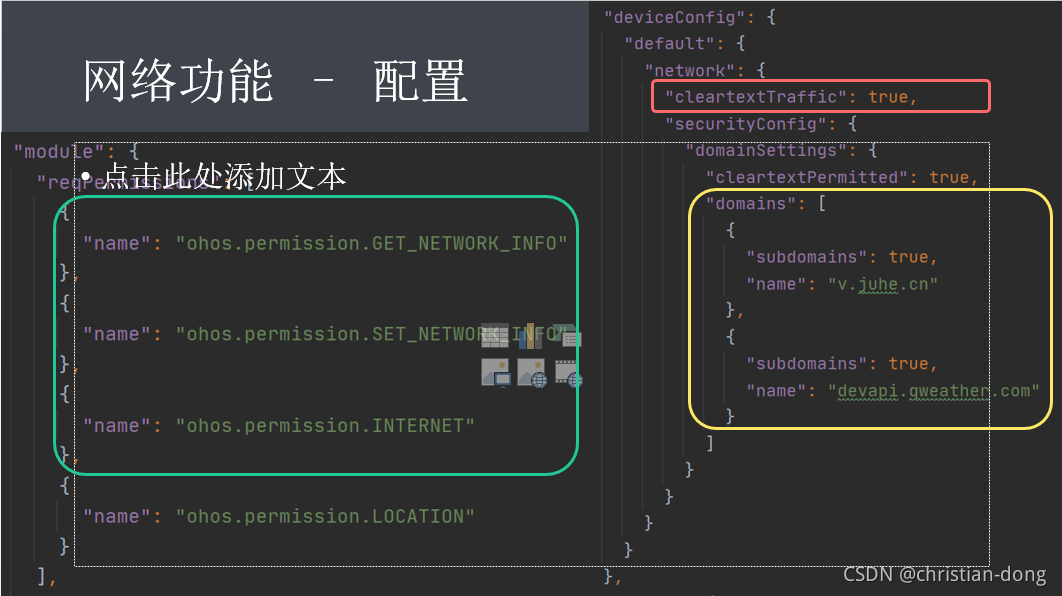
网络功能
详情查看:<https://developer.harmonyos.com/cn/docs/documentation/doc- references/js-apis-network-data-request-0000000000626077>
系统功能
通知消息
地理位置
网络状态
设备信息
屏幕亮度
数据存储
官方Demo
鸿蒙提供的一些具体应用实例。有代码,有文字介绍,有效果演示
详情查看:https://developer.harmonyos.com/cn/documentation/codelabs/
JS 购物应用
详情查看:<https://developer.huawei.com/consumer/cn/codelabsPortal/carddetails/JS- COMPONENTS>
JS 计步器卡片
详情查看:<https://developer.huawei.com/consumer/cn/codelabsPortal/carddetails/Step- Card>
分布式新闻分享
详情查看:<https://developer.huawei.com/consumer/cn/codelabsPortal/carddetails/HarmonyOS- NewsClient>
分布式亲自教育
详情查看:<https://developer.huawei.com/consumer/cn/codelabsPortal/carddetails/HarmonyOS- EducationSystem>