使用k8s部署Nginx服务,Nginx对外提供服务只希望部署在其中一台主机,该主机不提供其他服务
一.设置标签及污点
为了保证nginx之能分配到nginx服务器需要设置标签和污点,设置标签可以让Pod选择该服务器部署,设置污点可以使其他服务Pod无法部署在该服务器
本次部署nginx服务器IP为192.168.1.232
设置标签
1#设置标签 key为typevalue为nginx
2kubectl label node 192.168.1.232  type=nginx
3#查看标签
4kubectl get node 192.168.1.232 --show-labels
5NAME            STATUS   ROLES    AGE   VERSION   LABELS
6192.168.1.232   Ready    <none>   30h   v1.17.4   kubernetes.io/arch=amd64,kubernetes.io/hostname=192.168.1.232,kubernetes.io/os=linux,type=nginx
设置污点
1#给node192.168.1.232设置污点key为key值为nginx effec为NoSchedule永不调度
2#除非在Pod里设置了对应的tolerations参数
3kubectl taint node 192.168.1.232 key=nginx:NoSchedule
查看污点
kubectl describe node 192.168.1.232

二.设置Nginx-deployment的yaml文件
1# cat nginx-deployment.yaml
2apiVersion: apps/v1
3kind: Deployment
4metadata:
5  labels:
6    app: nginx
7  name: nginx-deployment
8spec:
9  replicas: 1
10  selector:
11    matchLabels:
12      app: nginx
13  template:
14    metadata:
15      labels:
16        app: nginx
17    spec:
18      containers:
19      - image: nginx:1.14.0
20        name: nginx
21      #标签选择器
22      nodeSelector:
23        type: nginx
24      #设置污点可以调度到对应服务器
25      tolerations:
26      - key: "key"
27        operator: "Equal"
28        value: "nginx"
29        effect: "NoSchedule"
应用启动
kubectl apply -f nginx-deployment.yaml
查看已经调度到对应的服务器
1# kubectl get pod -o wide
2NAME                                    READY   STATUS    RESTARTS   AGE     IP            NODE            NOMINATED NODE   READINESS GATES
3nginx-deployment-57f94c46b4-5whb5       1/1     Running   0          6h30m   172.17.97.3   192.168.1.232   <none>           <none>
三.设置Nginx配置文件和程序根目录挂载
启动的Nginx使用默认的配置文件和默认的网站根目录,需要使用volume挂载
1# cat nginx-deployment.yaml
2apiVersion: apps/v1
3kind: Deployment
4metadata:
5  labels:
6    app: nginx
7  name: nginx-deployment
8spec:
9  replicas: 1
10  selector:
11    matchLabels:
12      app: nginx
13  template:
14    metadata:
15      labels:
16        app: nginx
17    spec:
18      containers:
19      - image: nginx:1.14.0
20        name: nginx
21        volumeMounts:
22        - name: conf
23          mountPath: /etc/nginx
24        - name: opt
25          mountPath: /opt
26      #标签选择器
27      nodeSelector:
28        type: nginx
29      #设置污点可以调度到对应服务器
30      tolerations:
31      - key: "key"
32        operator: "Equal"
33        value: "nginx"
34        effect: "NoSchedule"
35      volumes:
36      - name: conf
37        hostPath:
38          path: /etc/nginx
39          type: Directory
40      - name: opt
41        hostPath:
42          path: /opt
43          type: Directory
本次使用了本机挂载hostPath挂载配置文件及根目录,生产环境最好使用pvc挂载
四.设置Service对外提供服务
1# cat nginx-service.yaml
2apiVersion: v1
3kind: Service
4metadata:
5  labels:
6    app: nginx
7  name: nginx-deployment
8spec:
9  ports:
10  - port: 80
11    name: nginx-service80
12    protocol: TCP
13    targetPort: 80
14    nodePort: 80
15  - port: 81
16    name: nginx-service81
17    protocol: TCP
18    targetPort: 81
19    nodePort: 81
20  selector:
21    app: nginx
22  type: NodePort
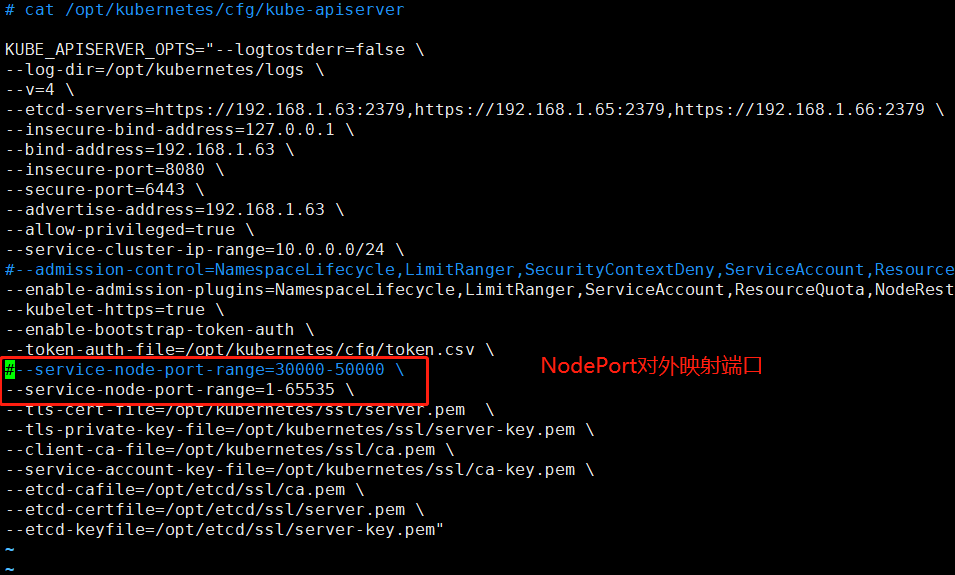
PS:使用NodePort启用端口对外提供服务,如果对外映射多个端口需要在port参数下加参数name定义名称,单个端口无需设置参数name
k8s默认使用NodePort对外映射端口为30000-50000如需要映射其他端口需要修改配置文件/opt/kubernetes/cfg/kube-apiserver,修改端口范围