
大版本对应:
Spring Boot
Spring Cloud
1.2.x
Angel版本
1.3.x
Brixton版本
1.4.x stripes
Camden版本
1.5.x
Dalston版本、Edgware版本
2.0.x
Finchley版本
2.1.x
Greenwich.SR2
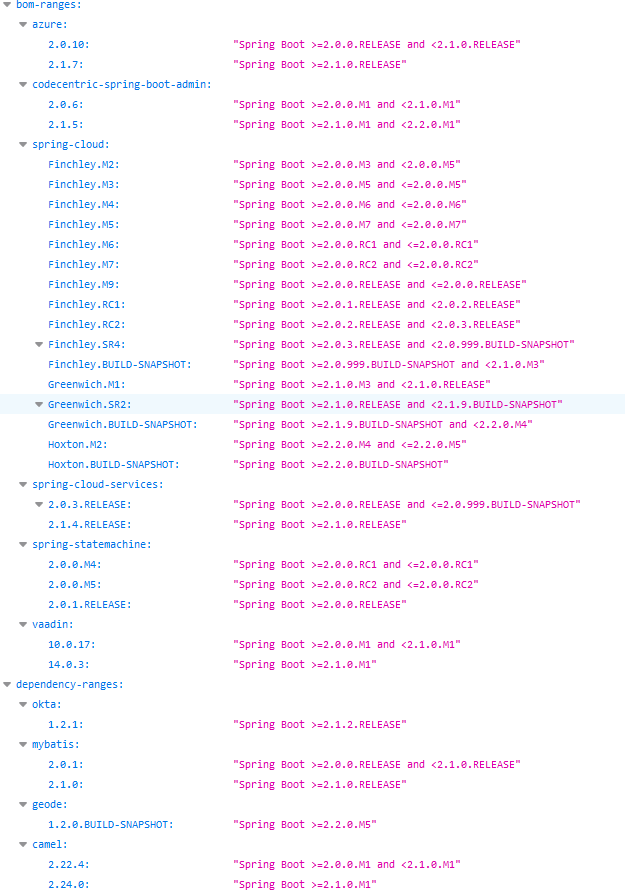
在实际开发过程中,我们需要更详细的版本对应:Spring 官方对应版本地址: (https://start.spring.io/actuator/info),建议用firefox浏览器打开,你会看见格式化好了json信息:
spring-cloud-dependencies 版本列表可查看:
https://mvnrepository.com/artifact/org.springframework.cloud/spring-cloud-dependencies
spring-boot-starter-parent 版本列表可查看:
https://mvnrepository.com/artifact/org.springframework.boot/spring-boot-starter-parent
在SpringCloud中,1.X和2.X版本在pom.xml中引入的jar包名字都不一样,比如有的叫spirng-cloud-starter-hystrix 有的叫spring-cloud-netflix-hystrix,维护起来会比较困难。
1.x版本pom.xml里几个基本用到的jar长这样:
1<project xmlns="http://maven.apache.org/POM/4.0.0"
2    xmlns:xsi="http://www.w3.org/2001/XMLSchema-instance"
3    xsi:schemaLocation="http://maven.apache.org/POM/4.0.0 http://maven.apache.org/xsd/maven-4.0.0.xsd">
4    <modelVersion>4.0.0</modelVersion>
5    <groupId>com.joyce</groupId>
6    <artifactId>joyce-test</artifactId>
7    <version>1.0</version>
8    <packaging>jar</packaging>
9
10    <parent>
11        <groupId>org.springframework.boot</groupId>
12        <artifactId>spring-boot-starter-parent</artifactId>
13        <version>1.5.9.RELEASE</version>
14        <relativePath />
15    </parent>
16
17    <dependencyManagement>
18        <dependencies>
19            <dependency>
20                <groupId>org.springframework.cloud</groupId>
21                <artifactId>spring-cloud-dependencies</artifactId>
22                <version>Edgware.RELEASE</version>
23                <type>pom</type>
24                <scope>import</scope>
25            </dependency>
26        </dependencies>
27    </dependencyManagement>
28
29    <properties>
30        <project.build.sourceEncoding>UTF-8</project.build.sourceEncoding>
31    </properties>
32
33    <dependencies>
34        <dependency>
35            <groupId>org.springframework.cloud</groupId>
36            <artifactId>spring-cloud-starter-feign</artifactId>
37        </dependency>
38        <dependency>
39            <groupId>org.springframework.cloud</groupId>
40            <artifactId>spring-cloud-starter-hystrix</artifactId>
41        </dependency>
42        <dependency>
43            <groupId>org.springframework.cloud</groupId>
44            <artifactId>spring-cloud-starter-zipkin</artifactId>
45        </dependency>
46        <dependency>
47            <groupId>org.springframework.cloud</groupId>
48            <artifactId>spring-cloud-starter-eureka</artifactId>
49        </dependency>
50        <dependency>
51            <groupId>org.springframework.boot</groupId>
52            <artifactId>spring-boot-starter-actuator</artifactId>
53        </dependency>
54        <dependency>
55            <groupId>org.springframework.boot</groupId>
56            <artifactId>spring-boot-starter-web</artifactId>
57            <exclusions>
58                <!-- 排除spring boot默认使用的tomcat,使用jetty -->
59                <exclusion>
60                    <groupId>org.springframework.boot</groupId>
61                    <artifactId>spring-boot-starter-tomcat</artifactId>
62                </exclusion>
63            </exclusions>
64        </dependency>
65        <dependency>
66            <groupId>org.springframework.boot</groupId>
67            <artifactId>spring-boot-starter-jetty</artifactId>
68        </dependency>
69        <dependency>
70            <groupId>org.springframework.cloud</groupId>
71            <artifactId>spring-cloud-starter-ribbon</artifactId>
72        </dependency>
73        <dependency>
74            <groupId>org.springframework.boot</groupId>
75            <artifactId>spring-boot-starter-test</artifactId>
76            <scope>test</scope>
77        </dependency>
78    </dependencies>
79</project>
在SpringBoot 1.5.9.RELEASE 版本中,junit测试类模版长这样:
1import org.junit.Test;
2import org.junit.runner.RunWith;
3import org.slf4j.LoggerFactory;
4import org.springframework.beans.factory.annotation.Autowired;
5import org.springframework.boot.test.context.SpringBootTest;
6import org.springframework.test.context.junit4.SpringRunner;
7import org.springframework.web.client.RestTemplate;
8
9@RunWith(SpringRunner.class)
10@SpringBootTest(classes=MyApplication.class)
11public class MyApplicationTest {
12    private static final org.slf4j.Logger LOG = LoggerFactory.getLogger(MyApplicationTest.class);
13
14    @Autowired
15    private RestTemplate restTemplate;
16    @Test
17    public void test() {
18        System.out.println("ok!!!");
19    }
20    @Test
21    public void orderName() {
22        try {
23            String name = "joyce";
24            String rr = restTemplate.getForObject("http://joyce-user/orderName?name="+name, String.class);
25            LOG.info("rr====" + rr);
26        } catch (Exception e) {
27            e.printStackTrace();
28        }
29    }
30
31}
。