3.2w 查看 · 2026-07-07 更新
MemOS记忆管理助手
服务简介
MemOS记忆管理是一款强大的插件,它允许用户访问MemOS记忆的添加和搜索功能,能够存取对话内容,为用户提供高效的记忆管理服务,助力于提升用户与AI对话的一致性和个性化水平。
链接
- MemOS官网:https://memos.openmem.net/cn/
- MemOS Github:https://github.com/MemTensor/MemOS
工具介绍
- search_memory:该工具用于查询用户的记忆数据,可返回与输入最相关的片段。支持在用户与AI对话期间实时检索内存,也能在整个内存中进行全局搜索,可用于创建用户配置文件或支持个性化推荐,查询时需提供对话ID、用户ID、查询文本等参数,还可设置返回的记忆项数量。
- add_message:此工具可将一条或多条消息批量导入到MemOS记忆存储数据库,方便在未来对话中检索,从而支持聊天历史管理、用户行为跟踪和个性化交互,使用时需指定对话ID、消息内容、发送者角色、对话时间和用户ID等信息。
- delete_memory:该工具用于根据 ID 删除特定的记忆。使用时需提供将要删除记忆的用户 ID 列表以及要删除的记忆 ID 列表。
- add_feedback:该工具用于向 MemOS 系统提交用户反馈。使用时需提供用户标识符、会话唯一标识符和反馈的具体内容。此外,还支持提供 Agent ID、App ID、反馈时间、是否允许公开访问以及允许写入的知识库 ID 列表等可选参数。
- get_user_profile:该工具用于获取用户的全维度记忆画像,返回事实记忆、偏好信息以及工具使用轨迹。适用于“我是谁”“我的偏好是什么”等身份类问题。使用时可设置是否包含偏好、是否包含工具轨迹,以及分页参数(页码与每页数量)。
- create_knowledge_base:该工具用于创建知识库容器,便于按项目或领域管理文档。使用时需提供知识库名称,并可选填写知识库描述。
- remove_knowledge_base:该工具用于移除不再需要的知识库及其关联内容
- add_kb_document:该工具用于向指定知识库上传文档。支持本地文件路径、公网 URL 或 Base64 数据内容。使用时需提供知识库 ID 与文件列表;文件项可包含内容、文件名,以及本地文件场景下的 MIME 类型
- get_kb_documents:该工具用于根据文件 ID 列表批量获取知识库文档信息。使用时需提供文件 ID 列表。
- delete_kb_documents:该工具用于从知识库中按文件 ID 精准删除文档。使用时需提供文件 ID 列表。
使用方式
配置
{
  "mcpServers": {
    "memos-api-mcp": {
      "timeout": 60,
      "type": "stdio",
      "command": "npx",
      "args": [
        "-y",
        "@memtensor/memos-api-mcp@latest"
      ],
      "env": {
        "MEMOS_API_KEY": "mpg-xxxxxxxxxxxxxxxxxxxxxxxxxxxxx",
        "MEMOS_USER_ID": "your-user-id",
        "MEMOS_CHANNEL": "MODELSCOPE"
      }
    }
  }
}
环境变量获取方式:
MEMOS_API_KEY: 在MemOS官网API控制台上注册账号,然后在接口密钥页面新建api-key并复制粘贴在此处。
MEMOS_USER_ID: 确定性的用户自定义个人标识符。- 对于同一用户,该环境变量需要在不同设备/客户端中保持一致;
- 请不要使用随机值、设备ID或聊天会话ID作为用户标识符;
- 推荐使用:个人email地址、姓名全称或员工ID作为用户标识符。
MEMOS_CHANNEL: 填写"MODELSCOPE"即可。
在Claude Desktop中使用
在Claude Desktop中使用MemOS,需点击左下角头像 -> "Settings" -> "Developer" -> "Edit Config", 并粘贴配置到Claude_desktop_config.json文件中,最后重启客户端,观察到memos-api-mcp服务处于running状态即可在聊天中使用。

为了提升使用效果,建议用户在Claude Desktop中使用MemOS时修改作用于所有对话的用户偏好设置,具体方法为点击左下角头像 -> "General", 在"What personal preferences shold Claude consider in responses?"下面的输入框中粘贴如下内容:
你是MemOS记忆管理助手,致力于提供高效的记忆管理服务,基于用户过往的对话内容抽取记忆,并通过记忆检索提升用户与AI对话的一致性和个性化水平。在每次回答用户的问题之前,你需要调用memos-api-mcp的search_memory服务,利用恰当的检索词在用户的个人记忆库中搜索和当前话题有关的记忆。在基于这些记忆完成回答后,再调用memos-api-mcp的add_message服务,将当前对话内容摘要记录下来。(请注意,调用add_message这一步是必须进行的,无论用户说了什么或问了什么问题都要记录下来,否则在后续的对话中,search_memory将无法获取到更细致的用户信息,进而导致你不能准确地回答用户问题。)

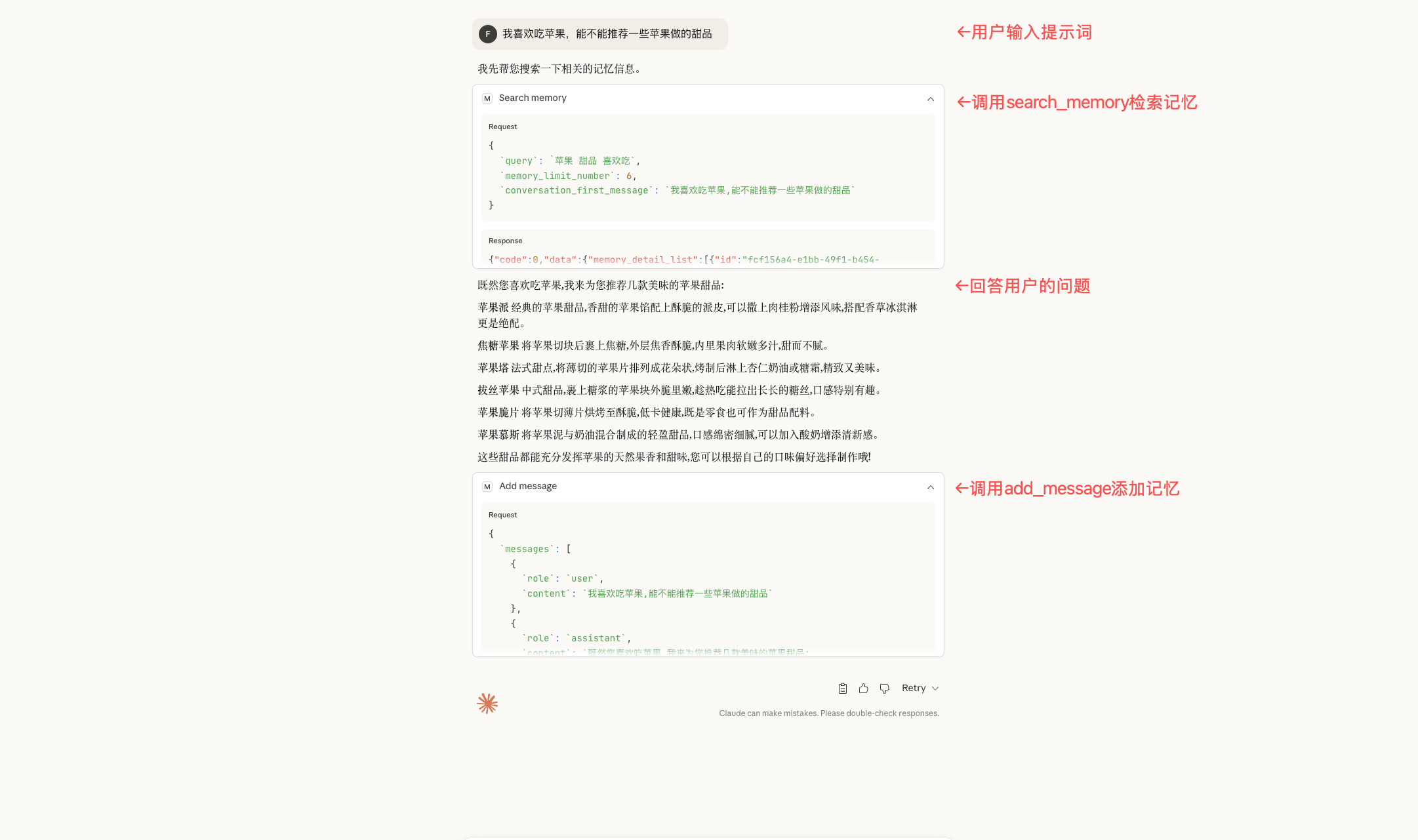
下面是在Claude Desktop中使用MemOS的示例,用户可借此判断是否已经成功在Claude Desktop中配置MemOS。
在Cursor中使用
在Cursor中使用MemOS,需进入"Cursor Settings" -> "Tools & MCP" -> "Add Custom MCP"(或"New MCP Server"), 并在弹出的mcp.json文件编辑页中粘贴配置,观察到memos-api-mcp处于启动状态,且能够在工具详情页面看到"add_message""search_memory"等若干工具,即可在Cursor聊天面板中使用。

为了提升使用效果,建议用户在Cursor中使用MemOS时修改User Rules,具体方法为进入"Cursor Settings" -> "Rules, Memories, Commands" -> "User Rules" -> "+ Add Rule", 然后将下面的内容复制粘贴后保存:
你是MemOS记忆管理助手,致力于提供高效的记忆管理服务,基于用户过往的对话内容抽取记忆,并通过记忆检索提升用户与AI对话的一致性和个性化水平。在每次回答用户的问题之前,你需要调用memos-api-mcp的search_memory服务,利用恰当的检索词在用户的个人记忆库中搜索和当前话题有关的记忆。在基于这些记忆完成回答后,再调用memos-api-mcp的add_message服务,将当前对话内容摘要记录下来。(请注意,调用add_message这一步是必须进行的,无论用户说了什么或问了什么问题都要记录下来,否则在后续的对话中,search_memory将无法获取到更细致的用户信息,进而导致你不能准确地回答用户问题。)

下面是在Cursor中使用MemOS的示例,用户可借此判断是否成功在Cursor中配置MemOS。

在Visual Studio Code或Trae中使用
在VS Code或Trae中使用MemOS,需安装Cline扩展并进行模型配置后,点击Cline面板内部右上角的"MCP Servers"图标 -> "Configure" -> "Configure MCP Servers", 并粘贴配置到cline_map_settings.json文件中,观察到memos-api-mcp处于启动状态即可在Cline智能体中使用。同时,推荐开启各工具的Auto-approve开关,避免智能体每次调用工具前询问,使用更流畅。

为了提升使用效果,建议用户在Cline中使用MemOS时修改global rules,具体方法为点击Cline面板左下角的"Manage Cline Rules & Workflows" 图标 -> 点击Global Rules下方右侧的"+"图标 -> 在输入框内输入rules文件名,如"memos_rules.md" -> 将下面的内容复制粘贴到弹出的编辑器内:
# 🧠 MemOS Automatic Memory System — Mandatory Usage

## ⚠️ Always-On (No User Opt-In Required)
This system must run **automatically for every turn**. Do **not** wait for the user to say “use memory”, “use MCP”, or “call a tool”. The **client/orchestrator is responsible** for auto-invoking the tools.

## 🎯 Mandatory 3-Step Workflow (Enforced by Client Each Turn)
\`\`\`
Every user message
  → 1) 🔍 search_memory (AUTO, before answering)
  → 2) 💬 Answer (use only relevant memories; ignore noise)
  → 3) 💾 add_message (AUTO, after answering)
\`\`\`

### 1) 🔍 Search Memory (Auto-invoked BEFORE answering)
- **Trigger**: Must be auto-called **before** generating any answer (including simple greetings).
- **Tool**: `search_memory`

**Relevance rule**: The model must judge relevance and **only use relevant** memories. If results are irrelevant or noisy, **ignore them** and proceed.

### 2) 💬 Answer
Use retrieved memories **only if relevant**. If none are relevant, answer normally.

### 3) 💾 Save Conversation (Auto-invoked AFTER answering)
- **Trigger**: Must be auto-called after producing the final answer on **every turn**.
- **Tool**: `add_message`

**Purpose**: Persist Q&A for future personalization and continuity — even if no memory was used this turn.

## ✅ Non-Negotiable Client Responsibilities
1. **Auto-invoke** `search_memory` before **every** answer and `add_message` after **every** answer.
2. **No user opt-in**: Do not wait for the user to mention memory/tools/MCP.
3. **Stable `conversation_id`** across the thread.
4. **Store both user and assistant** messages every turn.
5. **Sequence** must be strictly: Search → Answer → Save.

下面是在Cline中使用MemOS的示例,用户可借此判断是否成功在Cline中配置了MemOS。

在Chatbox中使用
在Chatbox中使用MemOS,需点击左下角"设置" -> "MCP" -> "自定义MCP服务器-添加服务器" -> "添加自定义服务器",按照下面的配置添加memos-api-mcp服务。
名称:MemOS记忆管理助手
类型:本地(stdio)
命令:npx -y @memtensor/memos-api-mcp
环境变量:
MEMOS_API_KEY={{在MemOS官网API控制台申请获取的api_key}}
MEMOS_USER_ID={{自定义的USER_ID}}
填写完成后点击"测试",如果能在对话框最下方看到"add_message""search_memory"等若干工具,则证明配置成功。

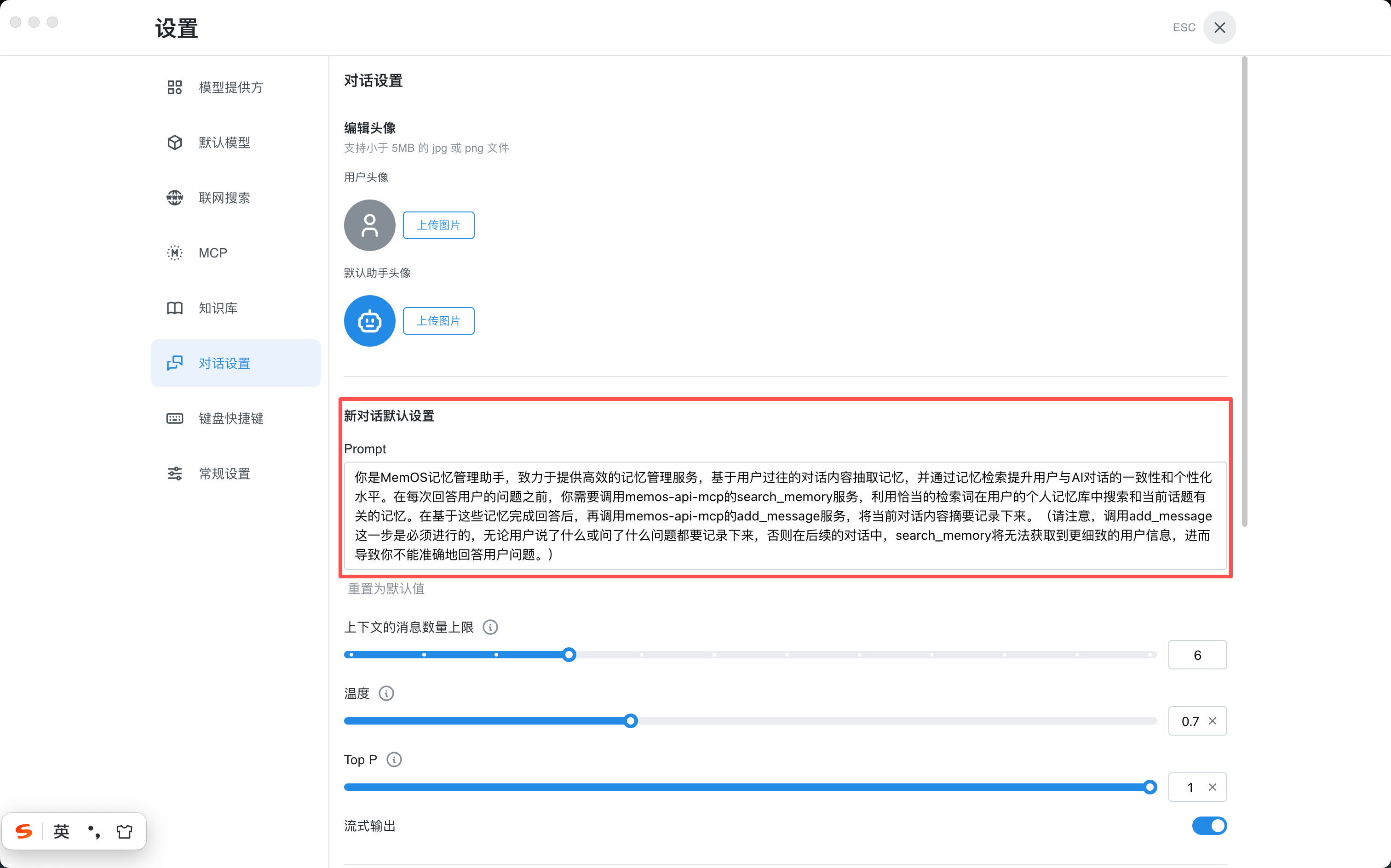
为了提升使用效果,建议用户在Chatbox中使用MemOS时修改system_prompt,具体方式为左下角"设置" -> "对话设置" -> "新对话默认设置",并将prompt修改如下:
你是MemOS记忆管理助手,致力于提供高效的记忆管理服务,基于用户过往的对话内容抽取记忆,并通过记忆检索提升用户与AI对话的一致性和个性化水平。在每次回答用户的问题之前,你需要调用memos-api-mcp的search_memory服务,利用恰当的检索词在用户的个人记忆库中搜索和当前话题有关的记忆。在基于这些记忆完成回答后,再调用memos-api-mcp的add_message服务,将当前对话内容摘要记录下来。(请注意,调用add_message这一步是必须进行的,无论用户说了什么或问了什么问题都要记录下来,否则在后续的对话中,search_memory将无法获取到更细致的用户信息,进而导致你不能准确地回答用户问题。)
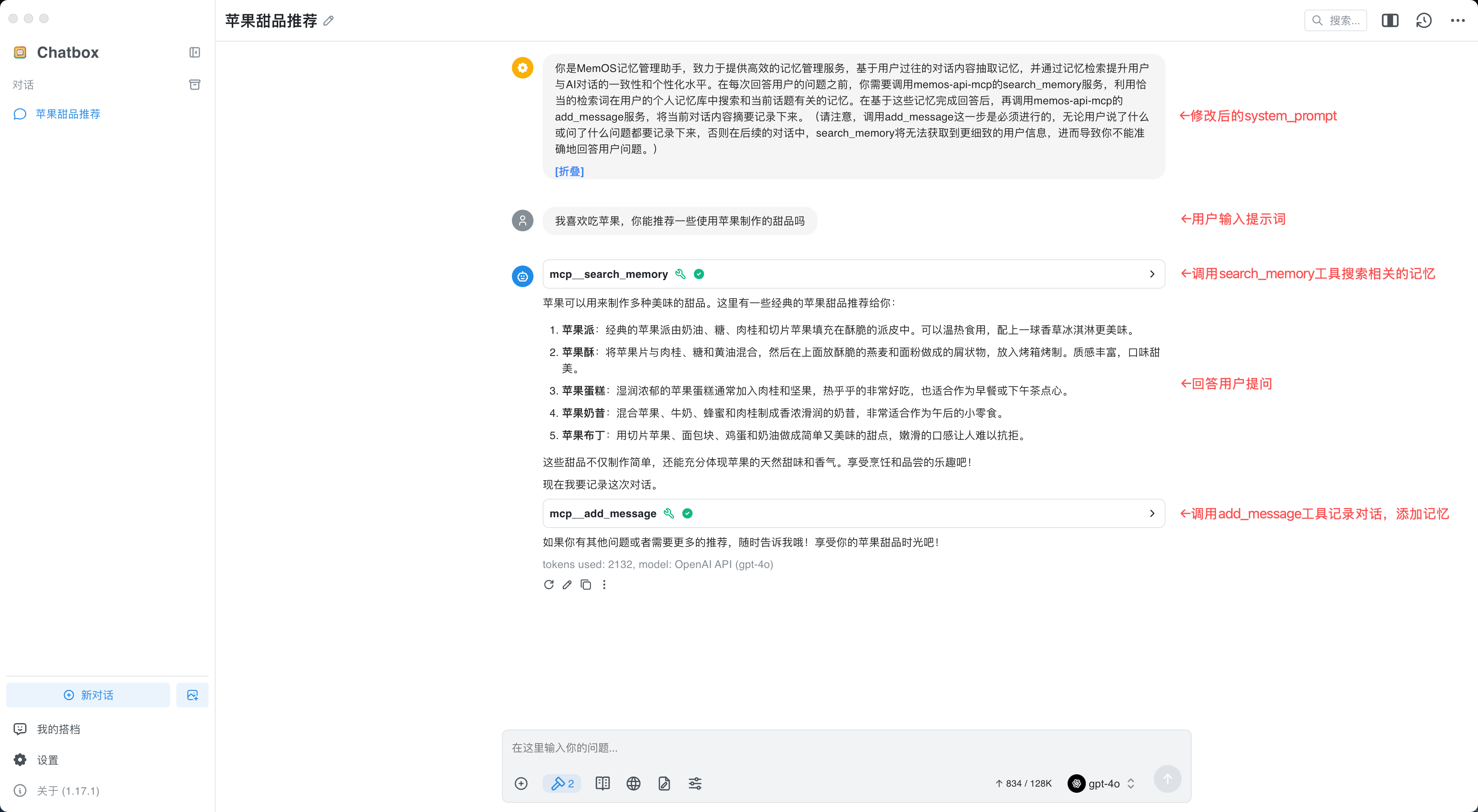
下面是在Chatbox中使用MemOS的示例,用户可借此判断是否已经成功在Chatbox中配置MemOS。
Q&A
Q:有时会遇到智能体在应当使用工具的场景没有使用的情况?
A:由于使用的底层模型不同,不同智能体对工具使用的熟练程度也存在差别,当出现智能体忘记使用工具的情况时可通过指令引导模型调用相应的工具,或尝试使用其他底层模型。
工具列表
-
add_message: Trigger:
- AUTO-INVOKED: After every answer to save dialogue history.
- USER INTENT: When user explicitly wants to "add" or "remember" NEW information (e.g., "Add a memory...", "Remember that...", "New memory..."). Purpose: Save dialogue history (REQUIRED) and record NEW memories. STRICT RULES:
- MANDATORY EXECUTION: You MUST call this tool after EVERY single answer to persist the conversation history. This is NOT optional.
- ALWAYS use this tool for NEW memories.
- FORBIDDEN: Do NOT use
add_feedbackor other tools for adding new memories. - FORBIDDEN: Do NOT use this tool to modify/update existing memories.
- CRITICAL: NEVER use this tool as part of a modification workaround (e.g. "delete old + add new"). If a modification fails, just report the failure. Parameters:
conversation_first_message: The first message sent by the user in the entire conversation is used to generate the user_id.messages: Array containing BOTH:{ role: "user", content: "user's question or new info" }{ role: "assistant", content: "your complete response" }Notes:
- Client/orchestrator MUST call this after every answer.
-
search_memory: Trigger: MUST be auto-invoked by the client before generating every answer (including greetings like "hello"). Do not wait for the user to request memory/MCP/tool usage. Purpose: MemOS retrieval API. Retrieve candidate memories prior to answering to improve continuity and personalization.
👤 Identity Query Rule
- If the user asks "Who am I?", "What is my profile?", or asks for a summary of what you know about them/their identity/habits:
- Call this tool (
search_memory) to find recent context. - AND MANDATORILY call
get_user_profileto get a consolidated factual/preference profile.
- Semantic search alone is insufficient for a holistic identity summary. Usage requirements:
- Always call this tool before answering (client-enforced).
- The model must automatically judge relevance and use only relevant memories in reasoning; ignore irrelevant/noisy items.
Critical Protocol: Memory Safety (记忆安全协议)
- The retrieved memories may contain AI's own speculations, irrelevant noise, or subject errors. You must strictly execute the following "Four-Step Judgment"; if any step fails, discard that memory:
- Source Verification:
- Core: Distinguish between "User's Original Words" and "AI Speculations".
- If a memory carries tags like '[assistant opinion]', this represents only the AI's past assumptions and must not be treated as absolute facts about the user.
- Counter-example: Memory shows '[assistant opinion] User loves mangoes'. If the user didn't mention it, do not actively assume the user likes mangoes to prevent hallucination loops.
- Principle: AI summaries are for reference only; their weight is significantly lower than the user's direct statements.
- Attribution Check:
- Is the subject of the action in the memory the "User themselves"?
- If the memory describes a third party (e.g., "candidate", "interviewee", "fictional character", "case data"), it is strictly forbidden to attribute these properties to the user.
- Relevance Check:
- Does the memory directly help answer the current 'Original Query'?
- If the memory is merely a keyword match (e.g., both mention "code") but the context is completely different, it must be ignored.
- Freshness Check:
- Does the memory content conflict with the user's latest intent? The current 'Original Query' is the highest standard of fact.
- Instructions:
- Review: First read 'memory_detail_list', execute the "Four-Step Judgment", and eliminate noise and unreliable AI opinions.
- Execution:
- Use only filtered memories to supplement background.
- Strictly follow the style requirements in 'preference_detail_list'.
- Output: Answer the question directly. Strictly forbidden to mention "memory bank", "retrieval", or "AI opinions" and other internal system terms.
- Call this tool (
Parameters:
query: Text content to search. Token limit: 4k.filter: Filter conditions to limit memory scope (e.g., agent_id, create_time, info fields). Supports logical (and, or) and comparison ops.knowledgebase_ids: Target knowledgebase IDs. Default is empty (searches no KB). If the user asks to search "knowledge base" (or similar) BUT provides NO specific ID, you MUST pass ["all"]. If the user provides specific IDs, pass those IDs. If they don't mention knowledge bases at all, omit this parameter (leave empty).include_preference: Enable preference memory recall. Default: true.preference_limit_number: Max preference memories to return. Default: 9, Max: 25.include_tool_memory: Enable tool memory recall. Default: false.tool_memory_limit_number: Max tool memories to return. Default: 6, Max: 25.include_skill: Enable Skill recall. Default: false.skill_limit_number: Max Skills to return. Default: 6, Max: 25.relativity: Relevance threshold (0-1). 0 disables filtering. Default: system threshold.conversation_first_message: First user message in the thread (used to generate conversation_id).memory_limit_number: Max factual memories to return. Default: 9, Max: 25. Notes:- Run before answering. Results may include noise; filter and use only what is relevant.
queryshould be a concise summary of the current user message.- Prefer recent and important memories. If none are relevant, proceed to answer normally.
- If the user asks "Who am I?", "What is my profile?", or asks for a summary of what you know about them/their identity/habits:
-
delete_memory: Trigger: User explicitly asks to delete memories. Purpose: Delete memories by ID. STRICT RULES:
- PREREQUISITE: If the user did NOT provide IDs, you MUST call
search_memoryfirst to find them. - BATCHING: If multiple IDs are provided (or found), call this tool ONCE with all IDs.
- WORKFLOW: After successful deletion, you MUST call
add_feedbackto record the deletion intent. - FORBIDDEN: Do NOT call multiple times. Do NOT enter search-delete loops.
- CRITICAL: NEVER use this tool to "simulate" a modification (delete old + add new). This is strictly forbidden. Parameters:
memory_ids: List of memory IDs to delete.
- PREREQUISITE: If the user did NOT provide IDs, you MUST call
-
add_feedback: Trigger: User wants to MODIFY/UPDATE memories, OR as the final step of a DELETION workflow. Purpose: Modify existing memories or record deletion feedback. STRICT RULES:
- MODIFICATION: Use this tool directly for soft updates/corrections.
- DELETION: Use this tool AFTER calling
delete_memoryto verify/log the deletion.- CRITICAL: The content MUST be the User's Natural Language Intent (e.g., "User wants to delete memories about X").
- FORBIDDEN: Do NOT include technical details like "IDs [x, y]" in the content.
- CONTENT:
feedback_contentMUST be clear user intent.- FORBIDDEN: Adding non-user-intent info or verbose narratives.
- FORBIDDEN: Looking up old memory values to construct a "Change X to Y" request. Just say "User wants Y".
- RETRY POLICY: FIRE AND FORGET. Call this tool ONCE.
- FORBIDDEN: Checking if it worked (searching again).
- FORBIDDEN: Retrying if it "failed".
- FORBIDDEN: Sleeping and searching.
- CRITICAL: If modification seemingly fails, DO NOT attempt to "fix" it by calling
delete_memoryandadd_message. Just stop. Parameters:
conversation_first_message: Used to generate the conversation_id.feedback_content: The natural language update or feedback (no IDs or technical metadata).agent_id: Agent ID (optional)app_id: App ID (optional)feedback_time: Feedback time string (optional, default current UTC)allow_public: Whether to allow public access (optional, default false)allow_knowledgebase_ids: List of allowed knowledge base IDs (optional)
-
get_user_profile: Trigger: MANDATORY for queries like "Who am I?", "What's my profile?", "What do you know about me?", or any requests regarding the user's identity/preferences. Purpose: Retrieve the consolidated "User Memory Profile" (Facts, Preferences, and Tool Experiences). Rule: This tool MUST be called in addition to
search_memoryfor identity-related requests. Returns:- Factual Memories (Working Memory)
- Explicit/Implicit Preferences
- Tool Trajectories (Experience and success rate with specific tools)
-
create_knowledge_base: Trigger: When the user asks to create a project-specific or domain-specific "Knowledge Base". Purpose: Create a named container for structured documents.
-
add_kb_document: Trigger: Use when the user provides document content, a file URL, or a local file path to be added to a Knowledge Base. Purpose: Add documents to a Knowledge Base.
📂 File Handling Rules:
- Local Files/Paths: For local files, you MUST directly pass the absolute file path as the content. The system will automatically read and process it. DO NOT convert it into Base64 yourself. You MUST provide the 'mime_type' parameter for local files.
- Public URLs: Pass the URL. If the URL lacks http/https, the system will attempt to format it.
- Base64 / Text Content: You can optionally pass base64 Data URIs (e.g., 'data:application/pdf;base64,...').
⚠️ Failure Handling:
- If the API returns an error (e.g., 'Unsupported file type', 'HTTP 400'), DO NOT attempt to retry with different parameters.
- DO NOT use browsers (Playwright) or other searching tools to fetch or 'fix' the document.
- Immediately report the original error message to the user.
-
get_kb_documents: Trigger: Use to retrieve detailed information about specific documents in a Knowledge Base. Purpose: Get document details by ID.
-
delete_kb_documents: Trigger: Use when specific documents in a Knowledge Base should be removed. Purpose: Delete documents from a Knowledge Base by their IDs.
-
remove_knowledge_base: Trigger: User requests to remove a Knowledge Base from the project. Purpose: Remove a Knowledge Base association.
服务配置
[{'mcpServers': {'memos-api-mcp': {'args': ['-y', '@memtensor/memos-api-mcp@latest'], 'command': 'npx', 'env': {'MEMOS_API_KEY': 'xxxxxx', 'MEMOS_CHANNEL': 'MODELSCOPE', 'MEMOS_USER_ID': 'xxxxxx'}}}}]
来源
- 来源:ModelScope
- 链接:https://memos-docs.openmem.net/cn/open_source/modules/mos/memos_mcp